
WPForms Tooltips
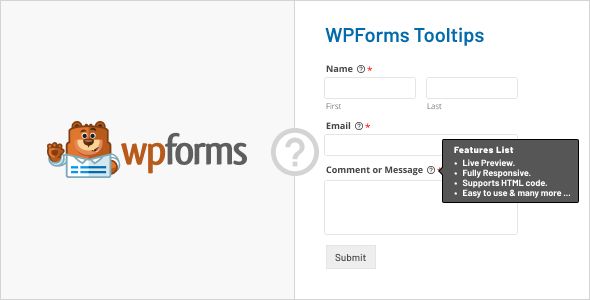
- Description
- Reviews
- FAQ
Enhance Your Forms and Boost Conversions with WPForms Tooltips
Are your website visitors abandoning forms out of confusion? Complex fields without clear instructions can frustrate users, leading to lost leads and sales. The WPForms Tooltips plugin is the perfect solution to this common problem, transforming your forms into intuitive, user-friendly experiences.
This powerful addon allows you to add elegant and helpful tooltips to any field in your WPForms. By providing instant, on-demand guidance, you can clarify requirements, reduce user errors, and significantly improve your form completion rates. Stop leaving your users guessing and start guiding them to success.
Key Features of WPForms Tooltips
Unlock a new level of form usability with a suite of powerful, easy-to-use features. This plugin is designed to give you maximum control with minimal effort.
- Universal Field Compatibility: Works seamlessly with all standard and advanced WPForms fields, including text, email, checkboxes, and file uploads.
- Advanced Styling Control: Customize every aspect of your tooltips, from icon color and size to background, text color, and borders to perfectly match your brand.
- Flexible Tooltip Positioning: Choose to display tooltips on the top, bottom, left, or right of any form field to ensure a perfect fit with your site’s layout.
- HTML Content Support: Go beyond plain text. You can easily add links, lists, bold text, and other HTML elements inside your tooltips for rich, informative content.
- Fully Responsive Design: Your tooltips will look and function perfectly on any device, whether it’s a desktop, tablet, or smartphone.
- No-Code Implementation: Add and customize tooltips directly within the familiar WPForms builder interface. No coding knowledge is required.
- Lightweight & Fast: Built with performance in mind, the plugin adds powerful functionality without slowing down your website.
In-Depth Feature Analysis
Let’s dive deeper into the core features that make WPForms Tooltips an essential tool for any website using WPForms.
Advanced Styling & Customization
Generic, out-of-the-box styling can clash with your website’s design. This plugin puts you in complete control of the visual appearance of your tooltips. You can create a seamless and professional look that reinforces your brand identity.
Effortlessly adjust icon colors, tooltip backgrounds, text colors, border styles, and even add subtle box shadows. This level of granular control ensures your form help text feels like an integrated part of your design, not a clunky afterthought. A well-styled form builds user trust and encourages completion.
Flexible Tooltip Positioning
Every form layout is different. A tooltip that looks great on one form might obstruct an important element on another. With flexible positioning, you have the power to decide exactly where each tooltip appears relative to its field.
Choose from top, right, bottom, or left positioning with a simple dropdown menu. This feature is critical for maintaining a clean, organized layout, especially on complex forms or pages with tight spacing. It guarantees your help text enhances the user experience without disrupting the visual flow.
Universal WPForms Field Compatibility
Your ability to provide help shouldn’t be limited to just a few field types. WPForms Tooltips is engineered to work flawlessly across the entire spectrum of WPForms fields, from the free Lite version to the Pro version.
Whether you need to explain a complex password requirement, clarify a file upload size limit, or provide details for a checkbox selection, this addon has you covered. This universal compatibility makes it a reliable and versatile tool for any form you build, ensuring a consistent user support experience site-wide.
Who Needs WPForms Tooltips?
This plugin is a game-changer for anyone who wants to improve their form’s clarity, usability, and conversion rate. It’s an indispensable tool for a wide range of users.
E-commerce Stores
Clarify shipping options, explain custom product configurations, or provide sizing chart information directly within your order forms. Reduce cart abandonment by answering customer questions before they even have to ask.
Service-Based Businesses & Agencies
Guide clients through detailed project quote forms. Explain technical terms, define the scope of work options, and ensure you receive all the necessary information upfront, saving valuable time on back-and-forth emails.
Registration & Event Forms
Provide instructions for event registration, explain different ticket tiers, or clarify dietary restriction fields. A smooth and easy registration process leads to more sign-ups and happier attendees.
Non-Profits & Donation Forms
Explain different donation levels, provide information on how funds will be used, or guide users through recurring donation setups. Building trust and clarity can directly lead to increased contributions.
The Smart, Cost-Effective Choice for Your Website
Why lock yourself into expensive annual subscriptions and strict usage limitations? By choosing this version of WPForms Tooltips, you are embracing a smarter, more flexible approach to building your website.
Our offering is possible thanks to the General Public License (GPL). We provide you with the exact same, powerful plugin code, but without the added cost of premium support. This makes it the perfect choice for developers, agencies, and savvy business owners.
- Unbeatable Value: Get access to the full-featured plugin for a simple, one-time payment. Say goodbye to recurring fees forever.
- Complete Freedom: Use the plugin on as many websites as you wish—for yourself or for your clients. There are no license keys or domain limitations to worry about.
- Safe and Secure Code: We provide 100% original, untouched, and unmodified plugin files. You can use it with confidence, knowing your site’s security is intact.
Frequently Asked Questions about WPForms Tooltips
Does WPForms Tooltips work with the free WPForms Lite plugin?
Yes, absolutely. This plugin is designed to be fully compatible with both the free WPForms Lite and all premium versions of WPForms Pro. You can enhance your forms regardless of which version you use.
Can I use HTML, like links or bold text, inside a tooltip?
Yes, the tooltip content editor supports HTML. This allows you to create rich, informative tooltips that can include links to support pages, bold important text, or even use unordered lists for better readability.
Will this plugin slow down my website’s loading speed?
No. WPForms Tooltips is built to be extremely lightweight and efficient. It loads its assets only when a WPForms form is present on the page, ensuring it has a minimal impact on your overall site performance.
How do I receive updates for the plugin?
When a new version is released by the original developer, we make it available for download in your account dashboard. You can then update the plugin manually on your WordPress site to access the latest features and security enhancements.
Is the plugin responsive and mobile-friendly?
Yes. The tooltips are fully responsive and have been tested to work beautifully across all devices, including desktops, tablets, and smartphones. This ensures a consistent and helpful user experience for all your visitors.
Is the code provided here safe and authentic?
Definitely. We distribute the exact same plugin files as the original developer under the GPL. The code is 100% original, unmodified, and free from any malware or malicious scripts, so you can install it with complete peace of mind.
Why is this plugin so affordable compared to the official price?
Our business model focuses on making premium tools accessible to everyone. By not bundling costly, direct developer support, we can offer the software at a significantly lower price. You get the same powerful features and the freedom to use them without limits.
Q: Do I need a license key?
A: No. All products are Pre-Activated. You can use 100% of the Premium features immediately.
Q: Can I use the One-Click Demo Import?
A: Yes, absolutely! We ensure the demo import feature works perfectly.
Q: Can I use the products on multiple websites?
A: Absolutely. The GPL license allows use on unlimited domains.
Q: Are the files safe?
A: Yes. All files are scanned by McAfee and VirusTotal before uploading.
Share Now!
Related Products




Related Products



Same Contributor


Featured Products


