
WordPress Tooltip Ultimate – Customisable Tooltip Generator
- Description
- Reviews
- FAQ
Tired of Confusing Your Website Visitors?
Are your readers leaving your site to Google complex terms or jargon? Every time a user leaves, you risk them not coming back. This breaks engagement and hurts your conversions. The WordPress Tooltip Ultimate – Customisable Tooltip Generator is the definitive solution to keep users on your page by providing instant, elegant clarifications right where they need them.
This powerful WordPress tooltip plugin allows you to effortlessly create and manage informative tooltips that appear on hover. Instead of cluttering your content with long explanations, you can embed them in clean, professional-looking popovers. Guide your users, improve their experience, and boost your site’s authority.
Unlock a Better User Experience with WordPress Tooltip Ultimate
WordPress Tooltip Ultimate is more than just a simple text popover tool. It’s a comprehensive suite for creating rich, interactive, and fully customized tooltips that integrate seamlessly with your website’s design and functionality.
Key Features at a Glance
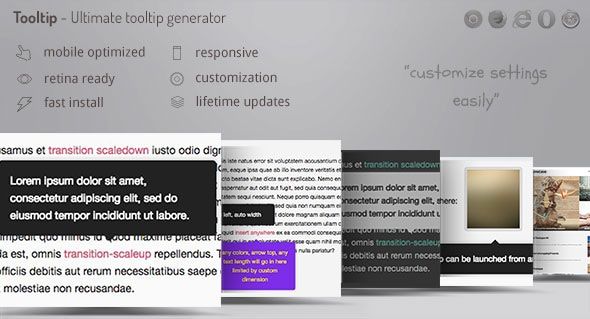
- Rich Content Tooltips: Go beyond plain text. Easily embed images, videos, audio players, and even other shortcodes directly inside your tooltips.
- Automated Glossary Creation: Define a keyword once, and the plugin can automatically generate a tooltip for that term across your entire website.
- Advanced Styling & Customization: Take full control of your tooltip’s appearance with options for colors, backgrounds, borders, fonts, opacity, and positioning.
- Page Builder Compatibility: Works flawlessly with popular page builders like Elementor, WPBakery (Visual Composer), and the Gutenberg block editor.
- Responsive & Mobile-Friendly: Your tooltips will look great and function perfectly on all devices, from desktops to smartphones.
- Easy Shortcode Implementation: A user-friendly shortcode generator makes it simple to add custom tooltips anywhere on your site without touching a line of code.
- WooCommerce Product Integration: Perfect for e-commerce, allowing you to add tooltips to product titles, attributes, and descriptions to provide extra information.
Dive Deep: How Tooltip Ultimate Transforms Your Content
Let’s explore the core features that make this plugin an essential tool for any serious WordPress website owner.
1. Create Stunning, Rich Content Tooltips
Forget boring, text-only popovers. With WordPress Tooltip Ultimate, your informational hints can be as dynamic as your content. The built-in WYSIWYG editor makes adding complex content a breeze.
Imagine the possibilities:
- Product Previews: Show a small product image in a tooltip when a user hovers over its name in a blog post.
- Video Explanations: Embed a short YouTube or Vimeo clip to explain a complex process or feature.
- Author Bios: Add a quick author bio with a photo in a tooltip on a multi-author blog.
This functionality transforms a simple clarification tool into a powerful engagement engine, capturing user interest and providing immense value without disrupting the reading flow.
2. Build an Automated Glossary in Minutes
The glossary feature is a game-changer for on-page SEO and user experience. Manually adding tooltips to every instance of a specific term is tedious and unsustainable. This plugin automates the entire process.
Simply create a tooltip for a keyword like “Search Engine Optimization.” The plugin will then scan your posts and pages, automatically applying your beautifully designed tooltip to every mention of that phrase. This not only saves you countless hours but also creates a rich, internally-linked content hub that search engines love.
3. Unmatched Customization and Styling Control
Your tooltips should feel like a native part of your website, not a clunky third-party add-on. WordPress Tooltip Ultimate gives you granular control over every visual aspect to ensure a perfect match with your brand identity.
You can easily adjust:
- Colors: Match the background, text, and border colors to your site’s palette.
- Dimensions: Set custom width, padding, and border-radius.
- Animations: Choose from smooth CSS3 animations for how the tooltip appears and disappears.
- Positioning: Decide exactly where the tooltip appears relative to the anchor text (top, bottom, left, or right).
With pre-built style templates and infinite customization options, you can create a look that is uniquely yours.
Who Needs the WordPress Tooltip Ultimate Plugin?
This versatile tool provides immense value across a wide range of websites and industries.
E-commerce Store Owners
Enhance your WooCommerce product pages by using tooltips to explain shipping policies, clarify product options, display size charts, or define technical specifications. Reduce pre-sale questions and increase conversions by giving customers the information they need to make a purchase decision instantly.
Bloggers & Content Creators
If you write about technical subjects, industry news, or complex topics, this plugin is for you. Define jargon, cite sources, or provide background information without cluttering your main article. This keeps your content clean and accessible to both experts and beginners.
Web Developers & Agencies
Add a powerful, cost-effective tool to your development toolkit. Because you are downloading a GPL-licensed version, you have the freedom to install and use this plugin on unlimited client websites. Deliver more value to your clients without incurring expensive recurring license fees.
Educators & Course Creators
Improve the learning experience for your students. Use tooltips within your online course materials on platforms like LearnDash or LifterLMS to define key concepts, provide hints for quizzes, or link to supplementary resources. It’s an elegant way to support your learners without interrupting their focus.
The Smart Choice: Why Download This Version?
You get the exact same powerful plugin offered on official marketplaces, but with a significant advantage.
Unbeatable Value and Freedom
Premium WordPress plugins often come with restrictive licenses and high annual fees. A single-site license can be costly, and a multi-site license even more so. We offer a different path. By leveraging the General Public License (GPL), we can provide you with the WordPress Tooltip Ultimate – Customisable Tooltip Generator for a fraction of the price.
This isn’t a ‘nulled’ or ‘cracked’ version. It’s the original, professional software, made available under a license that promotes freedom and affordability. Use it on one site, or a hundred sites. The choice and the freedom are yours.
100% Original & Secure Code
Your website’s security is paramount. We guarantee that every plugin and theme we provide is 100% original, untouched, and free from any malware, viruses, or malicious code. We download directly from the original developers and pass the clean, unmodified files on to you. You get premium functionality with peace of mind.
Frequently Asked Questions (FAQ)
Does WordPress Tooltip Ultimate work with Elementor and other page builders?
Yes, absolutely. The plugin is designed for modern WordPress development and works perfectly with the Gutenberg block editor, Elementor, WPBakery, Beaver Builder, and other popular page builders. You can easily insert tooltips using the provided shortcode in any text module or widget.
Can I add videos from YouTube or Vimeo into a tooltip?
Yes. The rich content editor allows you to embed videos, images, audio files, and any other HTML content. You can simply paste the embed code from YouTube or Vimeo into the tooltip’s content editor to create engaging video tooltips.
Will I receive updates for this tooltip plugin?
Yes. When you purchase from us, you get access to updates for one year. As soon as we receive an updated version from the original developer, we make it available for you to download from your account. This ensures your plugin remains compatible and secure.
How does the automatic glossary feature work?
The glossary feature is simple yet powerful. You create a tooltip for a specific keyword in the plugin’s dashboard. Then, you can enable the glossary setting, which will automatically scan your website’s content and apply that tooltip to every instance of the keyword it finds, saving you a massive amount of time.
Is the code for WordPress Tooltip Ultimate safe and original?
Yes, 100%. We source our files directly from the official developer. The files we provide are original and have not been altered in any way. You are getting the genuine premium plugin, legally redistributed under the GPL license.
Is this plugin responsive and will my tooltips work on mobile?
Yes, the plugin is fully responsive. The developers have ensured that tooltips display correctly and are user-friendly on all screen sizes, including tablets and smartphones. The tooltips will intelligently adjust their position and size to provide the best experience on smaller devices.
Can I use this plugin to create tooltips on my WooCommerce product pages?
Definitely. This is one of the most popular use cases. You can use shortcodes to add tooltips to your product short descriptions, long descriptions, and even product titles to provide extra details, explain variations, or link to sizing guides, directly improving the shopping experience.
Q: Do I need a license key?
A: No. All products are Pre-Activated. You can use 100% of the Premium features immediately.
Q: Can I use the One-Click Demo Import?
A: Yes, absolutely! We ensure the demo import feature works perfectly.
Q: Can I use the products on multiple websites?
A: Absolutely. The GPL license allows use on unlimited domains.
Q: Are the files safe?
A: Yes. All files are scanned by McAfee and VirusTotal before uploading.
Share Now!
Related Products




Related Products



Same Contributor


Featured Products


