
WordPress Accordion Plugin – Accordion Awesome Pro

- Description
- Reviews
- FAQ
Are you struggling with cluttered web pages and overwhelmed visitors? Do you need a sleek, organized way to present information without sacrificing user experience or SEO? The solution is here: the powerful WordPress Accordion Plugin – Accordion Awesome Pro.
This premium plugin empowers you to transform lengthy content into interactive, collapsible sections. It’s the perfect tool for FAQs, knowledge bases, product details, and more. Say goodbye to endless scrolling and hello to engaging, easy-to-digest content with Accordion Awesome Pro.
Unlock Organized Content with Accordion Awesome Pro
The digital landscape demands clarity and efficiency. The WordPress Accordion Plugin – Accordion Awesome Pro is engineered to meet these demands head-on. It helps you present complex information in a structured, user-friendly format.
This plugin doesn’t just make your content look good; it also enhances navigation and improves your site’s overall performance. Elevate your website’s professionalism and user satisfaction today.
Key Features of WordPress Accordion Plugin – Accordion Awesome Pro
Discover what makes Accordion Awesome Pro the ultimate choice for your WordPress site. We’ve packed it with features designed for power and simplicity.
- Intuitive Drag & Drop Builder: Effortlessly create and reorder accordion items with a visual interface.
- Fully Responsive Design: Your accordions will look perfect on any device, from desktops to smartphones.
- Extensive Customization Options: Control colors, fonts, icons, animation effects, and more to match your brand.
- SEO-Friendly Structure: Optimized for search engines, helping your collapsible content rank better.
- Gutenberg Block & Shortcode Support: Seamlessly integrate accordions into any page or post.
- Lightweight & Performance Optimized: Ensures fast loading times without slowing down your website.
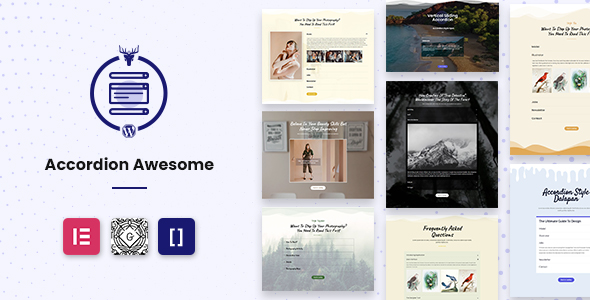
- Pre-made Templates: Get started quickly with a selection of professionally designed accordion layouts.
In-Depth Feature Analysis
Effortless Content Organization with Drag & Drop
Building beautiful accordions has never been easier. Accordion Awesome Pro features an intuitive drag and drop builder. This visual interface allows you to add, edit, and reorder accordion panels with complete ease.
You don’t need any coding knowledge to create stunning collapsible content. Simply drag elements into place, customize your text, and watch your organized content come to life. This saves you valuable time and effort in managing your site’s content.
It’s perfect for quickly structuring FAQs, a detailed knowledge base, or even a comprehensive product feature list. The visual editor ensures you see exactly what your users will experience.
Stunning & Responsive Design Across All Devices
In today’s multi-device world, responsive design is non-negotiable. The WordPress Accordion Plugin – Accordion Awesome Pro ensures your accordions look flawless on every screen size. From large desktop monitors to tablets and smartphones, your content will adapt beautifully.
This commitment to responsive design guarantees an optimal user experience for all your visitors. They can easily access and interact with your collapsible content, no matter how they browse your site. This also contributes positively to your search engine rankings.
Customize the appearance with a vast array of options. Choose from different icon sets, animation styles, and color schemes. Create a consistent look that aligns perfectly with your existing WordPress theme and brand identity.
SEO Advantage for FAQs & Knowledge Bases
Accordions are more than just a visual enhancement; they are powerful SEO tools. WordPress Accordion Plugin – Accordion Awesome Pro is built with SEO in mind. It ensures that content within your accordions is properly indexed by search engines.
By organizing your content into clear, digestible sections, you improve user engagement. Users spend more time on your page, which signals to Google that your content is valuable. This can lead to higher rankings for relevant keywords, especially for FAQ sections and knowledge base articles.
Google often features well-structured FAQ content as rich snippets in search results. Using Accordion Awesome Pro can help your site capture these coveted spots, driving more organic traffic. It’s a smart way to enhance both user experience and search visibility simultaneously.
Who Is WordPress Accordion Plugin – Accordion Awesome Pro For?
Accordion Awesome Pro is a versatile tool designed for a wide range of WordPress users. Its flexibility makes it indispensable for anyone looking to present information clearly and efficiently.
- Website Owners: Keep your pages clean and organized, improving user engagement and retention.
- Bloggers & Content Creators: Break down long articles into digestible sections, making complex topics easier to follow.
- E-commerce Stores: Display product specifications, shipping information, or detailed FAQs without cluttering product pages.
- Freelancers & Agencies: Quickly build professional-looking client websites with structured content, saving development time.
- Educators & Course Providers: Organize course syllabi, lesson plans, or student resources in an easy-to-navigate format.
- Support Centers: Create comprehensive knowledge bases and FAQ sections that users can quickly search and browse.
Why Choose This Version of Accordion Awesome Pro? (The GPL Advantage)
When you choose the WordPress Accordion Plugin – Accordion Awesome Pro under the GPL license, you’re not just getting a premium plugin. You’re gaining unparalleled freedom and value that sets it apart from traditional licensing models.
Many premium plugins come with restrictive licenses, limiting their use to a single site or requiring expensive annual subscriptions. This can quickly add up, especially if you manage multiple WordPress websites or client projects.
With Accordion Awesome Pro under GPL, you gain the freedom to install and use it on an unlimited number of websites. There are no recurring fees or hidden costs, offering significant long-term savings. This truly empowers you to build and expand without financial constraints.
Furthermore, the GPL ensures code transparency and safety. You benefit from a community-vetted codebase, reducing risks associated with proprietary, locked-down software. It’s a cost-effective, secure, and flexible way to enhance your WordPress site.
Contextual FAQ: Your Questions About Accordion Awesome Pro Answered
Is WordPress Accordion Plugin – Accordion Awesome Pro compatible with my theme and other plugins?
Yes, Accordion Awesome Pro is developed with high compatibility in mind. It adheres to WordPress coding standards, ensuring it works seamlessly with most well-coded themes and plugins. We’ve specifically tested it with popular themes and page builders like Elementor and Gutenberg. In the rare case of a conflict, our code is clean and easy to debug.
How do I get updates for Accordion Awesome Pro?
While the GPL license grants you freedom, updates are typically provided through our platform. We ensure you have access to the latest versions, which include new features, bug fixes, and compatibility improvements. Simply download the updated package from your account and install it to keep your plugin current.
Is Accordion Awesome Pro safe to use on a live website?
Absolutely. Accordion Awesome Pro is built with security and performance as top priorities. Our code is clean, optimized, and regularly reviewed to prevent vulnerabilities. Using a GPL-licensed version also means the code is transparent and widely used, benefiting from community scrutiny that enhances its safety profile.
Can I use Accordion Awesome Pro on multiple client websites?
Yes, this is one of the significant advantages of the GPL license. You can install and use Accordion Awesome Pro on as many client websites as you need without purchasing additional licenses. This makes it an incredibly cost-effective solution for freelancers and agencies.
Does Accordion Awesome Pro support custom CSS for advanced styling?
Indeed. While Accordion Awesome Pro offers extensive built-in customization options, we understand that some users require even more control. The plugin provides a dedicated custom CSS area, allowing advanced users to apply their own styles and truly make the accordions unique to their brand.
Will using accordions affect my website’s SEO performance?
On the contrary, using Accordion Awesome Pro can significantly *improve* your SEO. By organizing content, you enhance user experience, reduce bounce rates, and encourage longer dwell times. Search engines favor well-structured, user-friendly content. Our plugin ensures that the content within your accordions remains fully crawlable and indexable by search engines, even potentially contributing to rich snippets for FAQs.
What kind of content can I put inside the Accordion Awesome Pro sections?
Accordion Awesome Pro is incredibly flexible regarding content types. You can insert virtually any standard WordPress content, including plain text, rich text, images, videos, shortcodes from other plugins, and even custom HTML. This versatility allows you to create dynamic and engaging collapsible sections for any purpose.
Get Started with Accordion Awesome Pro Today
Stop letting cluttered content detract from your website’s potential. The WordPress Accordion Plugin – Accordion Awesome Pro offers a professional, efficient, and SEO-friendly solution for organizing your information. Embrace the power of interactive content and provide a superior experience for your visitors.
Enhance your WordPress site with Accordion Awesome Pro. It’s the smart choice for performance, design, and ultimate content control. Download it now and transform your content presentation!
Q: Do I need a license key?
A: No. All products are Pre-Activated. You can use 100% of the Premium features immediately.
Q: Can I use the One-Click Demo Import?
A: Yes, absolutely! We ensure the demo import feature works perfectly.
Q: Can I use the products on multiple websites?
A: Absolutely. The GPL license allows use on unlimited domains.
Q: Are the files safe?
A: Yes. All files are scanned by McAfee and VirusTotal before uploading.
Share Now!
Related Products



Related Products


Same Contributor


Featured Products


