
WooFoo – Restaurant Food Menu for Elementor

- Description
- Reviews
- FAQ
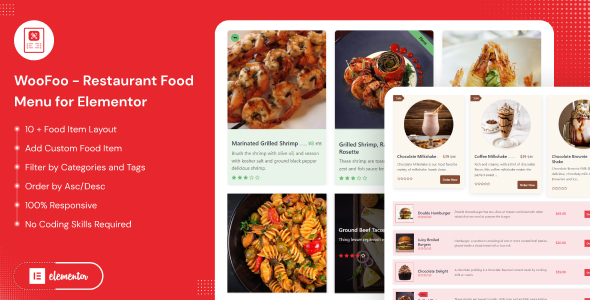
Transform your restaurant’s online presence with WooFoo – Restaurant Food Menu for Elementor. Are you tired of outdated, static menus that fail to entice customers or streamline your online ordering process? Many food businesses struggle to showcase their culinary delights effectively on their WordPress websites. This often leads to missed sales opportunities and a frustrating user experience for potential diners.
WooFoo provides the ultimate solution for creating dynamic, visually appealing, and fully functional online food menus. Seamlessly integrated with Elementor and WooCommerce, it empowers you to design a captivating digital menu board that drives engagement and boosts sales. Say goodbye to complex coding and hello to intuitive drag-and-drop menu creation.
Key Features of WooFoo – Restaurant Food Menu for Elementor
WooFoo is packed with powerful features designed to elevate your restaurant’s online menu. Discover how it simplifies management and enhances customer experience.
- Elementor Drag & Drop Builder: Effortlessly design and customize your food menu layouts with a real-time visual editor. No coding required.
- WooCommerce Integration: Turn your menu into a robust online ordering system, complete with ‘Add to Cart’ functionality and secure checkout.
- Fully Responsive Design: Your menu will look stunning and function perfectly on any device, from desktops to smartphones and tablets.
- Flexible Layouts & Styles: Choose from various pre-designed templates or create unique layouts to match your brand’s aesthetic.
- Dynamic Food Categories: Organize your dishes with custom categories, making it easy for customers to browse appetizers, main courses, desserts, and more.
- Dish Variations & Add-ons: Offer options for different sizes, toppings, or customizations directly within your menu items.
- Special Labels & Badges: Highlight new dishes, popular items, vegetarian options, or special offers with eye-catching labels.
In-Depth Features for Your Online Food Menu
Dive deeper into what makes WooFoo – Restaurant Food Menu for Elementor an indispensable tool for your culinary business. These core functionalities ensure your menu is both beautiful and highly efficient.
Effortless Elementor Drag & Drop Menu Builder
WooFoo leverages the power of Elementor, the leading WordPress page builder, to provide an unparalleled menu creation experience. Forget about clunky back-end interfaces or custom CSS. With Elementor’s intuitive drag-and-drop interface, building your digital menu board becomes a creative joy.
You can visually arrange menu items, add images, descriptions, prices, and even discount badges in real-time. This visual menu editor allows for instant previews, ensuring your menu looks exactly how you envision it before going live. The freedom to customize every aspect of your food display is right at your fingertips.
Seamless WooCommerce Online Ordering Integration
Beyond just displaying food, WooFoo transforms your menu into a powerful online food ordering system. By integrating flawlessly with WooCommerce, it enables your customers to add desired dishes to their cart directly from your beautiful menu layout. This streamlines the entire ordering process, from selection to checkout.
Customers can easily browse food categories, select dish variations, and complete their purchase securely through WooCommerce’s robust payment gateways. This integration means you can manage products, orders, and customer data all within your familiar WordPress dashboard. It’s a complete solution for restaurants offering takeout, delivery, or even dine-in ordering.
Highly Customizable & Fully Responsive Design
Your brand identity is crucial, and WooFoo – Restaurant Food Menu for Elementor helps you maintain it. The plugin offers extensive customization options, allowing you to tailor every design element to match your restaurant’s theme. Adjust fonts, colors, spacing, and layouts with ease to create a truly unique food menu display.
Crucially, every menu created with WooFoo is automatically fully responsive. This means your restaurant menu builder will adapt perfectly to any screen size, providing an optimal viewing and ordering experience on desktops, laptops, tablets, and smartphones. Ensure your customers can access your delicious offerings anytime, anywhere, with a perfectly optimized digital menu.
Who Benefits from WooFoo – Restaurant Food Menu for Elementor?
WooFoo is designed for a diverse range of culinary businesses and web professionals. It provides a flexible and powerful solution for anyone looking to enhance their online food presence.
- Restaurants & Cafes: Ideal for showcasing daily specials, full menus, and enabling direct online orders for any cuisine type.
- Bars & Pubs: Create engaging menus for drinks, snacks, and happy hour specials.
- Food Trucks & Pop-Ups: Quickly update menus on the go and provide an accessible online ordering platform.
- Catering Services: Present your catering packages and individual items with elegance and clarity.
- Freelance Developers: Build professional, high-converting restaurant websites for clients with a reliable and flexible tool.
- Web Agencies: Scale your web development services for the food industry, delivering feature-rich online menu solutions efficiently.
Why Choose This Version of WooFoo – Restaurant Food Menu for Elementor?
In a market flooded with WordPress plugins, selecting the right tool is critical. This version of WooFoo – Restaurant Food Menu for Elementor stands out by offering unparalleled value and freedom, thanks to its GPL license. We focus on empowering you with the best tools without hidden costs or restrictive terms.
When you choose our GPL-licensed WooFoo, you’re not just getting a powerful restaurant menu builder; you’re investing in true flexibility. Unlike proprietary plugins that often come with single-site licenses and annual renewal fees, our GPL offering provides you with the freedom to use WooFoo on unlimited websites. This means significant cost savings, especially for developers and agencies managing multiple client sites.
Moreover, the GPL ensures transparent and safe code. You benefit from a community-audited codebase, free from malicious scripts or vendor lock-in. This gives you the peace of mind that your online food ordering system is built on a secure and stable foundation. Experience the freedom to customize, distribute, and use WooFoo without limitations, allowing you to focus on growing your food business.
Frequently Asked Questions about WooFoo – Restaurant Food Menu for Elementor
We’ve compiled answers to common questions about WooFoo to help you get started and understand its benefits.
Does WooFoo – Restaurant Food Menu for Elementor work with the latest version of WooCommerce?
Yes, absolutely. WooFoo is regularly tested and updated to ensure full compatibility with the latest stable versions of WooCommerce. This guarantees a smooth and reliable online ordering experience for your customers and efficient product management for your business.
Can I display different menus for different locations or times of day?
While WooFoo provides robust menu creation, managing location-specific or time-based menus typically requires additional plugins or custom configurations. However, WooFoo’s flexible Elementor integration makes it easy to set up multiple pages with different menus, and use Elementor’s display conditions if available, or third-party solutions for location-specific content.
How do I update WooFoo – Restaurant Food Menu for Elementor to get new features and bug fixes?
As a GPL-licensed product, updates are provided regularly to ensure compatibility, security, and new feature additions. You can download the latest version from your purchase source and manually update it. We recommend backing up your site before any update.
Is WooFoo – Restaurant Food Menu for Elementor safe and free from malicious code?
Our commitment to the GPL philosophy means providing transparent and clean code. WooFoo is developed with best practices in mind, and its open nature allows for community scrutiny, ensuring a safe and secure solution for your restaurant’s online presence. We prioritize clean, efficient, and secure coding standards.
What kind of food items and variations can I display with WooFoo?
WooFoo is incredibly versatile. You can display virtually any food item, from complex gourmet dishes to simple drinks. It fully supports WooCommerce product variations, allowing you to offer different sizes (small, medium, large), toppings, spice levels, or other customizable options directly within your menu items. This enhances the online food ordering experience significantly.
Can I use WooFoo – Restaurant Food Menu for Elementor on multiple client websites without extra licenses?
This is one of the primary benefits of the GPL license. Yes, you can use WooFoo – Restaurant Food Menu for Elementor on an unlimited number of websites, including those for your clients, without purchasing additional licenses. This makes it an incredibly cost-effective solution for freelancers and web agencies.
Does WooFoo support custom styling for individual menu items?
Yes, with Elementor, you have granular control over styling. You can apply custom typography, colors, backgrounds, and spacing to individual menu items, sections, or categories. This allows for highly personalized and branded food display options that stand out.
Will WooFoo slow down my website?
WooFoo is developed with performance in mind. It’s built to be lightweight and efficient, utilizing Elementor’s optimized structure and WooCommerce’s robust framework. Proper website hosting and optimization practices will ensure your online food menu loads quickly and provides a smooth user experience.
Q: Do I need a license key?
A: No. All products are Pre-Activated. You can use 100% of the Premium features immediately.
Q: Can I use the One-Click Demo Import?
A: Yes, absolutely! We ensure the demo import feature works perfectly.
Q: Can I use the products on multiple websites?
A: Absolutely. The GPL license allows use on unlimited domains.
Q: Are the files safe?
A: Yes. All files are scanned by McAfee and VirusTotal before uploading.
Share Now!
Related Products




Related Products

Same Contributor



Featured Products


