
Wiloke Icon Box Lune for Elementor

- Description
- Reviews
- FAQ
Are you struggling to create visually engaging and highly customizable icon boxes within Elementor? The default options often fall short, limiting your creativity and making your website blend in rather than stand out. You need a powerful, flexible solution.
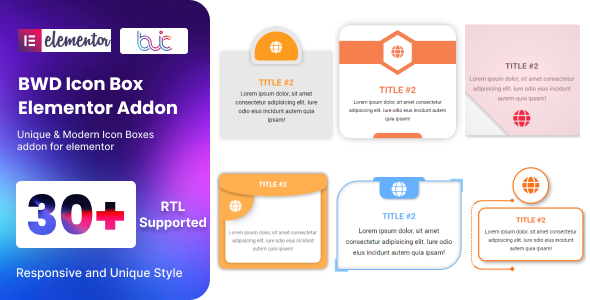
Introducing Wiloke Icon Box Lune for Elementor, the ultimate Elementor add-on designed to revolutionize how you display features, services, and key information. This incredible Elementor widget empowers you to craft stunning icon boxes with unparalleled design control, all within the familiar Elementor visual builder. Say goodbye to design limitations and hello to captivating website elements that truly resonate with your audience.
Wiloke Icon Box Lune for Elementor solves the pervasive problem of static, uninspiring icon displays. It injects dynamism and aesthetic appeal into your website, ensuring your most important content is not just seen, but truly felt. Elevate your web design projects with this essential tool.
Unlock Creative Freedom with Wiloke Icon Box Lune for Elementor
Wiloke Icon Box Lune for Elementor is more than just an icon box widget; it’s a comprehensive design toolkit. It provides an intuitive interface coupled with powerful features, allowing you to create anything from simple, elegant feature lists to complex, animated service sections. Your imagination is the only limit.
Key Features You’ll Love:
- Extensive Icon Library Support: Seamlessly integrate Font Awesome, Line Awesome, or upload your own custom SVG icons for ultimate brand consistency.
- Advanced Styling & Customization: Gain granular control over colors, typography, spacing, borders, backgrounds, and shadows for every element of your icon box.
- Dynamic Hover Effects & Animations: Captivate visitors with engaging hover effects and subtle entrance animations that bring your content to life.
- Flexible Layout & Positioning: Easily adjust icon and text alignment, stacking, and content order to fit any design aesthetic, ensuring perfect visual hierarchy.
- Fully Responsive Design Controls: Ensure your icon boxes look flawless on any device, from desktops to tablets and smartphones, with dedicated responsive settings.
- Deep Elementor Integration: Enjoy a smooth, native experience within the Elementor drag-and-drop visual editor, making design intuitive and efficient.
- GPL License Benefits: Experience the freedom to use, modify, and deploy Wiloke Icon Box Lune for Elementor across unlimited websites without recurring license fees.
In-Depth Look at Core Capabilities
Masterful Icon Styling & Versatile Icon Types
The foundation of any great icon box lies in its icons. Wiloke Icon Box Lune for Elementor offers unparalleled flexibility here. You’re not just limited to a few choices; you can select from popular icon font libraries like Font Awesome and Line Awesome, ensuring you always have a relevant icon at your fingertips.
For ultimate brand cohesion and performance, this Elementor widget allows you to upload custom SVG icons. This means pixel-perfect icons that scale beautifully without quality loss, enhancing your site’s professional appearance. Beyond selection, you get complete control over icon size, color, background, border, and even padding, allowing you to craft a unique visual identity for every icon box on your page.
This level of detail ensures that your icon boxes perfectly match your brand’s aesthetic and contribute to a cohesive user experience across your entire website. It’s truly about giving you the creative control you need.
Engage Your Audience with Dynamic Hover Effects & Animations
Static websites are a thing of the past. Wiloke Icon Box Lune for Elementor understands the importance of interactivity and visual feedback. That’s why it comes packed with a range of stunning hover effects and subtle animations designed to draw visitor attention and enhance engagement.
Imagine icons that subtly shift color, text that slides in on hover, or an entire icon box that gently expands when a user mouses over it. These small but impactful details create a more dynamic and memorable browsing experience. From subtle fades to energetic bounces, you can choose the animation style that best complements your overall design. These interactive elements not only look great but also guide users through your content, highlighting important calls to action or features.
Seamless Layout Control & Responsive Design
Crafting beautiful layouts that adapt to any screen size is crucial in modern web design. Wiloke Icon Box Lune for Elementor excels in providing robust layout controls within Elementor. You can easily adjust the alignment of your icon and text, whether you prefer them stacked, side-by-side, or in more complex arrangements. This flexibility allows you to design diverse sections, from multi-column service grids to concise feature lists.
Beyond desktop, every element created with this Elementor add-on is inherently responsive. With dedicated settings for different devices, you can fine-tune spacing, font sizes, and even hide elements to ensure your icon boxes look impeccable on smartphones, tablets, and larger screens. This guarantees a consistent and professional user experience, regardless of how your visitors access your site.
Who Is Wiloke Icon Box Lune for Elementor For?
This powerful Elementor add-on is designed for a wide range of web professionals and creatives looking to enhance their WordPress websites:
- Freelance Web Designers: Quickly build impressive, client-ready websites with advanced icon box designs, saving time and delivering higher quality.
- Digital Marketing Agencies: Create compelling service sections and feature displays for client projects, ensuring brand consistency and high conversion rates.
- E-commerce Store Owners: Clearly showcase product benefits, shipping features, or customer service points with visually appealing icon boxes that inform and persuade.
- Bloggers & Content Creators: Enhance blog posts and ‘About Us’ pages with engaging feature lists, skill displays, or key takeaway summaries.
- Portfolio Builders: Effectively highlight your skills, services, or project features in a professional and visually captivating manner.
- Any WordPress User with Elementor: If you use Elementor and want more control and creativity over your icon boxes, this plugin is an absolute game-changer.
Why Choose This Version of Wiloke Icon Box Lune for Elementor?
While premium plugins offer fantastic features, their licensing models often come with recurring costs or limitations on site usage. This is where the power and benefit of Wiloke Icon Box Lune for Elementor under the General Public License (GPL) truly shine.
Opting for our GPL version means you gain access to the identical, fully functional software without the usual premium price tag. You receive the full features of Wiloke Icon Box Lune for Elementor, allowing you to transform your designs without breaking your budget. This translates into significant cost savings, especially for developers and agencies managing multiple client websites.
The GPL license provides you with the freedom to use this Elementor add-on on as many websites as you wish, modify the code to suit your specific needs, and even redistribute it. This unparalleled flexibility ensures you’re investing in a solution that empowers your creativity and respects your financial resources. It’s a smart, ethical choice for world-class web development.
Frequently Asked Questions (FAQ)
What are the benefits of using a GPL version of Wiloke Icon Box Lune for Elementor?
Using the GPL version of Wiloke Icon Box Lune for Elementor provides several key benefits. You gain access to the full functionality of the plugin without the typical premium license fees. This means significant cost savings, the freedom to use it on unlimited websites, and the ability to modify the code if you have the technical expertise. It’s a cost-effective way to get premium features.
Is Wiloke Icon Box Lune for Elementor compatible with Elementor Pro?
Yes, Wiloke Icon Box Lune for Elementor is designed to be fully compatible with both the free version of Elementor and Elementor Pro. It seamlessly integrates into the Elementor visual builder, allowing you to use its advanced icon box features alongside all your existing Elementor Pro widgets and templates without conflict.
Can I use custom SVG icons with Wiloke Icon Box Lune for Elementor?
Absolutely! Wiloke Icon Box Lune for Elementor offers robust support for custom SVG icons. You can easily upload your own SVG files directly through the Elementor interface, ensuring your icon boxes perfectly match your brand’s unique design language and maintain crisp quality at any size.
How do I update Wiloke Icon Box Lune for Elementor?
As a GPL product, updates for Wiloke Icon Box Lune for Elementor are typically provided through the source from which you downloaded it. We strive to provide timely updates to ensure compatibility with the latest Elementor and WordPress versions, as well as introduce new features and bug fixes. Always check your download source for the latest versions.
Is Wiloke Icon Box Lune for Elementor safe to use on my website?
Yes, the Wiloke Icon Box Lune for Elementor provided through our platform is meticulously checked and verified to be clean, secure, and free from malicious code. We prioritize the safety and integrity of all our GPL software. You can integrate it into your WordPress site with complete confidence, knowing it upholds high coding standards.
Does Wiloke Icon Box Lune for Elementor support animated icons or Lottie files?
While Wiloke Icon Box Lune for Elementor primarily focuses on static and hover-animated icons (Font Awesome, SVG), its flexible structure allows for creative integrations. For advanced animated icon formats like Lottie, you might need additional Elementor add-ons that specifically support Lottie, which can then be combined with the layout and styling capabilities of Lune for Elementor for unique effects.
Can I use Wiloke Icon Box Lune for Elementor on multiple websites?
Yes, one of the significant advantages of the GPL license is the freedom it grants. You can use Wiloke Icon Box Lune for Elementor on an unlimited number of websites without any additional licensing costs or restrictions. This makes it an ideal solution for web developers, agencies, and users managing multiple projects.
What kind of support is available for Wiloke Icon Box Lune for Elementor?
While direct developer support is typically tied to premium licenses, our platform often provides resources and community support for GPL products. We aim to offer documentation, tutorials, and a knowledge base to help you make the most of Wiloke Icon Box Lune for Elementor. For specific technical issues, the vast Elementor and WordPress communities are also excellent resources.
Q: Do I need a license key?
A: No. All products are Pre-Activated. You can use 100% of the Premium features immediately.
Q: Can I use the One-Click Demo Import?
A: Yes, absolutely! We ensure the demo import feature works perfectly.
Q: Can I use the products on multiple websites?
A: Absolutely. The GPL license allows use on unlimited domains.
Q: Are the files safe?
A: Yes. All files are scanned by McAfee and VirusTotal before uploading.
Share Now!
Related Products


Related Products

Same Contributor



Featured Products


