
WiFi Analyzer – IP Tools-WPA WiFi Tester- – Network Scanner WPS WiFi Connect
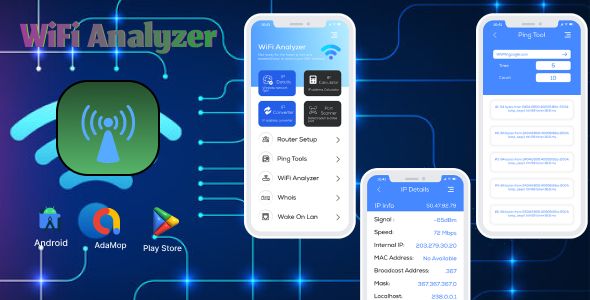
- Description
- Reviews
- FAQ
Unlock the full potential of your network with the ultimate toolkit. The WiFi Analyzer – IP Tools-WPA WiFi Tester- – Network Scanner WPS WiFi Connect is a comprehensive suite of professional-grade tools designed to help you analyze, secure, and optimize any wireless network. It solves the critical problems of slow connections, security vulnerabilities, and unknown devices on your network.
Whether you’re an IT professional, a tech enthusiast, or simply someone who wants a faster and safer internet connection, this application provides everything you need. Gain complete visibility and control over your network environment. Stop guessing and start analyzing with powerful, data-driven insights right from your device.
Your All-in-One Network Diagnostic Toolkit
Tired of juggling multiple apps for network analysis? This powerful application consolidates a dozen essential utilities into one clean, user-friendly interface. It’s the only network tool you’ll ever need.
- Advanced WiFi Analysis: Visualize your WiFi environment, find the least crowded channel, and measure signal strength in real-time for optimal router placement.
- Comprehensive IP Tools Suite: Access essential utilities like Ping, Traceroute, DNS Lookup, Port Scanner, and Whois to troubleshoot any connectivity issue.
- Robust Network Scanner: Instantly discover all devices connected to your WiFi network. Identify unknown users and potential intruders with just a tap.
- WPS/WPA Security Tester: Audit the security of your own network by testing for common WPS vulnerabilities, helping you fortify your router’s defenses.
- Detailed Connection Data: Get in-depth information about your network connection, including your external IP, internal IP, gateway, DNS server, and more.
- Router Admin Access: Find your router’s admin page and default credentials quickly to easily configure settings and improve security.
- Intuitive & Lightweight: Enjoy a clean, modern interface that presents complex data in an easy-to-understand format without draining your device’s resources.
In-Depth Feature Analysis
Let’s dive deeper into the core components that make this application an indispensable tool for network management and security.
Network Security Auditing (WPS/WPA Tester)
Is your network truly secure? The built-in WPA/WPS WiFi Tester helps you answer that question by performing a security audit on your own network. It tests for common vulnerabilities, particularly those related to the WPS protocol.
This feature is designed for educational and security purposes, allowing you to identify weaknesses before a malicious actor does. By understanding your router’s potential flaws, you can take corrective action, such as disabling WPS or updating your firmware, to create a much more secure network environment for your home or office.
Complete IP Toolkit for Professionals
Go beyond simple speed tests. This app includes a full suite of IP tools that network administrators use daily for diagnostics and troubleshooting. You get everything you need to solve complex network problems.
- Ping: Check the reachability of a host and measure round-trip time for packets.
- Traceroute: Trace the path packets take from your device to a destination server, identifying bottlenecks along the way.
- Port Scanner: Scan any IP address or hostname for open ports to check for security vulnerabilities.
- Whois & DNS Lookup: Retrieve domain registration information and perform DNS lookups to diagnose name resolution issues.
Advanced Network & Device Scanner
Who is using your WiFi right now? The powerful Network Scanner gives you a complete, real-time list of every device connected to your network. It provides the IP address, MAC address, and vendor name for each device.
This is crucial for both security and management. You can instantly spot unauthorized devices, identify bandwidth hogs, and ensure that only trusted users have access. It’s the ultimate tool for maintaining a clean and secure local network.
Who is This Network Toolkit For?
This versatile application is designed for a wide range of users who demand more from their network tools.
Perfect for Home Users & Tech Enthusiasts
Stop dealing with WiFi dead zones and buffering. Use the analyzer to find the best channel for your router, check for intruders on your network, and ensure your family’s online activity is safe and secure.
Essential for IT Professionals & Network Admins
Conduct network diagnostics and security assessments on the go. The comprehensive IP toolkit and powerful scanner make it an essential utility for troubleshooting client networks or managing corporate infrastructure from anywhere.
A Game-Changer for App Developers
Integrate or learn from a professionally built application without restrictive licensing. The GPL license gives you the freedom to study the code, customize it, and use it in your personal or commercial projects, providing incredible value and learning opportunities.
Why Choose This Version? The Freedom of GPL
You might see this product on official marketplaces for a much higher price. Our version offers the exact same powerful features and professional code, but with two key advantages: affordability and freedom.
- Unbeatable Value: We provide the original, unmodified code at a fraction of the developer’s price. This is possible because the software is licensed under the General Public License (GPL).
- Freedom to Use and Modify: You are not restricted to a single use. Use the application on unlimited personal projects, study its source code to improve your skills, or integrate its features into your own work.
- Safe, Verified Code: We ensure the files you download are 100% original and free from any malware or advertising. You get the premium tool without any of the risks.
Frequently Asked Questions (FAQ)
What mobile OS is the WiFi Analyzer – IP Tools app compatible with?
This application is designed for the Android operating system. It is optimized to work smoothly on a wide range of devices running modern versions of Android, ensuring broad compatibility and stable performance.
Does the WPS/WPA Tester feature work on all routers?
The effectiveness of the WPS/WPA Tester depends on the router’s firmware and security configuration. It is most effective at identifying known vulnerabilities in older or unpatched routers with WPS enabled. For modern, fully-updated routers, it serves as a good check to confirm that basic security measures are in place.
Will I receive updates for the WiFi Analyzer – IP Tools-WPA WiFi Tester?
Yes. We provide regular updates as they are released by the original developer. As long as your subscription with us is active, you will have access to the latest versions, ensuring you always have the most up-to-date features and security patches.
Can the Network Scanner see what websites other people are visiting?
No, and this is an important privacy distinction. The Network Scanner is designed to identify the devices connected to your network (by showing their IP, MAC, and vendor name) and to scan for open ports. It does not monitor or inspect internet traffic content.
Is this code safe to use?
Absolutely. We provide the original, untouched source code as released by the developer under the GPL. We run our own security checks to verify that the files are clean and free from any malicious code, so you can use them with confidence.
Why is this so much cheaper than on the official marketplace?
We can offer this product at a lower price because we don’t provide the direct, intensive technical support that the original author does. We simply redistribute the original software under the GPL license, which allows us to pass the savings on to you. You get the exact same premium product for a fraction of the cost.
Q: Do I need a license key?
A: No. All products are Pre-Activated. You can use 100% of the Premium features immediately.
Q: Can I use the One-Click Demo Import?
A: Yes, absolutely! We ensure the demo import feature works perfectly.
Q: Can I use the products on multiple websites?
A: Absolutely. The GPL license allows use on unlimited domains.
Q: Are the files safe?
A: Yes. All files are scanned by McAfee and VirusTotal before uploading.
Share Now!
Related Products
 NoteWise – Smart Notes, Reminders & To-Do Organizer Android$4.99
 Food Delivery App – A Complete Ready to Use MultiStore Mobile App(Android, ios) + Website$5.00
 Unity Game Template – Miniman Defender (Unity 6!)$8.00
 Android News App$5.00
 On Demand Pharmacy Delivery with Medicine Delivery and Upload Prescription App with 2 Apps & Admin$5.00




Related Products
Same Contributor



Featured Products


