
Schedule, Reset Countdown Plugin WooCommerce | WooCP
- Description
- Reviews
- FAQ
Drive Urgency and Skyrocket Your Sales with WooCP
Are you struggling to convert visitors into customers on your WooCommerce store? Creating genuine urgency is a proven marketing strategy, but it can be difficult to implement effectively. The Schedule, Reset Countdown Plugin WooCommerce | WooCP is the ultimate tool designed to solve this exact problem.
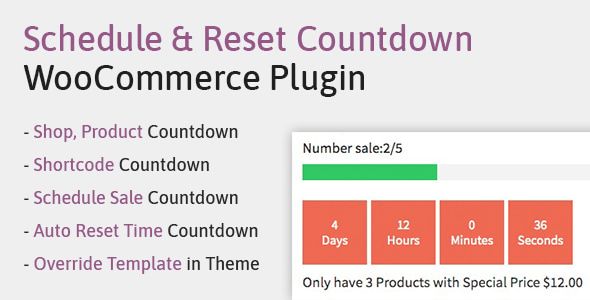
This powerful plugin allows you to add dynamic, fully customizable countdown timers to your products. You can schedule sales events, create flash deals, and automatically reset timers to generate consistent, authentic urgency. Stop letting potential sales slip away and start maximizing your revenue today.
Core Features of the Schedule, Reset Countdown Plugin
WooCP is packed with features that give you complete control over your promotional campaigns. It’s more than just a timer; it’s a complete sales automation toolkit for WooCommerce. Here’s what makes it an essential addition to your store:
- Multiple Countdown Types: Choose from fixed countdowns for specific dates, recurring timers that reset daily or hourly, or evergreen timers unique to each visitor.
- Advanced Product Scheduling: Automatically make products purchasable or change their price when a countdown starts or ends. You can even hide products or change stock status.
- Dynamic Reset Functionality: Set timers to reset after a specific duration (e.g., every 24 hours for a ‘Deal of the Day’) or based on user visits, creating personalized urgency.
- Highly Customizable Designs: Control the look and feel of your countdown timers. Change colors, sizes, fonts, and layouts to perfectly match your brand’s aesthetic.
- Flexible Display Options: Place your countdowns anywhere using shortcodes. Display them on single product pages, shop archives, category pages, or even in widgets and page builder elements.
- Bulk Scheduling: Save immense amounts of time by applying countdown and scheduling rules to multiple products or entire categories at once.
- Actionable Expiry Logic: Define what happens when the timer hits zero. You can hide the ‘Add to Cart’ button, change the product price back to normal, or display a custom message.
A Deeper Look into WooCP’s Powerful Capabilities
Let’s explore the three most impactful features that set the Schedule, Reset Countdown Plugin apart. These tools are specifically designed to give you an unfair advantage in a competitive market.
Advanced Scheduling & Automation
Manual sales management is a thing of the past. With WooCP, you can plan your entire promotional calendar in advance and let the plugin handle the execution. This is true set-and-forget marketing automation for your WooCommerce store.
Imagine setting up your Black Friday or holiday sales weeks ahead of time. You simply choose a start and end date. When the time comes, the plugin can automatically:
- Display a countdown timer on selected products.
- Change the product’s price to the sale price.
- Make a previously hidden product visible and purchasable.
- When the sale ends, it automatically reverts all changes, saving you time and stress.
Dynamic Reset Countdown Timers
This is where WooCP truly shines for creating evergreen urgency. A standard countdown is great for a site-wide sale, but a reset timer creates a personalized fear of missing out (FOMO) for every single visitor. This feature is a conversion-boosting powerhouse.
You can configure several types of reset timers:
- Daily/Hourly Reset: Perfect for creating a “Daily Deal” or “Hourly Flash Sale” that automatically refreshes.
- Per Visitor Reset: The timer starts counting down the first time a user visits a product page. This creates a unique, limited-time offer just for them.
- On-Visit Reset: The countdown resets every time the user reloads the page, constantly reinforcing scarcity.
This level of dynamic timing makes your offers feel fresh and exclusive, compelling visitors to act immediately rather than waiting.
Flexible Display & Customization
A countdown timer is only effective if it’s seen and fits your brand. WooCP offers unparalleled flexibility in both placement and design. You are not locked into a single, ugly timer style on your product page.
Using intuitive shortcodes, you can place timers anywhere you want. This includes:
- Above or below the ‘Add to Cart’ button on product pages.
- Directly on product images on the shop/archive pages.
- Within custom tabs or description areas.
- In your website’s header, footer, or sidebar using widgets.
- Integrated seamlessly with page builders like Elementor, Divi, and WP Bakery.
Furthermore, the visual customizer lets you tweak every aspect of the timer’s appearance. Match your brand’s colors, adjust fonts, and select from different styles to ensure the countdown enhances your site’s design, rather than detracting from it.
Who is the Schedule, Reset Countdown Plugin For?
This versatile plugin is a must-have for anyone serious about e-commerce. Its wide range of features provides immense value to various users.
E-commerce Store Owners
If you run your own WooCommerce store, WooCP is a non-negotiable tool. Use it to effortlessly run flash sales, holiday promotions, product launches, and clearance events. Boost your conversion rate and average order value with targeted urgency.
Marketing Agencies & Freelancers
Deliver incredible results for your clients. With our GPL-licensed version, you can install WooCP on an unlimited number of client websites without purchasing extra licenses. Offer advanced scarcity marketing as a service and become an invaluable partner.
Dropshippers and Affiliate Marketers
Create compelling, time-sensitive offers around the products you promote. Use evergreen reset timers to ensure that every visitor to your landing page feels a sense of urgency, dramatically increasing the likelihood of a click-through or purchase.
Why Download Our GPL Version of WooCP?
You have choices when it comes to acquiring WordPress plugins. Our version of the Schedule, Reset Countdown Plugin WooCommerce | WooCP offers a unique combination of freedom, safety, and unbeatable value.
Freedom and Cost-Effectiveness
The number one benefit is freedom. Under the GPL license, you are free to use this plugin on as many websites as you wish—be it for your own projects or for your clients. This eliminates the high cost of purchasing multiple licenses or expensive agency packages.
This is the exact same code as the original, offered at a fraction of the price. You get 100% of the premium functionality without the premium price tag. It’s the smartest way to build a powerful toolkit for your business.
Safe, Verified, and Original Code
We understand the importance of security. Every plugin we offer, including WooCP, is 100% original, unmodified, and free from any malware or malicious code. We acquire the files directly from the original developer and pass them on to you, ensuring your website’s integrity and safety.
Frequently Asked Questions
Does the WooCP plugin work with the latest version of WooCommerce and WordPress?
Absolutely. We ensure our plugins are tested for compatibility with the latest stable versions of WordPress and WooCommerce. As new updates are released, we provide updated versions of the plugin that you can download from your account.
Can I show a countdown timer on my shop page or only on single product pages?
Yes, you can display timers on both. The plugin provides shortcodes that you can easily insert into your theme’s templates or use with a page builder to show countdowns on shop/archive pages, category pages, and even homepage feature sections.
Is this plugin compatible with page builders like Elementor or Divi?
Yes, it is. The plugin’s functionality is based on shortcodes, which are universally supported by all major page builders, including Elementor, Divi, Beaver Builder, and WP Bakery. You can easily drag a text or shortcode module and paste the WooCP shortcode to display your timer.
What happens when the countdown timer reaches zero?
You have full control over the expiration event. You can configure the plugin to hide the product, make it ‘out of stock’, revert the price to its original state, hide the ‘Add to Cart’ button, or simply hide the countdown timer itself. This flexibility allows you to tailor the user experience perfectly.
Will I receive updates for the Schedule, Reset Countdown Plugin?
Yes. We provide regular updates for all our products. As long as you have an active subscription with us, you will have access to the latest versions of the plugin, ensuring compatibility and access to new features as they are released by the original developer.
Is it safe to use this GPL-licensed version on my website?
It is completely safe. The files we provide are the original, untouched code from the developer. We do not modify the plugin files in any way. You are getting the authentic premium plugin, simply distributed under the freedom of the General Public License (GPL).
What’s the difference between buying from you and buying from the official CodeCanyon page?
The primary difference is price and support. When you buy from the developer, a large portion of the cost goes towards their direct, one-on-one technical support. Our model offers the exact same plugin at a significantly lower price but does not include direct developer support. For most users who don’t need hand-holding, this trade-off provides incredible value and freedom.
Q: Do I need a license key?
A: No. All products are Pre-Activated. You can use 100% of the Premium features immediately.
Q: Can I use the One-Click Demo Import?
A: Yes, absolutely! We ensure the demo import feature works perfectly.
Q: Can I use the products on multiple websites?
A: Absolutely. The GPL license allows use on unlimited domains.
Q: Are the files safe?
A: Yes. All files are scanned by McAfee and VirusTotal before uploading.
Share Now!
Related Products




Related Products



Same Contributor


Featured Products


