
Multi-Kitchen Module for Tabletrack

- Description
- Reviews
- FAQ
Streamline Your Restaurant Operations with the Multi-Kitchen Module for Tabletrack
Are you struggling to manage a complex restaurant with multiple cooking stations? Do orders get lost between the bar, the grill, and the main kitchen? The Multi-Kitchen Module for Tabletrack is the definitive solution to bring order to the chaos and revolutionize your operational workflow.
This powerful add-on for the Tabletrack restaurant reservation system allows you to intelligently route specific menu items to designated kitchens or preparation areas. It eliminates confusion, reduces errors, and dramatically speeds up your order fulfillment process. Give your kitchen staff the clear, focused tools they need to perform at their best.
Unlock Peak Efficiency: Key Features
The Multi-Kitchen Module is packed with features designed to optimize your restaurant’s back-of-house operations. It transforms your Tabletrack system into a comprehensive command center for your entire culinary team.
- Smart Item-to-Kitchen Routing: Assign individual menu items or entire categories to specific kitchens (e.g., salads to the prep station, steaks to the grill).
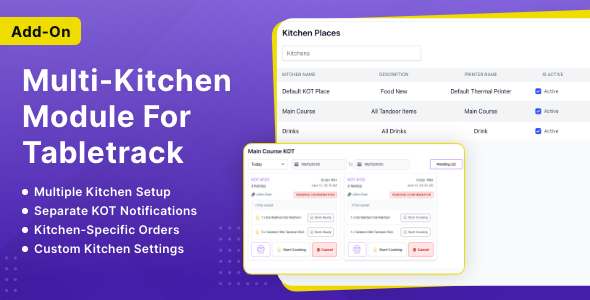
- Dedicated Kitchen Dashboards: Each kitchen gets its own clean, real-time Kitchen Display System (KDS) showing only relevant orders.
- Real-Time Order Status Updates: Staff can update an order’s status (e.g., Cooking, Ready), which instantly reflects across the system for waiters and managers.
- Printable Kitchen Order Tickets (KOT): Generate and print clear, detailed order tickets for each kitchen, ensuring accuracy.
- Seamless Tabletrack Integration: Built specifically for Tabletrack, this module integrates perfectly with your existing reservation and ordering system.
- Improved Communication: Drastically reduce verbal miscommunication between front-of-house and back-of-house staff.
- User-Friendly Management: A simple and intuitive backend interface makes assigning items and managing kitchens incredibly easy.
In-Depth Feature Analysis
Let’s dive deeper into the core functionalities that make this module an essential tool for any serious restaurant business.
Smart Item Routing & Assignment
The heart of the Multi-Kitchen Module is its intelligent routing capability. You are no longer limited to a single, cluttered order queue. Now, you have granular control over your entire menu’s workflow.
From the WordPress backend, you can easily create multiple kitchens—Bar, Main Kitchen, Grill Station, Pizza Oven, Dessert Station, etc. Then, simply edit each food item and assign it to its designated kitchen. When a waiter places an order with a drink, a steak, and a pizza, the system automatically sends each item to the correct station’s dashboard.
Dedicated Kitchen Dashboards (KDS)
Clarity is key to a fast-paced kitchen. This module provides each kitchen with its own unique URL for a dedicated Kitchen Display System (KDS). This screen displays a clean, card-based view of incoming orders, showing only the items assigned to that specific station.
Your grill chef sees only the steak orders, and your bartender sees only the drink orders. This focused view eliminates distractions, prevents staff from working on the wrong items, and helps them manage their queue efficiently. It’s a visual, real-time system designed for speed and accuracy.
Real-Time Order Synchronization
Bridge the gap between your dining room and your kitchen. When a kitchen staff member updates an item’s status on their KDS—for example, changing it from ‘Pending’ to ‘Cooking’—that status is updated across the entire Tabletrack system in real-time.
This means your floor manager and waitstaff always know the exact progress of every dish without having to shout into the kitchen. Once an item is marked ‘Ready’, the server is notified to pick it up, ensuring food is delivered to the customer hot and fresh. This seamless communication is critical for providing an exceptional dining experience.
Who is the Multi-Kitchen Module For?
This module is a game-changer for a wide range of food and beverage businesses looking to scale their operations and improve efficiency.
- Large Restaurants: Perfect for establishments with distinct preparation areas like a raw bar, grill station, and pastry section.
- Food Courts & Food Halls: Manage orders seamlessly across multiple independent food vendors from a centralized system.
- Ghost Kitchens & Cloud Kitchens: Run multiple virtual brands from a single physical kitchen, routing orders for each brand to the correct culinary team.
- Hotels & Resorts: Efficiently manage orders from multiple on-site restaurants, room service, and poolside bars.
- Busy Cafes & Bars: Separate drink orders from food orders to ensure your barista and your chef can work in parallel without confusion.
Why Download From Us? The Smart Choice
When you get the Multi-Kitchen Module for Tabletrack from us, you’re not just buying a plugin; you’re investing in freedom, value, and security. We operate under the General Public License (GPL), which gives you incredible benefits.
- Unbeatable Value: Get the exact same premium functionality and code as the original, but at a fraction of the cost. This makes professional tools accessible to everyone.
- Freedom to Use: Use the module on as many of your own or your clients’ websites as you need. No more buying a license for every single project.
- Safe and Secure Code: We provide the original, untouched files directly from the developer. Our downloads are 100% free from malware, ads, or malicious code.
- Access to Updates: As long as your membership is active, you get access to future updates, ensuring compatibility and access to new features.
Frequently Asked Questions (FAQ)
Is the Multi-Kitchen Module compatible with the latest version of Tabletrack?
Yes. We ensure that our plugins and modules are kept up-to-date. This version is tested for compatibility with the latest releases of both WordPress and the core Tabletrack reservation system plugin.
How do I assign a menu item to a specific kitchen?
The process is incredibly simple. After installing the module, you’ll see a new ‘Kitchens’ section in your WordPress dashboard where you can create your stations. Then, when editing a product (menu item), a new dropdown menu will appear allowing you to assign it to the kitchen of your choice.
Can each kitchen have its own unique dashboard view?
Absolutely. That is the core feature. Each kitchen you create is given a unique URL for its KDS (Kitchen Display System). This link can be opened on any web-enabled device like a tablet or monitor in that kitchen, showing only the orders relevant to them.
Will I receive updates for this module?
Yes. Your purchase includes access to ongoing updates for the product. We regularly update our repository with the latest versions released by the original developers, ensuring your site remains secure and functional.
Is the code provided here safe and original?
100% safe. We believe in transparency and security. The files you download are the original, unmodified code distributed by the developer under the GPL. We simply redistribute them, making them more affordable.
Why is this product so much more affordable on your site?
Our business model is built on the freedom of the General Public License (GPL). Because WordPress and its derivatives like themes and plugins are under the GPL, we can legally and safely redistribute them. We buy the product and share the cost among many customers, making powerful tools accessible to everyone from freelancers to agencies.
Q: Do I need a license key?
A: No. All products are Pre-Activated. You can use 100% of the Premium features immediately.
Q: Can I use the One-Click Demo Import?
A: Yes, absolutely! We ensure the demo import feature works perfectly.
Q: Can I use the products on multiple websites?
A: Absolutely. The GPL license allows use on unlimited domains.
Q: Are the files safe?
A: Yes. All files are scanned by McAfee and VirusTotal before uploading.
Share Now!
Related Products


Related Products


Same Contributor


Featured Products


