
MaterialX – Android Material Design UI 3.5

- Description
- Reviews
- FAQ
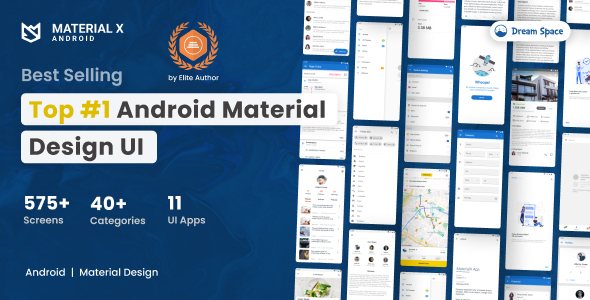
Revolutionize Your Android App Development with MaterialX – Android Material Design UI 3.5
Are you an Android developer or agency striving to build visually stunning, user-friendly applications that stand out? Do you often find yourself spending countless hours on UI design and implementation, delaying your product launch?
Introducing **MaterialX – Android Material Design UI 3.5**, the ultimate solution for crafting elegant and highly functional Android applications with unprecedented speed and efficiency. This comprehensive UI component kit is meticulously engineered to align with Google’s latest Material Design 3 guidelines, ensuring your apps not only look modern but also provide an intuitive user experience.
With MaterialX, you can dramatically cut down development time. It provides a robust foundation of pre-built, customizable components. Stop reinventing the wheel and start focusing on your app’s core functionality, delivering exceptional value to your users faster than ever before.
Key Features of MaterialX – Android Material Design UI 3.5
MaterialX – Android Material Design UI 3.5 is packed with features designed to empower developers and designers alike. Explore the core capabilities that make it an indispensable tool for your next Android project.
- Full Material Design 3 Compliance: Access a vast library of components built strictly to the latest Google Material Design 3 specifications, including Material You theming.
- Extensive UI Component Library: A rich collection of widgets, layouts, and interactive elements covering almost every app screen scenario.
- Deep Customization Options: Easily adapt colors, typography, shapes, and animations to match your unique brand identity or specific project requirements.
- Ready-to-Use Screen Templates: Accelerate development with pre-designed screens for common app functions like authentication, profiles, settings, and e-commerce.
- Responsive & Adaptive Layouts: Components are designed to look great and function flawlessly across various Android device sizes and orientations.
- Clean, Modular & Well-Documented Code: Benefit from a highly organized codebase that is easy to understand, integrate, and extend.
- Light & Dark Theme Support: Implement system-wide theme preferences effortlessly, enhancing user comfort and accessibility.
In-Depth Feature Analysis
Let’s dive deeper into some of the most impactful features that make MaterialX – Android Material Design UI 3.5 a game-changer for your app development workflow.
Comprehensive Material Design 3 Implementation
Material Design 3 represents the pinnacle of Android UI aesthetics and functionality. MaterialX – Android Material Design UI 3.5 doesn’t just mimic MD3; it fully embraces its principles. This includes dynamic color capabilities, enhanced accessibility features, and refined component behaviors.
You gain instant access to a suite of components, from elegant buttons and sophisticated navigation bars to intricate data entry fields and informative cards. Each element adheres to the latest design system, ensuring a cohesive and professional look across your entire application. Building with MD3 means staying ahead of the curve, offering users a familiar yet fresh experience.
Unparalleled Customization & Flexibility
Your app deserves a unique identity. MaterialX – Android Material Design UI 3.5 provides an incredible degree of customization, allowing you to tailor every aspect of its components. Beyond basic color changes, you can adjust typography, shape systems, and even component states with ease.
This flexibility is crucial for branding and differentiating your application in a crowded marketplace. The modular structure of the code means you can modify components without breaking the overall design system. This allows for both rapid prototyping and detailed, pixel-perfect adjustments, giving you complete creative control over your app’s visual identity.
Accelerated Development with Pre-built Screens
One of the biggest time sinks in app development is building common screens from scratch. MaterialX – Android Material Design UI 3.5 solves this by offering a rich collection of pre-built screen templates. Imagine having ready-to-integrate designs for login, registration, user profiles, settings, shopping carts, and much more.
These templates are not just static images; they are fully functional, customizable code snippets that you can drop directly into your project. This feature drastically reduces boilerplate code and allows your team to focus on innovative features and business logic. It’s like having a head start on every project, bringing your ideas to life at an incredible pace.
Who Benefits from MaterialX – Android Material Design UI 3.5?
MaterialX – Android Material Design UI 3.5 is designed to serve a diverse range of professionals in the mobile development ecosystem. Its versatility and comprehensive features make it an ideal choice for various use cases.
App Developers & Startups
For individual developers and lean startups, time is money. MaterialX empowers you to build Minimum Viable Products (MVPs) and full-fledged applications significantly faster. Focus your energy on innovative features and backend logic, knowing your UI is polished and professional.
The pre-built components and screens mean less coding for common UI elements. This allows you to launch your app quicker and iterate based on user feedback. It’s a robust foundation that saves critical development resources.
Freelancers & Agencies
Delivering high-quality projects on tight deadlines is the norm for freelancers and agencies. MaterialX – Android Material Design UI 3.5 equips you with the tools to exceed client expectations consistently. Create impressive demos and final products that reflect professionalism and cutting-edge design.
Its modular design facilitates easy integration into existing projects and seamless collaboration within teams. You can confidently take on more projects, knowing you have a reliable, high-performance UI toolkit at your disposal.
UI/UX Designers
Designers can leverage MaterialX to bridge the gap between design concepts and actual implementation. Use the components to quickly prototype ideas and ensure that the final product perfectly matches your vision. The consistent adherence to Material Design 3 guidelines guarantees a superior user experience.
Understanding how components are built and structured can also enhance communication with developers. This leads to a smoother design-to-development handover process. It’s an excellent resource for validating design choices in a real-world context.
Why Choose Our GPL Version of MaterialX – Android Material Design UI 3.5?
When considering a premium UI component library like MaterialX – Android Material Design UI 3.5, the licensing model is a critical factor. Our GPL-licensed version offers distinct advantages that benefit your projects both financially and operationally.
Unrestricted Freedom and Flexibility
Under the GNU General Public License (GPL), you gain unparalleled freedom. This means you can use MaterialX – Android Material Design UI 3.5 on an unlimited number of projects without additional license fees or recurring subscriptions. Whether you’re building one app or a hundred, the cost remains the same.
This freedom extends to modification and distribution. You can adapt the code to perfectly fit your unique requirements, ensuring complete control over your application’s design and functionality. It’s the ultimate toolkit for scalable development.
Significant Cost Savings
Proprietary licenses for high-quality UI component kits can be prohibitively expensive, especially for agencies or developers with multiple projects. Our GPL-licensed MaterialX – Android Material Design UI 3.5 provides access to the same premium features at a fraction of the cost.
This allows you to allocate more of your budget to other critical aspects of your project, such as marketing, backend infrastructure, or hiring talent. It’s a smart financial decision that doesn’t compromise on quality or functionality.
Secure, Audited & Reliable Codebase
The nature of open-source software, especially under a strong license like GPL, often fosters a higher degree of code scrutiny. Our version of MaterialX – Android Material Design UI 3.5 is sourced from reputable developers and often benefits from community oversight.
This ensures you’re working with clean, efficient, and reliable code. You can integrate it into your projects with confidence, knowing it’s built to professional standards and designed for stability. Security and performance are paramount in today’s app landscape.
Frequently Asked Questions
We understand you might have questions about MaterialX – Android Material Design UI 3.5 and its GPL licensing. Here are some common inquiries to help you make an informed decision.
What exactly is MaterialX – Android Material Design UI 3.5?
MaterialX – Android Material Design UI 3.5 is a comprehensive collection of pre-built, customizable user interface components and screen templates specifically for Android app development. It fully adheres to Google’s latest Material Design 3 guidelines, empowering developers to create modern, beautiful, and highly functional Android applications rapidly.
Does MaterialX – Android Material Design UI 3.5 support the latest Android versions?
Yes, MaterialX – Android Material Design UI 3.5 is continuously updated and optimized for compatibility with the latest Android operating system versions. It leverages modern Android development best practices and libraries to ensure seamless integration and performance on current devices and future releases.
How often are updates provided for MaterialX – Android Material Design UI 3.5?
We strive to provide timely updates to MaterialX – Android Material Design UI 3.5, incorporating bug fixes, performance enhancements, and new features. Updates are typically released in response to significant changes in Android’s ecosystem or Material Design guidelines. As a GPL-licensed product, you’re always free to update when new versions become available.
Is the code for MaterialX – Android Material Design UI 3.5 clean and well-documented?
Absolutely. MaterialX – Android Material Design UI 3.5 is built with developer experience in mind. The codebase is modular, follows clean architecture principles, and is extensively documented. This makes it easy to understand, customize, and integrate into your existing or new Android projects, ensuring a smooth development workflow.
Can I use MaterialX – Android Material Design UI 3.5 in commercial projects?
Yes, definitively. Under the GPL license, you have the full freedom to use MaterialX – Android Material Design UI 3.5 in an unlimited number of commercial and personal projects. There are no restrictions on how many apps you build or how you monetize them, providing complete peace of mind for your business ventures.
What kind of support is available for MaterialX – Android Material Design UI 3.5?
While we provide the GPL-licensed product, direct, dedicated support for individual installations is typically not included. However, the comprehensive documentation and the vibrant open-source community around such tools often serve as excellent resources. You’ll find a wealth of information and potential solutions readily available.
How does the GPL license benefit my development workflow with MaterialX – Android Material Design UI 3.5?
The GPL license significantly enhances your development workflow by offering flexibility and cost-efficiency. You eliminate recurring licensing fees, allowing budget savings. Moreover, the freedom to modify the code means you can tailor MaterialX to your exact project needs without vendor lock-in. This fosters innovation and ensures your projects are future-proof.
Q: Do I need a license key?
A: No. All products are Pre-Activated. You can use 100% of the Premium features immediately.
Q: Can I use the One-Click Demo Import?
A: Yes, absolutely! We ensure the demo import feature works perfectly.
Q: Can I use the products on multiple websites?
A: Absolutely. The GPL license allows use on unlimited domains.
Q: Are the files safe?
A: Yes. All files are scanned by McAfee and VirusTotal before uploading.
Share Now!
Related Products
 Material UIX – KOTLIN Material Design VER 1.3$1.00
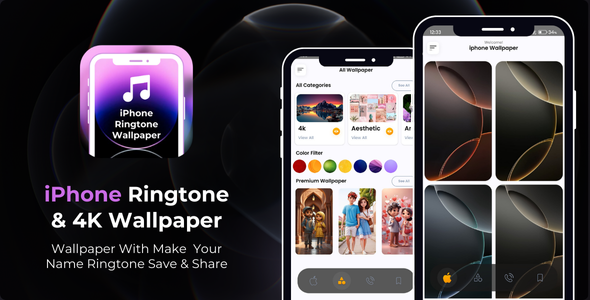 iPhone Ringtone Wallpaper with AdMob Ads Android$5.00
 Metal Detector Metal Finder with AdMob Ads Android$5.00
 OffScreen Video Recorder – Spy Camera – Record Video in Background$5.00
 Ghost Detector Radar Camera – Ghost Detector Simulator – Spirit Detector$5.00



Related Products
Same Contributor


Featured Products


