
File Manager – Manage all your files | iOS App | Swift | InApp Purchase | AdMob Support

- Description
- Reviews
- FAQ
Launch a Powerful iOS File Management App in Record Time
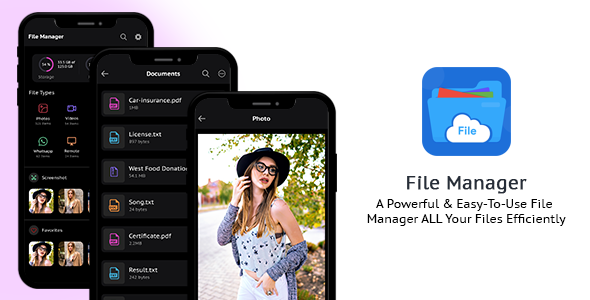
Stop wrestling with complex code and endless development cycles. The File Manager – Manage all your files | iOS App | Swift | InApp Purchase | AdMob Support template is your all-in-one solution to launch a professional, feature-rich file organizer app on the Apple App Store. This is not just a concept; it’s a complete, market-ready project built with the latest technologies.
This premium iOS app source code solves a critical problem for developers and entrepreneurs: time and cost. Instead of spending thousands of dollars and months on development, you get a solid foundation that is ready for customization and deployment. It’s the perfect shortcut to bringing your app idea to life.
Our Swift-based file manager provides a seamless user experience, powerful features, and built-in monetization options. Give your users the tool they need to manage documents, photos, and media with ease, all while you build a new revenue stream.
Core Features of the iOS File Manager App
This isn’t a basic template. It’s a comprehensive package packed with the features modern users expect from a top-tier file management application. Here’s what you get right out of the box:
- Built with Swift & SwiftUI: Utilizes Apple’s modern, powerful, and declarative UI framework for a clean, maintainable, and future-proof codebase.
- Ready-to-Go Monetization: Integrated with Google AdMob for ad revenue and configured for In-App Purchases (IAP) to easily offer a premium, ad-free version.
- Secure Private Folder: A key feature that allows users to protect sensitive files and folders with a passcode, adding a layer of privacy and security.
- Comprehensive File & Folder Operations: Full support for creating, renaming, moving, copying, deleting, and sharing files and folders.
- ZIP Archive Support: Users can easily create ZIP archives from files and folders or extract contents from existing ZIP files directly within the app.
- Integrated Media Viewer: Includes a built-in document viewer, image gallery, and media player, so users don’t need to leave the app to access their content.
- Modern User Interface: Features a clean, intuitive design with full support for both Light and Dark Mode, automatically adapting to the user’s system settings.
In-Depth Feature Analysis
Let’s dive deeper into the three pillars that make this iOS app template an unbeatable value for any developer.
Effortless Monetization with AdMob & In-App Purchases
An app is not just a tool; it’s a business. This file manager template is built with monetization at its core. We’ve done the heavy lifting of integrating two of the most popular revenue models for you.
Easily display Google AdMob banner and interstitial ads to generate consistent revenue from the free version of your app. The code is structured for simple configuration—just add your own Ad Unit IDs. Furthermore, the In-App Purchase functionality is already set up, allowing you to offer a ‘Pro’ or ‘Premium’ version that removes ads and unlocks features, providing a direct and powerful upgrade path for your user base.
A Robust and Powerful File Management Engine
At its heart, this is a powerful utility. Users can manage their digital life with an intuitive interface that handles all essential tasks. The app supports a wide range of file types, from documents (PDF, DOCX) and images (JPG, PNG) to audio and video files.
The ability to compress files into a ZIP archive and decompress them is a crucial feature for power users. This functionality, combined with seamless sharing options via native iOS share sheets, makes the app a central hub for all file-related activities. It’s the kind of reliability and performance that earns 5-star reviews on the App Store.
Clean, Modern Codebase (Swift & SwiftUI)
Forget outdated Objective-C projects or messy code that’s impossible to customize. This app is built entirely in Swift 5 using SwiftUI, Apple’s latest and greatest framework. This means the code is not only high-performing but also incredibly easy to read, modify, and extend.
Whether you want to re-skin the UI, change the branding, or integrate new cloud storage APIs, the clean architecture makes it a breeze. The Xcode project is well-organized and commented, ensuring you can get started on your customizations immediately, saving you countless hours of reverse-engineering a complex project.
Who is This iOS App Template For?
This versatile app template is the perfect starting point for a wide range of individuals and teams.
- App Entrepreneurs: Launch your own app on the App Store with a minimal upfront investment. Get to market quickly and start building your user base today.
- iOS Developers: Save hundreds of hours of development time. Use this template as a solid foundation for a more complex, custom file management or utility app.
- Digital Agencies: Quickly deliver a high-quality, fully functional iOS app to your clients without building everything from the ground up, increasing your project profitability.
- Students & Learners: Explore a real-world, professional Xcode project built with Swift and SwiftUI to enhance your coding skills and understand modern app architecture.
Why Choose Our Version? The Smart & Affordable Choice
You might see this app template on other marketplaces for a significantly higher price, often with restrictive single-use licenses. Our model is different. We believe in providing value and freedom through the GPL.
By choosing us, you get the exact same professional, 100% original code but with incredible benefits. You receive the freedom to use the code on unlimited projects, for yourself or for clients. It’s a one-time, cost-effective payment that empowers you to build without limits.
We provide safe, unmodified code directly from the developer, giving you a secure and stable foundation for your next big app idea. It’s the smartest way to access premium development resources without the premium price tag.
Frequently Asked Questions (FAQ)
Is this app template compatible with the latest version of iOS and Xcode?
Absolutely. The File Manager – Manage all your files | iOS App is built using modern Swift and SwiftUI, ensuring it is fully compatible with the latest versions of iOS and Xcode. We regularly check our products to ensure they work with new system updates, providing you with a stable and future-proof codebase.
Can I customize the app’s branding, colors, and UI?
Yes! That’s one of the primary benefits of this template. The source code is clean and well-organized, making it straightforward to change colors, replace app icons, rename the app, and modify the user interface to match your unique brand identity. You have full control over the final look and feel.
How do I configure AdMob and In-App Purchases with my own accounts?
The process is designed to be simple. The code includes clearly marked configuration files or sections where you can input your unique AdMob Ad Unit IDs and your In-App Purchase product identifiers from App Store Connect. Detailed documentation is often included to guide you through these specific steps.
Will I receive future updates for this iOS app template?
Yes. When you purchase from us, you get access to all future updates for this item for free. As the original developer releases updates for new iOS versions or adds new features, we make them available for you to download from your account dashboard.
Is the code provided safe and secure to use for a commercial App Store app?
We guarantee that the code we provide is 100% original, unmodified, and free from any malware. We download directly from the original developer and pass it on to you. You can confidently use this source code to build and launch a secure application on the Apple App Store.
Why is this app template so much more affordable here than on official marketplaces?
Our business model is based on the General Public License (GPL). This allows us to offer premium, high-quality software and code at a fraction of the original price. You get the same powerful tool but without the cost of bundled premium support, which many users don’t need. It’s the most cost-effective way to access world-class development assets.
Q: Do I need a license key?
A: No. All products are Pre-Activated. You can use 100% of the Premium features immediately.
Q: Can I use the One-Click Demo Import?
A: Yes, absolutely! We ensure the demo import feature works perfectly.
Q: Can I use the products on multiple websites?
A: Absolutely. The GPL license allows use on unlimited domains.
Q: Are the files safe?
A: Yes. All files are scanned by McAfee and VirusTotal before uploading.
Share Now!
Related Products






Related Products



Same Contributor


Featured Products


