
Changelog & Custom List for Elementor – Logger
- Description
- Reviews
- FAQ
Effortlessly Communicate Your Product’s Evolution
Are you struggling to clearly communicate your product updates, feature releases, or version histories? Manually creating and styling changelogs is tedious, time-consuming, and often results in a plain, unengaging list. The Changelog & Custom List for Elementor – Logger plugin is the ultimate solution, designed to solve this exact problem directly within the Elementor page builder.
This powerful Elementor widget allows you to create stunning, professional, and easy-to-read changelogs in minutes. It’s not just for software updates; you can build any kind of custom list, from product roadmaps to feature showcases. Stop wrestling with code and start presenting your information beautifully.
Key Features of Logger for Elementor
Logger is packed with features that give you complete control over how you present your lists and version updates. Here’s a look at what makes this plugin a must-have for any serious product owner or developer.
- Effortless Changelog Creation: Quickly add versions and list items with predefined labels like ‘New’, ‘Improved’, ‘Fixed’, or create your own.
- Versatile Custom List Builder: Don’t just stop at changelogs. Use Logger to create product roadmaps, feature lists, announcements, timelines, and more.
- Extensive Styling & Customization: Get granular control over every visual element, including colors, typography, spacing, icons, and borders, all within the familiar Elementor interface.
- Custom Labels & Badges: Go beyond the defaults with unlimited custom labels. Assign unique text and colors to perfectly match your brand and message.
- Fully Responsive & Mobile-Friendly: Your changelogs and lists will look perfect on any device, from desktops to tablets and smartphones, without any extra effort.
- Font Awesome & Custom Icon Support: Choose from thousands of Font Awesome icons or upload your own custom SVG icons to add a unique visual flair to your lists.
- Lightweight & Performance Optimized: Built with clean, efficient code, Logger won’t slow down your website, ensuring a fast user experience and better SEO.
In-Depth Feature Analysis
Let’s dive deeper into the three core features that make Logger the best choice for creating changelogs and custom lists in WordPress.
Effortlessly Create Professional Changelogs
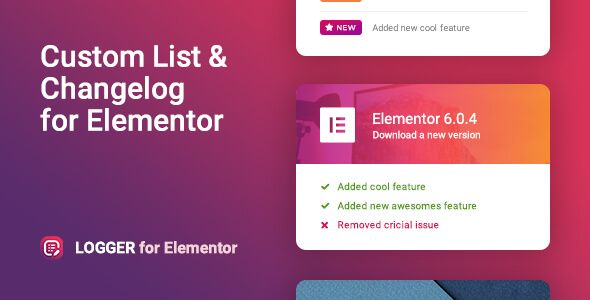
The primary function of Logger is to make changelog creation simple and intuitive. You can easily group updates under specific version numbers, making your release history clean and organized. The plugin comes with standard, color-coded labels that users immediately recognize: ‘New’ for features, ‘Fixed’ for bug fixes, and ‘Improved’ for enhancements.
This structured approach transforms a boring wall of text into a scannable, user-friendly update log. It helps build trust with your customers by transparently communicating the work you’re putting into your product. This clarity is essential for retaining users and managing expectations for your software, theme, or service.
Go Beyond Changelogs with a Versatile Custom List Builder
Logger’s true power lies in its flexibility. While it excels at creating version histories, its custom list functionality opens up a world of possibilities. You are not limited to the predefined labels or a changelog structure.
You can create an unlimited number of custom labels with unique text and colors. This allows you to build a wide variety of lists, such as:
- Product Roadmaps: Showcase upcoming features with labels like ‘Planned’, ‘In Progress’, and ‘Launched’.
- Feature Showcases: Detail the key benefits of your product using custom icon lists.
- Event Timelines: Display a schedule of events or company milestones in a vertical timeline format.
- Update Announcements: Announce recent news or updates in a visually appealing way.
Total Visual Control with Deep Customization
Every brand has a unique identity, and your lists should reflect that. Logger provides an extensive set of styling options directly within the Elementor editor, giving you complete control over the look and feel without touching a single line of code.
You can customize everything from the global font and colors to the specific styling of each element. Adjust the typography, change label colors, modify icon sizes, control spacing and padding, and even customize the vertical timeline bar. This deep level of customization ensures that your changelog or custom list will integrate seamlessly with your website’s design.
Who Is This Plugin For?
Logger is a versatile tool that provides immense value to a wide range of users. If you build, manage, or sell products, this plugin is for you.
Software Developers & SaaS Companies
Clearly communicate your development progress. Keep your users informed and engaged with professional release notes that build trust and reduce support tickets.
WordPress Theme & Plugin Authors
Showcase the continuous improvement of your WordPress products. A clean, public changelog is a powerful marketing tool that signals an active and well-maintained product.
Web Design Agencies & Freelancers
Deliver more value to your clients. Use Logger to create stylish feature lists, project timelines, or company histories that elevate a standard website into a professional-grade platform.
Anyone Needing Stylish, Organized Lists
If you need to present any kind of information in a structured, vertical list format, Logger is the perfect tool. It’s ideal for bloggers, marketers, and business owners who want to present information clearly and elegantly.
Get Premium Features Without the Premium Price Tag
Why pay high prices or commit to recurring subscriptions for a single-use license? Our version of Changelog & Custom List for Elementor – Logger gives you the complete, fully-featured plugin under the GPL, providing incredible value and freedom.
By choosing this version, you get the freedom to use a powerful, premium tool at a fraction of the cost. The code is 100% original and safe, allowing you to build with confidence. This is the smartest way to access premium functionality while keeping your project budgets lean and efficient.
Frequently Asked Questions (FAQ)
Is the Logger plugin compatible with the latest Elementor and WordPress versions?
Yes. We ensure that our plugins are regularly updated to maintain compatibility with the latest versions of WordPress, Elementor, and Elementor Pro. You can use Logger with confidence, knowing it will work seamlessly with your modern tech stack.
Can I customize the ‘New’, ‘Fixed’, and ‘Improved’ labels?
Absolutely. While Logger comes with these helpful presets, you have full freedom to edit them or create an unlimited number of your own custom labels. You can define the text and color for each label to perfectly match your content and brand identity.
Can I use this plugin to create a product roadmap instead of a changelog?
Yes! This is one of the most popular alternative uses for Logger. By creating custom labels like ‘Planned’, ‘In Progress’, and ‘Completed’, you can easily build a visually engaging product roadmap to share your future plans with your audience.
How do I receive updates for Changelog & Custom List for Elementor – Logger?
Once you download the plugin, you will receive any and all updates released for it. We provide access to the latest versions, ensuring you always have the newest features and security enhancements as they become available.
Is the code for this plugin safe to use on my website?
Yes, completely. The plugin files are 100% original, untouched, and sourced directly from the developer. They are free from any malware or malicious code. We simply redistribute the software under the GPL, giving you access to safe, authentic, and affordable premium tools.
Does this plugin work with the free version of Elementor?
Yes, Logger is a standalone Elementor addon and works perfectly with both the free version of Elementor and Elementor Pro. You do not need the Pro version to use this plugin and all its features.
Q: Do I need a license key?
A: No. All products are Pre-Activated. You can use 100% of the Premium features immediately.
Q: Can I use the One-Click Demo Import?
A: Yes, absolutely! We ensure the demo import feature works perfectly.
Q: Can I use the products on multiple websites?
A: Absolutely. The GPL license allows use on unlimited domains.
Q: Are the files safe?
A: Yes. All files are scanned by McAfee and VirusTotal before uploading.
Share Now!
Related Products






Related Products



Same Contributor



Featured Products


