
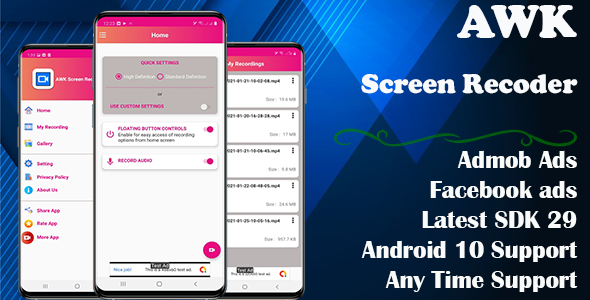
AWK Screen Recorder with Audio (Supported android 14 and SDK 34)

- Description
- Reviews
- FAQ
Launch Your Own High-Performance Screen Recording App
Are you looking to build and deploy a modern, reliable screen recording application for Android? The AWK Screen Recorder with Audio (Supported android 14 and SDK 34) provides the complete source code you need. It’s a powerful, ready-to-launch solution that eliminates months of development time and effort.
This app template solves a major problem for developers and entrepreneurs: creating a feature-rich screen capture tool that is fully compliant with the latest Android standards. It’s built for performance, monetization, and a seamless user experience, right out of the box.
With this code, you gain the freedom to create, customize, and publish your very own utility app on the Google Play Store, tapping into a massive market of users who need a high-quality recording tool.
Key Features at a Glance
This isn’t just a basic template. It’s a comprehensive package packed with the features users demand from a premium screen recorder.
- Android 14 & SDK 34 Ready: Guarantees full compatibility with the latest Android OS, ensuring your app meets Google Play’s modern requirements.
- Crystal-Clear Recording: Capture smooth, high-definition video with synchronized internal or microphone audio.
- Monetization Integrated: Comes pre-loaded with Google AdMob and Facebook Ads for immediate revenue generation.
- Intuitive Floating Controls: A non-intrusive floating bubble allows users to start, pause, and stop recordings without leaving their current app.
- Built-in Video Trimmer: Users can quickly edit and trim their recordings directly within the app, a highly sought-after feature.
- No Root Required: Works on all standard Android devices without needing risky root access, making it safe and accessible for everyone.
- Clean & Well-Documented Code: Built on a professional, well-organized codebase that makes customization and rebranding straightforward.
In-Depth Feature Analysis
Let’s dive deeper into the core components that make this source code a game-changer for any mobile developer.
Unmatched Android 14 & SDK 34 Support
Staying current with Google’s platform requirements is non-negotiable for success on the Play Store. This source code is built targeting SDK 34, the latest standard for Android 14. This isn’t just a number; it’s a critical advantage.
Compliance means your app benefits from enhanced security, improved performance, and access to modern APIs. It also ensures your app won’t be delisted or penalized for targeting outdated software, giving you a future-proof foundation.
Crystal-Clear Audio and Video Capture
The quality of the recording is everything. The AWK Screen Recorder delivers exceptional results with a robust set of user-configurable options. Your app’s users will have complete control over their output.
- Resolution Control: Allow users to choose from various resolutions, including Full HD (1080p), to balance quality and file size.
- Frame Rate & Bitrate Settings: Offer advanced controls for smooth motion capture, perfect for recording fast-paced mobile games or detailed tutorials.
- Dual Audio Sources: The app intelligently handles audio recording, allowing users to capture internal device audio (on supported versions) or use their microphone for commentary.
Monetization Ready with AdMob & Facebook Ads
A great app deserves a great revenue model. This source code comes with seamless integration for two of the largest ad networks: Google AdMob and Facebook Audience Network. This provides you with a powerful, flexible way to monetize your user base from day one.
The implementation is clean and professional, with support for banner, interstitial, and rewarded ads. You can easily switch between networks or use them together to maximize your ad fill rate and earnings potential. This turns your app from a project into a potential business.
Who is This App Source Code For?
The versatility of the AWK Screen Recorder source code makes it an ideal asset for a wide range of individuals and teams.
- Mobile App Developers: Skip the foundational work and jump straight to customization. This template saves you hundreds of hours of coding and debugging.
- Entrepreneurs & Startups: Enter the lucrative mobile app market with a proven, high-demand utility app. This is a cost-effective way to launch a product with a clear path to monetization.
- Content Creators & Gamers: Create a branded screen recording app for your community, offering them a tool to capture their own gameplay or creative content.
- Businesses & Educators: Develop an in-house app for creating training materials, product demonstrations, or technical support videos directly from a mobile device.
Why Choose This GPL Version? The Freedom to Build
When you acquire the AWK Screen Recorder with Audio (Supported android 14 and SDK 34) from us, you’re getting more than just the code. You’re getting the freedom and value that comes with the GPL license.
Unbeatable Cost-Effectiveness
Hiring a developer to build an app of this caliber from scratch would cost thousands of dollars. Our one-time purchase gives you the complete, professional codebase for a fraction of that price. There are no recurring fees or hidden costs.
The Power of Unlimited Use
Because the code is licensed under the GPL, you have the freedom to use it as you see fit. You can customize it, rebrand it, and even use it as a base for multiple different app projects. You are not locked into a restrictive license that limits your creativity or commercial potential.
Safe, Verified, and Transparent Code
We ensure that every product we offer is 100% original and free from any malicious code or backdoors. You can inspect every line of the source code yourself, giving you complete peace of mind that your app and your users’ data are secure.
Frequently Asked Questions (FAQ)
Is this AWK Screen Recorder source code compatible with the latest Android Studio?
Absolutely. The code is designed and maintained to work flawlessly with the latest stable versions of Android Studio, including Giraffe and subsequent releases. It utilizes modern Gradle configurations and project structures for a smooth development experience.
Does the app support internal audio recording on all Android versions?
This is a great question that touches on Android’s platform rules. Google officially enabled a standard API for internal audio capture starting with Android 10. This app correctly uses that API, so internal audio recording works perfectly on Android 10 and newer. For older versions, it defaults to microphone recording as per platform limitations.
Can I easily rebrand the app with my own logo, name, and color scheme?
Yes, the source code is intentionally structured to make rebranding simple. Key assets like logos, app icons, and color values are located in easily accessible resource files. The clean codebase and documentation make it straightforward to change the package name and publish the app under your own brand identity.
Will I receive future updates for this app source code?
We provide our customers with updates as we receive them from the original developer. When a new version is released to address new Android features or fix bugs, we make it available for you to download from your account, ensuring your project can stay current.
Is it safe and legal to use this GPL-licensed code to publish an app on the Google Play Store?
Yes, it is 100% safe and permitted. The General Public License (GPL) gives you the legal freedom to modify and distribute the software. The code we provide is original and clean. You can confidently build upon it, sign it with your own developer key, and publish it as your own application.
What kind of support is included with my purchase?
Your purchase includes our dedicated support for any issues related to downloading, accessing, or installing the source code files. While we do not provide developer-level support for custom modifications or coding questions, the included documentation and clean code make it accessible for anyone with basic Android development knowledge.
Q: Do I need a license key?
A: No. All products are Pre-Activated. You can use 100% of the Premium features immediately.
Q: Can I use the One-Click Demo Import?
A: Yes, absolutely! We ensure the demo import feature works perfectly.
Q: Can I use the products on multiple websites?
A: Absolutely. The GPL license allows use on unlimited domains.
Q: Are the files safe?
A: Yes. All files are scanned by McAfee and VirusTotal before uploading.
Share Now!
Related Products
 Women Lose Weight & Water Reminder – Android (Kotlin)$5.00
 DJ Music Mixer Studio | DJ Song Mixer | Android | Admob Ads$5.00
 ShapeShift Puzzle – Complete Unity Game$5.00
 Ionic React Tinder – ionic react dating app ui theme | Ionic 8.5 | Capacitor 7$5.00
 Word Search – Master Brain – Word Puzzle – Word Search Explorer – Word Connect – Word Finder App$5.00



Related Products
Same Contributor


Featured Products


