
Article Read Time & Progress Bar

- Description
- Reviews
- FAQ
In today’s fast-paced digital world, capturing and retaining user attention is paramount. The Article Read Time & Progress Bar is an essential WordPress plugin designed to elevate your content engagement and improve the overall user experience on your website. This powerful tool addresses a critical problem: visitors often abandon articles because they don’t know the time commitment involved. By clearly displaying the estimated reading time and providing a visual progress bar, you empower your readers, reduce bounce rates, and encourage deeper content consumption.
Our meticulously crafted plugin ensures your audience knows exactly what to expect, fostering a more transparent and enjoyable reading journey. It’s not just about showing a number; it’s about providing valuable engagement metrics that lead to better visitor retention. Enhance the readability of your blog posts, articles, and news content with this intuitive solution.
Unlock Superior Engagement with Core Features
The Article Read Time & Progress Bar comes packed with features designed to give you complete control and flexibility. From precise time calculations to stunning visual customization, every aspect is built to enhance your website’s interaction.
Here are the standout capabilities that make this plugin indispensable for any content-rich WordPress site:
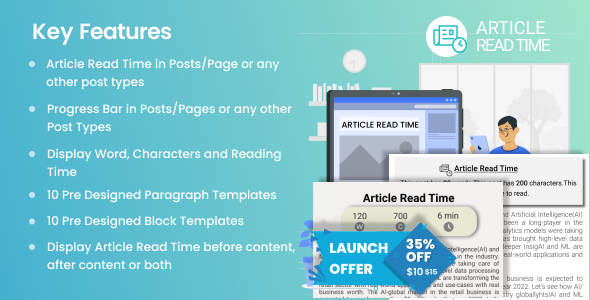
- Accurate Reading Time Calculation: Dynamically estimates article read time based on custom words per minute settings.
- Highly Customizable Progress Bar: Tailor the progress indicator’s color, height, position, and animation to match your brand.
- Flexible Display Options: Show estimated read time and progress bar on posts, pages, custom post types, or specific categories.
- Performance Optimized: Lightweight code ensures your site speed remains unaffected, providing a smooth user experience.
- Full Translation Ready: Easily translate the plugin into any language, reaching a global audience.
- Intuitive Admin Panel: Configure all settings effortlessly through a user-friendly WordPress dashboard interface.
- Gutenberg Block & Shortcode Support: Integrate estimated reading time and progress display seamlessly into your content.
In-Depth Feature Analysis
Let’s dive deeper into the key functionalities that make the Article Read Time & Progress Bar a must-have for content creators and publishers.
Precise Reading Time Calculation & Display
Understanding how long an article takes to read is crucial for managing reader expectations. This plugin offers an intelligent system to calculate and display the estimated reading time for all your content. You can set a custom words-per-minute (WPM) value, ensuring the calculation reflects your audience’s typical reading speed.
The system considers all visible text content, ignoring shortcodes and other non-readable elements, to provide an accurate estimate. This feature significantly improves user experience, allowing visitors to quickly gauge their commitment before diving into a long-form article. It’s a simple yet powerful way to enhance content consumption metrics.
Fully Customizable & Dynamic Progress Bar
A visual scroll progress bar is a subtle yet effective way to keep readers engaged and informed about their position within an article. Our plugin provides an elegant, dynamic progress bar that can be extensively customized to perfectly fit your website’s design. You have complete control over its appearance.
Choose from a wide range of colors, adjust the height and thickness, and decide on its position (top, bottom, or custom CSS). The progress bar animates smoothly as the user scrolls, offering a visual cue that encourages them to continue reading until the end. This visual feedback dramatically reduces bounce rate and improves visitor retention on your most valuable content.
Flexible Display & Control Options
Every website has unique content strategies, and the Article Read Time & Progress Bar respects that. The plugin offers unparalleled flexibility in where and how the reading time and progress bar are displayed. You can choose to enable it globally across all posts, pages, or specific custom post types.
Need more granular control? Easily exclude specific posts, pages, or even entire categories. Furthermore, dedicated Gutenberg blocks and shortcodes allow you to insert the estimated reading time directly into your content, offering precise placement. This adaptability ensures seamless integration without compromising your content strategy.
Who Benefits from Article Read Time & Progress Bar?
This powerful WordPress plugin is designed for a broad spectrum of users who prioritize user engagement and content performance. If you publish content online, this tool is for you.
- Bloggers & Content Creators: Enhance the reading experience for your audience, leading to longer visits and more loyal readers.
- News & Magazine Websites: Provide essential context for your articles, helping readers navigate your extensive content library efficiently.
- Educational Platforms: Clearly indicate the length of lessons or study materials, aiding students in managing their learning time.
- Digital Marketers: Improve engagement metrics, which can positively impact SEO and user behavior signals.
- Publishers & Authors: Offer a professional touch to your online publications, making your content more accessible and appealing.
- E-commerce Stores with Blogs: Keep potential customers engaged with valuable content, guiding them through your sales funnel.
Why Choose This Version of Article Read Time & Progress Bar?
When selecting a plugin for your WordPress site, you want a solution that offers both powerful features and peace of mind. Our GPL version of the Article Read Time & Progress Bar provides significant advantages that make it the smartest choice for your website.
You gain the ultimate freedom to use this premium plugin on an unlimited number of websites without any recurring subscription fees. This cost-effective approach means you pay once and own the software, allowing you to deploy it across all your projects, clients’ sites, or personal blogs without additional expenses. It’s a truly budget-friendly solution for professional web development.
Furthermore, GPL software embodies transparency and security. You receive the original, untampered code, free from malicious scripts or hidden backdoors. This ensures your website remains safe and performs optimally. With GPL, you are investing in reliable, high-quality code that you can trust, backed by a community-driven philosophy of open access and user freedom.
Frequently Asked Questions
Here are some common questions about the Article Read Time & Progress Bar and how it works.
How does the Article Read Time & Progress Bar calculate reading time?
The plugin calculates the estimated reading time by counting the words in your content and dividing them by a user-defined average words-per-minute (WPM) setting. You can adjust the WPM in the plugin settings to match your audience’s typical reading speed. It smartly excludes shortcodes and other non-text elements to ensure accuracy.
Can I customize the appearance of the progress bar?
Absolutely! The Article Read Time & Progress Bar offers extensive customization options for the progress bar. You can easily change its color, height, position (top, bottom, or custom), and even the animation style through the intuitive admin panel. This flexibility ensures it seamlessly integrates with your website’s existing design and branding.
Is the plugin compatible with my WordPress theme and page builder?
Yes, the plugin is developed with broad compatibility in mind. It adheres to WordPress best practices, making it compatible with most standard WordPress themes. It also works well with popular page builders like Elementor, Beaver Builder, and Gutenberg, offering shortcode and block support for easy integration into your content layouts.
Does Article Read Time & Progress Bar support custom post types?
Indeed. The plugin is designed to be highly flexible. You can enable or disable the estimated reading time and progress bar for various content types, including standard posts, pages, and any custom post types you have registered on your WordPress site. This ensures comprehensive coverage for all your valuable content.
Will this plugin affect my website’s loading speed or performance?
No, the Article Read Time & Progress Bar is built to be extremely lightweight and performance-optimized. It uses efficient code and minimal resources, ensuring that it has virtually no impact on your website’s loading speed. We prioritize fast performance to maintain an excellent user experience on your site.
How do I get updates for this GPL version of Article Read Time & Progress Bar?
For GPL versions, updates are typically provided through the platform where you acquired the plugin. You will receive access to the latest plugin files as they are released. Simply download the updated version and install it on your site, often overriding the previous version, to benefit from new features and bug fixes.
Can I use Article Read Time & Progress Bar on multiple websites?
Yes, one of the primary benefits of the GPL license is the freedom to use the software on an unlimited number of websites. You can install the Article Read Time & Progress Bar on all your personal sites, client projects, and development environments without purchasing additional licenses.
Is it safe to use a GPL version of Article Read Time & Progress Bar?
Absolutely. Using a GPL version of the plugin is completely safe. The GPL license guarantees you receive the original, unaltered code, ensuring it’s free from malware or unauthorized modifications. It means you’re getting the same high-quality, secure software as any other license, with the added benefit of freedom and flexibility.
Q: Do I need a license key?
A: No. All products are Pre-Activated. You can use 100% of the Premium features immediately.
Q: Can I use the One-Click Demo Import?
A: Yes, absolutely! We ensure the demo import feature works perfectly.
Q: Can I use the products on multiple websites?
A: Absolutely. The GPL license allows use on unlimited domains.
Q: Are the files safe?
A: Yes. All files are scanned by McAfee and VirusTotal before uploading.
Share Now!
Related Products



Related Products


Same Contributor



Featured Products


