
Appender – Copycat Content Protection for WordPress
- Description
- Reviews
- FAQ
Stop Plagiarism with Appender – Copycat Content Protection for WordPress
Content theft is a silent killer for your website’s SEO rankings. When scrapers or competitors copy your hard work, search engines might get confused about the original source. Appender – Copycat Content Protection for WordPress is the ultimate solution to protect your intellectual property and reclaim your traffic.
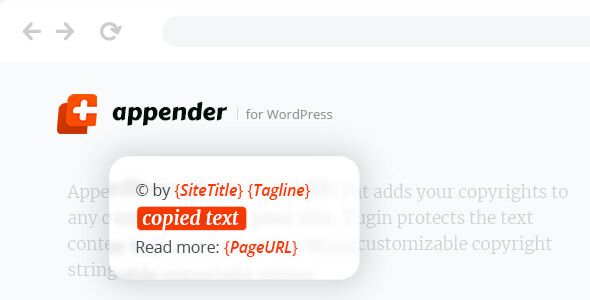
This powerful plugin ensures that whenever someone copies text from your site, a customizable attribution link is automatically appended. It transforms potential theft into a high-quality backlink opportunity. By using Appender – Copycat Content Protection for WordPress, you maintain your authority while discouraging lazy content curators from stealing your articles.
Whether you want to block right-clicks entirely or simply ensure you get credit, this tool gives you total control. It is lightweight, developer-friendly, and designed to work seamlessly with any theme. Protect your brand and your search engine positions with a professional content protection strategy.
Key Features of Appender – Copycat Content Protection for WordPress
- Automatic Source Attribution: Automatically adds a “Read More” or “Source” link to any text copied from your website.
- Customizable Text Injection: You can fully customize the message that appears when users paste your content elsewhere.
- Right-Click Protection: Optionally disable the right-click context menu to prevent easy image and text saving.
- Selection Control: Prevent users from highlighting or selecting text on specific pages or your entire site.
- Dynamic Placeholders: Use tags like %page_title%, %page_url%, and %site_name% to create personalized attribution links.
- Exclusion Rules: Choose specific pages, posts, or categories where you want to disable protection.
- Lightweight Code: Built for performance, ensuring that your page load speeds remain lightning-fast.
1. Intelligent Source Link Injection
The primary strength of Appender – Copycat Content Protection for WordPress is its ability to follow your content across the web. When a user copies a paragraph, the plugin silently attaches a link back to your original post. This is crucial for SEO because it signals to search engines that your site is the primary authority.
You can customize exactly how this link looks. For example, you can add a copyright notice, the author’s name, or a direct call to action. This ensures that even if your content is stolen, you still get the branding and traffic benefits you deserve.
This feature works instantly without requiring any complex setup. It is a set-it-and-forget-it tool that builds your backlink profile naturally over time. Most scrapers won’t even notice the link is there until they paste it into their own editor.
2. Advanced Right-Click and Text Selection Blocking
Sometimes, simple attribution isn’t enough to stop determined content thieves. Appender – Copycat Content Protection for WordPress allows you to disable the right-click functionality entirely. This prevents users from accessing the “Copy” command or saving your custom images.
Additionally, you can disable text selection across your entire site. This makes it significantly harder for manual “copy-pasters” to take your research and data. It adds a layer of friction that discourages casual theft while keeping your UI clean.
These features are highly flexible and can be toggled on or off depending on your needs. You can protect your most valuable long-form guides while leaving your contact page accessible. This balance between security and user experience is what makes the plugin so effective.
3. Seamless Integration and Performance Optimization
Many security plugins are bloated and slow down your WordPress dashboard. Appender – Copycat Content Protection for WordPress is built with a “performance-first” mindset. It uses clean JavaScript and PHP to ensure zero impact on your Core Web Vitals.
The plugin is fully compatible with popular page builders like Elementor, Divi, and Beaver Builder. It works perfectly with the Gutenberg block editor and classic editor alike. You don’t have to worry about breaking your site layout or styling when you activate protection.
Furthermore, because this is the GPL version, you have the freedom to audit the code. There are no hidden tracking scripts or unnecessary external calls. You get a lean, mean, content-protecting machine that respects your server resources.
Who Should Use Appender – Copycat Content Protection?
This plugin is an essential tool for any website owner who produces original content. If you spend hours researching and writing, you cannot afford to let others profit from your work. It is particularly valuable for the following niches:
- Professional Bloggers: Protect your unique voice and prevent scrapers from outranking you with your own content.
- News and Media Outlets: Ensure that your breaking news reports always link back to your official source.
- Documentation Sites: Keep your technical guides and manuals secure from competitors looking to copy your instructions.
- E-commerce Stores: Prevent competitors from stealing your unique product descriptions and marketing copy.
- Freelance Writers: Showcase your portfolio safely without worrying about potential clients copying your work without payment.
Why Download the GPL Version of Appender?
Choosing the GPL version of Appender – Copycat Content Protection for WordPress offers incredible value without compromising on quality. The General Public License ensures that you have the freedom to use the software on as many sites as you want. There are no restrictive license keys or annual “seats” to worry about.
This version provides you with the full feature set at a fraction of the cost. You get safe, clean code that has been vetted for security. It is the perfect choice for agencies and freelancers who manage multiple client websites and need a cost-effective solution.
By using the GPL version, you are embracing the open-source spirit of WordPress. You get the same powerful functionality and SEO benefits while maintaining complete control over your budget. It’s the smartest way to scale your web business without recurring overhead.
Frequently Asked Questions
Does Appender – Copycat Content Protection for WordPress affect my SEO?
Yes, but in a positive way. By adding source links to copied text, it helps search engines identify you as the original creator. This prevents duplicate content issues from hurting your rankings.
Can I customize the attribution link for different categories?
Currently, the plugin provides global settings for your attribution links. However, you can use dynamic placeholders to ensure the link always points to the specific URL of the copied content.
Is this plugin compatible with the latest version of WordPress?
Absolutely. Appender – Copycat Content Protection for WordPress is regularly updated to ensure full compatibility with the latest WordPress core releases and PHP versions.
Will this plugin block Google from indexing my site?
No, the protection features are designed to target human users and basic scrapers. Search engine bots like Googlebot can still crawl and index your content normally for ranking purposes.
Does it work on mobile devices?
Yes, the text selection and copy protection features are responsive. They work across desktops, tablets, and smartphones to ensure your content is protected everywhere.
Can I disable protection for logged-in administrators?
Yes, you can configure the plugin so that administrators and editors can still copy and paste freely. This ensures your team can manage the site without any restrictions while visitors are blocked.
Are there any hidden subscription fees?
No. When you get the GPL version of Appender – Copycat Content Protection for WordPress, you pay once and enjoy the freedom to use it forever on your projects.
Q: Do I need a license key?
A: No. All products are Pre-Activated. You can use 100% of the Premium features immediately.
Q: Can I use the One-Click Demo Import?
A: Yes, absolutely! We ensure the demo import feature works perfectly.
Q: Can I use the products on multiple websites?
A: Absolutely. The GPL license allows use on unlimited domains.
Q: Are the files safe?
A: Yes. All files are scanned by McAfee and VirusTotal before uploading.
Share Now!
Related Products




Related Products



Same Contributor



Featured Products


