
360° Panoramic Image Viewer – WordPress Plugin

- Description
- Reviews
- FAQ
Elevate Your Website with the 360° Panoramic Image Viewer – WordPress Plugin
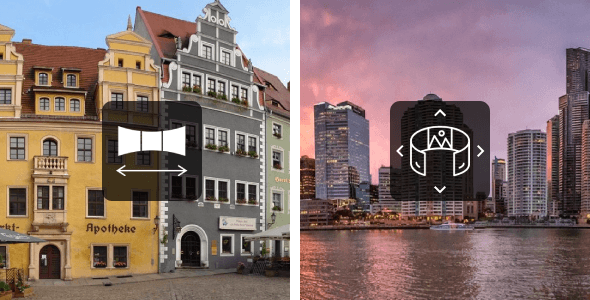
In today’s visually-driven digital landscape, static images often fall short. Your audience craves engagement, immersion, and a dynamic experience. The 360° Panoramic Image Viewer – WordPress Plugin is engineered to meet this demand, transforming ordinary flat images into captivating, interactive panoramas directly on your WordPress website. This powerful tool solves the common problem of stale visual content, allowing you to create virtual tours, showcase products from every angle, or simply provide a breathtaking immersive experience.
Imagine giving your website visitors the power to explore a property, examine a product, or dive into a travel destination with a simple drag of their mouse or touch of their screen. This robust WordPress panoramic viewer makes it incredibly easy. It’s designed for seamless integration, offering a responsive design that looks flawless on any device. Enhance user engagement and keep visitors on your pages longer with this innovative WordPress plugin.
Key Features: Transform Your Visual Content
The 360° Panoramic Image Viewer – WordPress Plugin comes packed with functionalities to bring your visuals to life. Here are some of its standout capabilities:
- Fully Responsive Design: Ensures your panoramic images look stunning and function perfectly on desktops, tablets, and mobile devices.
- Intuitive Shortcode Generator: Effortlessly embed panoramas anywhere on your site without needing to write a single line of code.
- Interactive Hotspots: Add clickable points within your panoramas to provide additional information, link to other pages, or create guided virtual tours.
- Customizable Controls: Empower users with options for zoom, pan, auto-rotate, and full-screen mode, all fully configurable to match your site’s aesthetic.
- High-Performance Image Handling: Optimized to display high-resolution panoramic images quickly and smoothly, ensuring a superior user experience.
- Cross-Browser Compatibility: Works flawlessly across all major web browsers, guaranteeing a consistent experience for every visitor.
- Gutenberg Block & Page Builder Integration: Easily add and manage your 360° content using the native WordPress block editor or your favorite page builder.
In-Depth Feature Analysis: Dive Deeper into Immersion
Unleash Interactivity with Dynamic Hotspots
Beyond simply viewing, the 360° Panoramic Image Viewer – WordPress Plugin empowers you to create truly interactive narratives. Its powerful hotspot feature allows you to place clickable markers at specific points within your panoramic images. These hotspots can reveal textual information, display pop-up images, or even link to external URLs or other pages on your site. This functionality is invaluable for virtual tours, allowing users to navigate between different rooms, explore product features in detail, or access supplementary content.
Imagine a virtual open house where users can click on a furniture piece to learn its brand, or a travel panorama where clicking on a landmark reveals its history. The possibilities for enhancing user engagement are limitless. Hotspots transform passive viewing into an active exploration, significantly increasing the time visitors spend interacting with your content. They are easy to set up through the plugin’s intuitive interface.
Seamless Responsiveness for Every Device
A truly world-class web experience demands responsiveness. The 360° Panoramic Image Viewer – WordPress Plugin is built from the ground up with a mobile-first approach. Your immersive panoramic images will automatically adapt to fit any screen size, from large desktop monitors to the smallest smartphone screens. This means your visitors will enjoy a smooth, uncompromised viewing experience regardless of the device they use.
Touch gestures are fully supported, allowing users to pan and zoom with natural finger movements on their tablets and phones. This dedication to responsive design ensures maximum accessibility and a consistent, high-quality experience for your entire audience. You never have to worry about your stunning panoramas breaking or looking distorted on different devices. This commitment to responsiveness is key for modern SEO and user satisfaction.
Effortless Content Creation with Shortcode & Block Integration
Creating and embedding your 360° panoramic images has never been easier. The plugin offers a user-friendly shortcode generator, allowing you to configure your panorama settings and instantly get a shortcode to paste anywhere on your site – posts, pages, or even custom post types. For those who prefer a more visual approach, the 360° Panoramic Image Viewer – WordPress Plugin also integrates seamlessly with the Gutenberg block editor.
Simply add a dedicated panorama block, upload your image, and customize its settings directly within the editor. This flexibility extends to popular page builders like Elementor, Beaver Builder, and Divi, thanks to the robust shortcode functionality. You can drag and drop a shortcode module into your page builder layout and paste your generated shortcode. This ensures that users of all technical skill levels can implement stunning panoramic content without hassle.
Who Can Benefit from the 360° Panoramic Image Viewer – WordPress Plugin?
This versatile WordPress plugin is a game-changer for a wide array of individuals and businesses looking to captivate their audience:
- Real Estate Agents: Offer immersive virtual property tours that distinguish your listings and attract more qualified buyers.
- E-commerce Stores: Provide 360-degree product views, allowing customers to inspect items from every angle and boost purchasing confidence.
- Photographers & Artists: Showcase your landscape, interior, or architectural photography in a truly engaging and interactive format.
- Travel Bloggers & Tourism Agencies: Transport your audience to exotic destinations with virtual tours and breathtaking panoramic views, inspiring their next adventure.
- Museums & Art Galleries: Create virtual exhibits, allowing visitors to explore collections and spaces remotely, enhancing accessibility.
- Architects & Interior Designers: Present project walkthroughs and design concepts in an interactive, compelling manner that clients will love.
- Web Developers & Agencies: Deliver exceptional value to clients by integrating cutting-edge interactive visuals, expanding your service offerings.
- Bloggers & Content Creators: Elevate your articles and stories with dynamic visual content, keeping readers engaged and on your page longer.
Why Choose This 360° Panoramic Image Viewer – WordPress Plugin (GPL Licensed)?
While many premium plugins offer similar features, our 360° Panoramic Image Viewer – WordPress Plugin stands out due to its incredible value proposition, rooted in the General Public License (GPL). You gain unparalleled freedom and significant cost savings without compromising on quality or features.
Unlike proprietary plugins that often come with restrictive licenses, recurring fees, and limitations on website usage, this GPL-licensed version offers:
- One-Time Payment, Lifetime Value: Pay once and use the plugin forever. No annual subscriptions, no recurring costs.
- Unlimited Website Installations: Install the plugin on as many WordPress websites as you own or manage. Perfect for agencies and freelancers with multiple client projects.
- Freedom to Customize: The GPL license gives you the liberty to modify the plugin’s code to suit your specific needs or integrate it deeper with your existing solutions.
- Access to Future Updates: Stay current with the latest features, performance improvements, and security enhancements without additional charges.
- Safe and Secure Code: Benefit from transparent, open-source code that is scrutinized by a global community, ensuring high standards of security and reliability.
- Cost-Effective for All: Achieve premium functionality and peace of mind at a fraction of the cost of restrictive commercial licenses.
Choose the smart, flexible, and powerful solution for your interactive image needs. Experience the difference that true freedom and value can make for your WordPress projects.
Frequently Asked Questions (FAQ)
How do I install the 360° Panoramic Image Viewer – WordPress Plugin?
Installation is straightforward. After downloading the plugin, log into your WordPress admin dashboard. Navigate to ‘Plugins’ > ‘Add New’ > ‘Upload Plugin’. Choose the downloaded .zip file and click ‘Install Now’. Once installed, click ‘Activate Plugin’, and you’ll find a new menu item to start configuring your panoramic images.
Does the 360° Panoramic Image Viewer – WordPress Plugin work with the latest version of WordPress?
Yes, this plugin is regularly tested and maintained to ensure full compatibility with the latest versions of WordPress. We prioritize keeping the plugin up-to-date, ensuring smooth operation and access to all new WordPress features.
Is the plugin compatible with popular page builders like Elementor, Divi, or Beaver Builder?
Absolutely. The 360° Panoramic Image Viewer – WordPress Plugin generates shortcodes for embedding your panoramas. You can easily paste these shortcodes into any text editor or shortcode module provided by Elementor, Divi, Beaver Builder, or any other popular page builder. This ensures seamless integration into your existing design workflows.
Will I receive future updates for the 360° Panoramic Image Viewer?
Yes, when you acquire this GPL-licensed plugin, you gain access to all future updates. These updates include new features, performance enhancements, security patches, and compatibility improvements, ensuring your plugin remains powerful and current.
Can I use the 360° Panoramic Image Viewer for commercial projects?
Yes, under the GPL license, you have the full freedom to use this plugin for both personal and commercial projects. There are no restrictions on how you can utilize it for client work, e-commerce stores, or any other commercial venture.
Does this plugin support mobile devices and touch gestures?
Yes, the 360° Panoramic Image Viewer – WordPress Plugin is fully responsive. It is designed to work flawlessly on all mobile devices, including smartphones and tablets. Users can navigate and interact with your panoramic images using intuitive touch gestures like swiping and pinching.
What kind of image formats does the 360° Panoramic Image Viewer support?
The plugin primarily supports standard image formats like JPEG and PNG, which are widely used for panoramic photography. For best performance and quality, we recommend using high-resolution JPEG images optimized for web use.
How does the hotspot feature work, and can I link them to other pages?
The hotspot feature allows you to define specific interactive points within your panorama. Through the plugin’s interface, you can easily add, position, and customize these hotspots. Yes, each hotspot can be configured to open a pop-up with text or an image, or to link to any URL, including other pages on your website or external sites, making it perfect for creating interactive tours.
Is there a limit to how many panoramic images I can display on my site?
No, there is no inherent limit imposed by the 360° Panoramic Image Viewer – WordPress Plugin itself. You can create and display as many panoramic images as your website’s server resources and database can efficiently handle. We recommend optimizing your images for web performance to ensure a smooth experience with a large number of panoramas.
Q: Do I need a license key?
A: No. All products are Pre-Activated. You can use 100% of the Premium features immediately.
Q: Can I use the One-Click Demo Import?
A: Yes, absolutely! We ensure the demo import feature works perfectly.
Q: Can I use the products on multiple websites?
A: Absolutely. The GPL license allows use on unlimited domains.
Q: Are the files safe?
A: Yes. All files are scanned by McAfee and VirusTotal before uploading.
Share Now!
Related Products




Related Products

Same Contributor



Featured Products


