
2FA Authenticator Plugin for Rise CRM – Compatible with Google, Microsoft, Authy & More

- Description
- Reviews
- FAQ
Fortify Your Rise CRM with Unbreakable Two-Factor Authentication
In today’s digital landscape, a simple password is no longer enough to protect your sensitive business data. The 2FA Authenticator Plugin for Rise CRM – Compatible with Google, Microsoft, Authy & More is your essential security upgrade. It adds a critical layer of protection to your login process, safeguarding your projects, client information, and internal communications from unauthorized access.
This powerful plugin seamlessly integrates with your Rise CRM installation, making it incredibly easy to implement multi-factor authentication (MFA). Stop worrying about weak passwords or brute-force attacks. Take control of your CRM’s security today.
Core Features at a Glance
- Universal Authenticator Support: Works flawlessly with all major TOTP (Time-based One-Time Password) apps, including Google Authenticator, Microsoft Authenticator, Authy, and more.
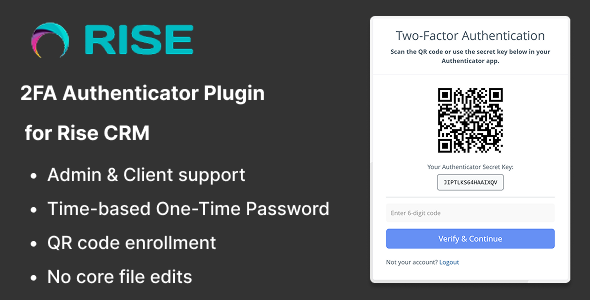
- Effortless QR Code Setup: Users can enable 2FA in seconds by simply scanning a QR code with their preferred authenticator app.
- Role-Based Enforcement: As an admin, you can selectively enforce 2FA for specific user roles. Secure your team members’ accounts while providing flexibility for client access.
- Emergency Backup Codes: Generates a set of one-time backup codes for each user, ensuring they can always access their account even if they lose their device.
- Trusted Device Option: Users can choose to “remember” a device for a set period, streamlining logins on trusted computers without compromising security.
- Lightweight & Secure Code: Built with performance in mind, this plugin adds robust security without slowing down your Rise CRM instance.
- GPL Freedom & Value: Enjoy the full power of this premium security plugin at a fraction of the cost, with the freedom to use it as you see fit.
A Deeper Look into Key Security Features
Understanding how this plugin protects you is key. Let’s explore the three most impactful features that make it an indispensable tool for any serious Rise CRM user.
Universal Compatibility with Your Favorite Authenticator App
Flexibility is paramount when it comes to security tools. We understand that your team members may already have a preferred authenticator app they use and trust. That’s why this plugin was built on the open TOTP standard.
This means you are not locked into a single ecosystem. Whether your team uses Google Authenticator, Microsoft Authenticator, Authy, 2FAS, or any other standard-compliant app, the integration is seamless. This universal compatibility ensures a smooth rollout and high adoption rates among your users.
Granular Control with Role-Based Enforcement
Not every user in your CRM requires the same level of security. This plugin gives you the granular control you need. From the settings panel, you can easily mandate 2FA for specific roles.
For example, you can require all ‘Staff’ or ‘Admin’ accounts to use two-factor authentication to protect your core business data. At the same time, you can leave it as an optional feature for ‘Client’ accounts, providing them with a frictionless login experience. This targeted approach allows you to implement maximum security where it matters most.
User-Friendly Onboarding and Failsafes
A security feature is only effective if people use it. The onboarding process is designed to be incredibly simple. Users are guided through a quick setup process involving scanning a QR code, which instantly links their account to their authenticator app.
Furthermore, we’ve built in a crucial failsafe: backup codes. Upon enabling 2FA, each user receives a set of single-use recovery codes. If they ever lose or break their phone, they can use one of these codes to log in and re-establish their 2FA connection, preventing lockouts and support headaches.
Who Needs This 2FA Plugin for Rise CRM?
This plugin is a non-negotiable security layer for any individual or organization that relies on Rise CRM to manage their business operations.
- Agencies & Consultancies: Protect your clients’ sensitive project data, communications, and invoices from unauthorized access. Build trust by demonstrating a commitment to robust security.
- Small and Medium-Sized Businesses (SMBs): Secure your internal team accounts, financial records, and operational data stored within your CRM. Prevent costly data breaches caused by compromised employee passwords.
- Freelancers & Solopreneurs: Your Rise CRM is your business’s central nervous system. A single security breach could be devastating. This plugin is an affordable, one-time investment to secure your livelihood.
- Teams with Remote Workers: When your team accesses the CRM from various locations and networks, the risk of a breach increases. 2FA ensures that only authorized users with their registered device can log in, regardless of their location.
Why Choose This Version? The Smart & Affordable Choice
You have choices when it comes to acquiring plugins. So why is this the best option for you? It comes down to two things: value and freedom.
This 2FA Authenticator Plugin for Rise CRM is distributed under the GNU General Public License (GPL). This means you get the exact same powerful, secure code as the original, but without the hefty price tag or restrictive licensing. It’s the smarter way to build and secure your business tools.
- Incredible Savings: Get access to premium security features for a single, low price. No recurring subscriptions or per-site license fees.
- Freedom to Use: Use the plugin on any and all of your Rise CRM installations. Perfect for developers and agencies managing multiple client sites.
- Safe, Verified Code: We provide you with the original, untouched code. You can be confident you are installing a secure and reliable plugin.
Frequently Asked Questions (FAQ)
Is this 2FA Authenticator plugin compatible with the latest version of Rise CRM?
Absolutely. We ensure our plugins are tested with the latest stable releases of Rise CRM. You can install it with confidence, knowing it will integrate smoothly with your current setup.
What happens if a user loses their phone and can’t generate a code?
This is exactly why the backup code feature is so important. When a user first sets up 2FA, they are given a list of one-time-use backup codes. They can use one of these codes in place of the authenticator app code to gain access to their account and set up a new device.
Can I force 2FA for my staff but make it optional for my clients?
Yes, you can. The plugin includes a powerful role-based enforcement feature. From the admin settings, you can select which user roles are required to have 2FA enabled, giving you precise control over your security policy.
How do I receive updates for the plugin?
Once you purchase, you gain access to our repository for 12 months, where you can download updates as they become available. This ensures your plugin remains compatible with future Rise CRM versions and receives any feature enhancements.
Will installing this plugin slow down my Rise CRM site?
Not at all. The plugin is built to be extremely lightweight and efficient. It only runs during the login process and has a negligible impact on your CRM’s overall performance. Security shouldn’t come at the cost of speed.
Is the code in this GPL plugin safe and original?
Yes, 100%. We provide the exact same code that is distributed by the original developer. The plugin is open-source under the GPL, which gives you the freedom to inspect the code yourself. It is free from any malware or modifications.
Why is this so much more affordable than buying from the developer directly?
Our business model is different. By providing software under the GPL, we don’t have to factor in the costs of ongoing, intensive technical support for every purchase. This allows us to pass the significant savings directly to you, providing access to premium tools for a fair, one-time price.
Q: Do I need a license key?
A: No. All products are Pre-Activated. You can use 100% of the Premium features immediately.
Q: Can I use the One-Click Demo Import?
A: Yes, absolutely! We ensure the demo import feature works perfectly.
Q: Can I use the products on multiple websites?
A: Absolutely. The GPL license allows use on unlimited domains.
Q: Are the files safe?
A: Yes. All files are scanned by McAfee and VirusTotal before uploading.
Share Now!
Related Products



Related Products


Same Contributor


Featured Products


