
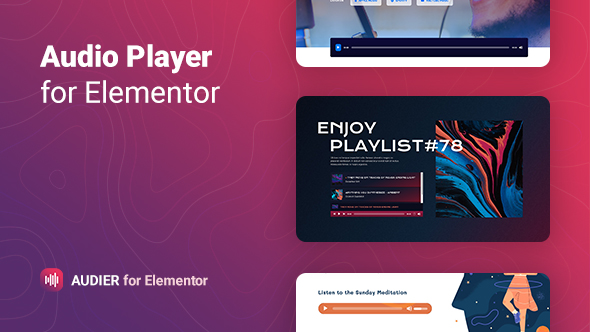
Audier – Audio Player with Controls Builder for Elementor

- Description
- Reviews
- FAQ
Unleash Superior Audio Experiences with Audier – Audio Player with Controls Builder for Elementor
Are you struggling with generic, uninspiring audio players on your WordPress website? Do you wish for complete control over the design and functionality of your embedded audio content? Your search ends here.
Introducing **Audier – Audio Player with Controls Builder for Elementor**, the ultimate solution for anyone looking to integrate beautiful, fully customizable audio experiences into their Elementor-powered sites. This powerful plugin transforms how you present podcasts, music tracks, audiobooks, and more.
Say goodbye to rigid player designs and limited features. Audier empowers you to build stunning, responsive audio players that perfectly match your brand’s aesthetic and provide an exceptional user experience.
Why Audier is Your Go-To Audio Player for Elementor
Audier stands out by offering unparalleled flexibility and a truly intuitive design process. It’s not just an audio player; it’s a complete control builder within Elementor.
This means you can visually craft every element of your player. From play/pause buttons to progress bars and volume controls, everything is at your fingertips. Discover the power of a custom audio solution.
Key Features That Set Audier Apart:
- Elementor Controls Builder: Visually design every aspect of your audio player with a drag-and-drop interface. No coding required for stunning results.
- Fully Responsive Design: Ensure your audio player looks and functions flawlessly on any device, from desktops to mobile phones. Reach every listener effectively.
- Playlist Management: Create and manage dynamic playlists to keep your audience engaged with continuous audio content. Perfect for podcasts and music albums.
- Customizable UI/UX: Tailor colors, fonts, icons, and layouts to perfectly match your brand’s identity. Reflect your unique style.
- Track Metadata Display: Show track titles, artist names, album art, and other relevant information clearly. Enhance listener engagement.
- Multiple Audio Sources: Supports various audio formats and sources, including self-hosted files and external URLs. Flexibility for all your audio needs.
- Continuous Playback: Maintain audio playback even as users navigate through different pages on your website. Provides a seamless listening experience.
In-Depth Feature Spotlight: Crafting Your Perfect Audio Experience
Let’s dive deeper into the core functionalities that make Audier – Audio Player with Controls Builder for Elementor an indispensable tool for web creators.
Elementor Controls Builder: True Drag-and-Drop Customization
The heart of Audier lies in its innovative Elementor Controls Builder. This feature revolutionizes how you design audio players. Forget about predetermined templates or basic styling options.
With Audier, you gain granular control over every single component of your audio player. You can drag and drop individual controls like play buttons, progress bars, volume sliders, and time displays directly onto your Elementor canvas.
This visual approach allows for limitless design possibilities. Position elements exactly where you want them, resize them, and apply unique styling to each part. Build a player that is truly one-of-a-kind and perfectly integrated into your website’s design.
Advanced Playlist Management for Engaging Content Delivery
For podcasters, musicians, and content creators with multiple audio files, efficient playlist management is crucial. Audier provides robust tools to organize and present your audio collections.
Easily create multi-track playlists, arrange tracks in any order, and even enable shuffle or repeat options. This keeps your audience listening longer and provides a structured way to consume your audio content.
Display track information, add album art for each item, and give users intuitive navigation through your entire audio library. This feature significantly enhances the user experience for any music or podcast website.
Fully Responsive Design & Seamless User Experience
In today’s mobile-first world, ensuring your website content looks great on all devices is non-negotiable. Audier – Audio Player with Controls Builder for Elementor is built from the ground up with responsiveness in mind.
Your custom-designed audio players will automatically adapt to different screen sizes, delivering an optimal listening experience on desktops, tablets, and smartphones. This prevents frustrating visual glitches or unresponsive controls.
Beyond responsiveness, Audier prioritizes a seamless user experience. Features like continuous playback ensure that audio doesn’t cut out when users navigate to a new page, keeping them immersed in your content. This attention to detail significantly boosts user satisfaction.
Who Can Benefit from Audier – Audio Player with Controls Builder for Elementor?
Audier is a versatile tool designed for a wide range of users and website types. Its flexibility makes it ideal for various digital projects.
- Podcasters & Broadcasters: Present your episodes with a sleek, branded player that offers easy navigation and episode information. Enhance your podcast’s professional appeal.
- Musicians & Bands: Showcase your tracks, albums, and entire discographies with customizable players on your artist portfolio site. Engage your fans visually and audibly.
- Audiobook Publishers: Offer a user-friendly experience for listeners with intuitive controls and clear progress indicators. Make consuming audiobooks a pleasure.
- Educators & Course Creators: Embed lectures, lessons, or guided meditations with a player that seamlessly integrates into your online courses. Provide accessible learning.
- Web Designers & Agencies: Deliver bespoke audio solutions for clients using Elementor, saving development time and impressing with custom designs. Expand your service offerings.
- Freelancers & Bloggers: Easily add high-quality audio content to articles, interviews, or soundscapes without needing advanced coding skills. Elevate your content strategy.
Why Choose This Version of Audier – Audio Player with Controls Builder for Elementor?
When considering an essential tool like Audier, understanding the value beyond the features is key. This version offers significant advantages, especially for developers, agencies, and budget-conscious creators.
Unlike restrictive single-site licenses, this version of Audier empowers you with genuine freedom. It’s built on the principles of the General Public License (GPL), which means you gain unparalleled flexibility for your projects.
Unlocking Unprecedented Value and Freedom:
- Cost-Effectiveness: Invest once and deploy Audier on an unlimited number of websites. This dramatically reduces ongoing costs for agencies and freelancers managing multiple client sites.
- Unlimited Usage: The GPL license grants you the freedom to use Audier on as many personal or client projects as you need. No more per-site license fees or limitations.
- Safe & Secure Code: Our versions are sourced directly from original developers, ensuring you receive genuine, untouched, and secure code. Your website’s integrity is paramount.
- Access to Future Updates: Stay current with the latest features, bug fixes, and security enhancements. We provide regular updates to ensure compatibility and optimal performance.
- Developer-Friendly: For those who understand the power of open-source, this offers the ability to inspect, learn from, and even modify the code for specific project needs (though most users won’t need to).
- Ethical & Legal: Using GPL-licensed software is fully legal and aligns with the spirit of open-source development. Enjoy peace of mind with your toolkit.
Choose this version to leverage Audier’s full potential without proprietary restrictions. It’s the smart choice for sustainable, scalable web development.
Frequently Asked Questions About Audier – Audio Player with Controls Builder for Elementor
We understand you might have questions before integrating a new tool into your WordPress workflow. Here are some common inquiries about Audier and its benefits.
Does Audier – Audio Player with Controls Builder for Elementor work with the latest version of Elementor?
Yes, absolutely. We ensure that Audier is consistently updated to maintain full compatibility with the latest versions of Elementor and Elementor Pro. You can build with confidence, knowing your tools are in sync.
Can I use Audier to create a podcast player with multiple episodes?
Yes, Audier is perfectly suited for podcasting. Its robust playlist management features allow you to easily create and manage multi-episode podcasts, displaying track titles, descriptions, and even album art for each episode.
Will I receive updates for Audier after my purchase?
Yes, you will receive access to all future updates for Audier – Audio Player with Controls Builder for Elementor. We provide these updates regularly to ensure you always have the most current and feature-rich version.
Is Audier compatible with popular audio hosting services like SoundCloud or Spotify?
Audier primarily focuses on self-hosted audio files and direct external URLs. While it doesn’t directly integrate with the proprietary APIs of services like SoundCloud or Spotify for embedded players, you can often link to or use embed codes provided by those platforms alongside Audier for a comprehensive audio strategy.
Is Audier – Audio Player with Controls Builder for Elementor safe to use on my live website?
Absolutely. Audier is sourced from original developers, ensuring its code integrity and security. We prioritize providing secure, stable software that you can confidently deploy on any production website without concerns.
Can I customize the appearance of the progress bar and volume slider?
Yes, the Elementor Controls Builder gives you complete control over the styling of every element. You can customize colors, sizes, shapes, and even add custom icons to your progress bar, volume slider, and all other player controls.
Can I use Audier on multiple client websites without additional licenses?
Yes, that’s one of the significant advantages of this version. Due to its GPL license, you are free to use Audier – Audio Player with Controls Builder for Elementor on an unlimited number of websites, including those for your clients, without incurring extra licensing costs.
Does Audier support continuous playback across different pages of my website?
Yes, Audier features continuous playback. This means your audio will continue playing seamlessly in the background even as your users navigate to different pages on your WordPress site, providing an uninterrupted listening experience.
What audio file formats does Audier support?
Audier supports commonly used audio formats such as MP3, OGG, and WAV, ensuring broad compatibility for your audio content. It’s designed to handle the most popular file types effectively.
Elevate Your Audio Content Today with Audier
Stop settling for mediocre audio players. With **Audier – Audio Player with Controls Builder for Elementor**, you gain the power to create stunning, functional, and fully integrated audio experiences on your WordPress website.
Embrace the freedom of a truly customizable audio solution. Enhance user engagement, elevate your brand, and deliver your audio content exactly as you envision it. Get Audier today and transform your site’s sound.
Q: Do I need a license key?
A: No. All products are Pre-Activated. You can use 100% of the Premium features immediately.
Q: Can I use the One-Click Demo Import?
A: Yes, absolutely! We ensure the demo import feature works perfectly.
Q: Can I use the products on multiple websites?
A: Absolutely. The GPL license allows use on unlimited domains.
Q: Are the files safe?
A: Yes. All files are scanned by McAfee and VirusTotal before uploading.
Share Now!
Related Products



Related Products

Same Contributor


Featured Products


