
Coder – Syntax Highlighter for Elementor

- Description
- Reviews
- FAQ
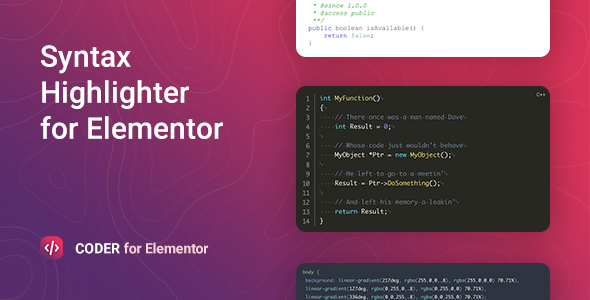
Need to showcase code beautifully on your WordPress site? Coder – Syntax Highlighter for Elementor is the ultimate solution. This powerful Elementor widget transforms plain code blocks into visually appealing, easy-to-read syntax-highlighted snippets. It’s specifically designed for developers, educators, and technical bloggers who demand perfection in their content presentation. Say goodbye to dull, unformatted code and hello to professional, engaging displays right within your favorite page builder. Coder – Syntax Highlighter for Elementor ensures your technical content stands out, enhancing user experience and readability for every visitor.
Unlock the potential to present any programming language with elegance. Our solution provides seamless integration, extensive customization, and the freedom to use it across all your projects. Enhance your technical tutorials, documentation, and portfolio pieces with a tool built for precision and performance.
Key Features of Coder – Syntax Highlighter for Elementor
Discover the core functionalities that make Coder – Syntax Highlighter for Elementor an indispensable tool for displaying code. These features are designed to provide maximum flexibility and ease of use within your Elementor workflow.
- Seamless Elementor Integration: Drag-and-drop the Coder widget directly into your Elementor designs for instant code embedding.
- Extensive Language Support: Highlight code for hundreds of programming languages, from Python to PHP, JavaScript to CSS, and beyond.
- Dozens of Built-in Themes: Choose from a rich library of beautiful syntax highlighting themes, including popular light and dark modes, to match your website’s aesthetic.
- Live Preview Customization: See your code styling changes in real-time within the Elementor visual editor, ensuring pixel-perfect results.
- Line Numbering & Highlighting: Easily toggle line numbers and highlight specific lines of code for educational purposes or to draw attention.
- Copy to Clipboard Button: Provide users with a convenient one-click option to copy your code snippets directly.
- Responsive Design Ready: Code blocks look great and function perfectly on any device, from desktops to mobile phones.
In-Depth Feature Analysis: Elevating Your Code Presentation
Let’s dive deeper into the standout features that make Coder – Syntax Highlighter for Elementor the premier choice for code display. Each aspect is crafted to offer you superior control and visual appeal.
Effortless Elementor Integration for Your Code Blocks
Coder – Syntax Highlighter for Elementor is built from the ground up to work seamlessly with Elementor. You don’t need to touch any code to display code. Simply drag the “Coder” widget onto your page and paste your code snippet. The intuitive interface within the Elementor visual editor allows you to customize every aspect of your code block. This integration means you can maintain a consistent design workflow without ever leaving your page builder. Elevate your technical content presentation with unparalleled ease and efficiency.
Showcase Any Code with Extensive Language Support
Whether you’re writing tutorials for Python, sharing CSS tricks, or documenting a complex JavaScript library, Coder – Syntax Highlighter for Elementor has you covered. It boasts support for a vast array of programming languages. This extensive language support ensures that your code snippets are always highlighted accurately and beautifully, regardless of the syntax. From obscure languages to the most popular ones, Coder intelligently detects and formats your code. This feature is crucial for maintaining clarity and professionalism across diverse technical topics and coding standards.
Stunning Visuals with Diverse Syntax Highlighting Themes
First impressions matter, especially when presenting code. Coder – Syntax Highlighter for Elementor offers a comprehensive collection of pre-designed syntax highlighting themes. These themes range from classic developer dark modes to vibrant light themes, ensuring you find the perfect style. You can instantly switch between themes in the Elementor editor and see the changes live. This flexibility allows you to perfectly match your code blocks with your website’s branding and overall design aesthetic. Make your code snippets not just functional, but also a visual delight that engages your audience.
Who Can Benefit from Coder – Syntax Highlighter for Elementor?
Coder – Syntax Highlighter for Elementor is a versatile tool. It empowers various professionals and hobbyists to present code beautifully. This Elementor widget is an indispensable asset for anyone sharing technical information and code snippets.
Developers & Programmers
As a developer, you constantly share code. Coder allows you to embed code snippets directly into your portfolio, documentation, or blog posts. Highlight your skills with perfectly formatted, readable code examples. It’s ideal for showcasing your projects and explaining complex concepts with clarity and precision.
Technical Bloggers & Educators
Are you running a programming blog or creating online courses? Coder – Syntax Highlighter for Elementor makes your tutorials shine. Clearly present code examples, highlight key lines, and provide a copy-to-clipboard button for your readers. This enhances the learning experience significantly, making complex topics easier to grasp.
Freelancers & Agencies
Build stunning client websites that require code displays. With Coder, you can integrate elegant code blocks without extra coding or hassle. Offer premium features to your clients without incurring recurring costs. This adds professional polish to any technical project, reinforcing your agency’s expertise.
WordPress Enthusiasts & Hobbyists
Even if you’re not a full-time developer, you might share code snippets. Coder provides an easy, visual way to do so. Elevate your personal blog or project site with professional syntax highlighting. It’s accessible for users of all skill levels, turning basic code into beautiful displays.
Why Choose Coder – Syntax Highlighter for Elementor? Freedom & Functionality
When you decide to enhance your WordPress site with a syntax highlighter, many options exist. However, Coder – Syntax Highlighter for Elementor stands out. It offers a unique blend of premium features and unparalleled value. This solution provides the flexibility and robustness you need without typical limitations, setting it apart from the competition.
Unlock Premium Features Without Recurring Costs
Many premium plugins come with ongoing subscription fees. Coder – Syntax Highlighter for Elementor offers top-tier features without these recurring charges. You gain access to all its advanced capabilities for a single, upfront investment. This approach provides significant cost savings over time, especially for freelancers and agencies managing multiple projects. You get the quality of a premium product with the financial freedom you deserve.
Unrestricted Usage Across Unlimited Projects
The underlying GPL license empowers you with incredible freedom. You can use Coder – Syntax Highlighter for Elementor on as many websites as you own or manage. There are no site limits, no activation keys per domain. This is invaluable for web developers, agencies, and anyone with multiple WordPress installations. Deploy Coder on client sites, personal projects, and test environments without worrying about licensing restrictions. It truly gives you the freedom to create and innovate without boundaries.
Reliable & Secure Code for Your Website
Our version of Coder – Syntax Highlighter for Elementor is thoroughly tested and distributed with integrity. We ensure that the code is safe, clean, and free from malicious scripts. You can confidently integrate this syntax highlighter into your WordPress ecosystem. Focus on creating great content, knowing your site is protected. We prioritize security and performance to give you peace of mind and safeguard your digital presence.
Regular Updates for Compatibility & New Features
Even with a single acquisition, you receive consistent updates. These updates ensure Coder – Syntax Highlighter for Elementor remains compatible with the latest versions of WordPress and Elementor. You’ll also benefit from new features and performance enhancements as they are released. We are committed to maintaining and improving this powerful tool. Stay current and secure without additional subscription fees, ensuring your code displays are always at their best.
Frequently Asked Questions About Coder – Syntax Highlighter for Elementor
We understand you might have questions about integrating a powerful tool like Coder – Syntax Highlighter for Elementor. Here are some common inquiries and their answers, designed to give you clarity and confidence in your decision.
What programming languages does Coder – Syntax Highlighter for Elementor support?
Coder – Syntax Highlighter for Elementor offers extensive language support. It highlights syntax for hundreds of programming languages. This includes popular choices like HTML, CSS, JavaScript, PHP, Python, Java, Ruby, C++, C#, SQL, and many more. Its intelligent detection ensures your code is always formatted correctly and beautifully.
Is Coder – Syntax Highlighter for Elementor compatible with Elementor Pro?
Yes, absolutely! Coder – Syntax Highlighter for Elementor is fully compatible with both the free version of Elementor and Elementor Pro. It integrates seamlessly into the Elementor visual editor, allowing you to use its features alongside all Elementor Pro widgets and templates. You can expect a smooth and integrated workflow, enhancing your design capabilities.
How do I update Coder – Syntax Highlighter for Elementor?
Updates for Coder – Syntax Highlighter for Elementor are provided regularly. You will typically receive update notifications directly within your WordPress dashboard. Simply follow the standard WordPress plugin update procedure. This ensures you always have the latest features, bug fixes, and compatibility improvements, keeping your syntax highlighting current and secure.
Can I customize the syntax highlighting themes or create my own?
Coder – Syntax Highlighter for Elementor comes with a rich library of pre-designed themes, including popular light and dark options. While it doesn’t offer a direct custom theme builder within the Elementor interface, many existing themes are highly configurable. You can often adjust colors and styles via custom CSS if needed. This allows for extensive personalization to match your site’s unique aesthetic.
Is Coder – Syntax Highlighter for Elementor safe and secure to use on my website?
Yes, our version of Coder – Syntax Highlighter for Elementor is thoroughly vetted for safety and security. We ensure the code is clean, free from malware, and functions robustly within the WordPress environment. Your website’s security and performance are a top priority. You can integrate it with complete confidence, knowing your site is protected.
Can I use Coder – Syntax Highlighter for Elementor on multiple client websites?
Absolutely! One of the significant advantages of Coder – Syntax Highlighter for Elementor (under its GPL license) is the freedom to use it on unlimited websites. Whether for personal projects or client sites, a single acquisition covers all your needs. There are no per-site licensing restrictions. This makes it incredibly cost-effective for agencies, freelancers, and developers managing multiple WordPress installations.
Does Coder – Syntax Highlighter for Elementor impact my website’s loading speed?
Coder – Syntax Highlighter for Elementor is optimized for performance. It loads necessary scripts efficiently, ensuring minimal impact on your website’s loading speed. While any additional functionality adds a slight overhead, Coder is designed to be lightweight and fast. We prioritize a smooth user experience for both you and your visitors, maintaining optimal site performance.
What if I encounter an issue or need support?
While Coder – Syntax Highlighter for Elementor is designed to be user-friendly, issues can occasionally arise. We provide access to documentation and resources to help you troubleshoot common scenarios. For specific questions or technical challenges, you can often find solutions through community forums or dedicated support channels, depending on your purchase source. We are here to help you succeed.
Q: Do I need a license key?
A: No. All products are Pre-Activated. You can use 100% of the Premium features immediately.
Q: Can I use the One-Click Demo Import?
A: Yes, absolutely! We ensure the demo import feature works perfectly.
Q: Can I use the products on multiple websites?
A: Absolutely. The GPL license allows use on unlimited domains.
Q: Are the files safe?
A: Yes. All files are scanned by McAfee and VirusTotal before uploading.
Share Now!
Related Products




Related Products


Same Contributor


Featured Products


