
Content Blocks Layout For WPBakery Page Builder – News & Magazine Style

- Description
- Reviews
- FAQ
Revolutionize Your WordPress Content Display with Content Blocks Layout For WPBakery Page Builder – News & Magazine Style
Are you looking to create captivating, professional news and magazine-style layouts on your WordPress website? Do you find it challenging to organize your diverse content into visually appealing blocks using WPBakery Page Builder?
Struggling with static content displays that fail to engage your readers is a common problem. Many WordPress users desire dynamic, flexible ways to showcase posts, custom post types, and editorial content.
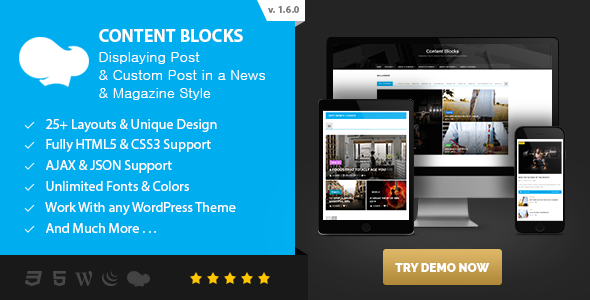
Enter Content Blocks Layout For WPBakery Page Builder – News & Magazine Style. This powerful plugin is specifically designed to transform how you present your articles, blogs, and custom content. It integrates seamlessly with WPBakery Page Builder, offering an intuitive drag-and-drop experience to build stunning content showcases that resonate with your audience.
With this tool, you gain unparalleled creative control. You can achieve sophisticated layouts that were once only possible with custom coding. Best of all, this GPL-licensed version provides you with the freedom to use it on unlimited websites, modify it to your heart’s content, and enjoy premium features without restrictive licenses.
Key Features of Content Blocks Layout For WPBakery Page Builder – News & Magazine Style
Unlock a world of design possibilities with these core functionalities:
- Dynamic Content Display Options: Choose from a rich selection of responsive grid layouts, list views, masonry designs, and captivating carousel blocks to present your posts and custom post types beautifully.
- Advanced Query Builder: Precisely select which content to display based on categories, tags, authors, post formats, custom fields, and more. Craft highly relevant content sections for your readers.
- Seamless WPBakery Integration: Enjoy a native drag-and-drop experience within the WPBakery Page Builder interface. Easily add, configure, and style your content blocks with live previews.
- Full Custom Post Type Support: Go beyond standard posts. Effortlessly display content from any custom post type, making it perfect for portfolios, products, testimonials, or events.
- Extensive Styling & Typography Controls: Fine-tune every visual aspect. Customize fonts, colors, backgrounds, borders, spacing, and hover effects to match your brand identity perfectly.
- AJAX Pagination & Load More: Improve user experience by allowing visitors to browse through more content without full page reloads. Implement smooth “Load More” buttons or infinite scroll.
- Responsive Design & Device Adaptability: Ensure your content looks flawless on any screen size, from desktops to tablets and smartphones. All layouts are fully responsive and retina-ready.
In-Depth Feature Analysis: Elevating Your Content Presentation
Unleash Creative Layouts with Dynamic Display Options
The core strength of Content Blocks Layout For WPBakery Page Builder – News & Magazine Style lies in its versatile display capabilities. Forget rigid, boring content presentations that hinder user engagement. This plugin empowers you to choose from an array of modern and classic designs, ensuring your content always looks fresh and professional.
Imagine showcasing your latest articles in an elegant grid layout, highlighting featured stories in a prominent carousel block, or creating a visually rich masonry display for image-heavy content. Each layout is crafted with responsiveness in mind, adapting flawlessly to any device. This means your editorial content will always be accessible and appealing, whether viewed on a large monitor or a mobile phone.
From simple list layouts perfect for quick summaries to complex, multi-column grid layouts ideal for news portals, the options are extensive. You can even mix and match different block styles on a single page, creating truly unique and engaging article showcases. This flexibility is crucial for digital publishing, allowing you to control the narrative visually.
Effortless Content Management with Advanced Querying
Managing and displaying specific content dynamically can be a complex task without the right tools. Content Blocks Layout For WPBakery Page Builder simplifies this process with its powerful and intuitive query builder. You no longer need to manually select individual posts or resort to custom code to pull in specific content.
With this feature, you can define precise criteria for your content blocks. Want to display only posts from the ‘Technology’ category, published last week, and featuring a specific tag? No problem. Need to show custom post types like ‘Recipes’ or ‘Products’ that belong to a certain taxonomy?
The advanced querying options give you complete control over your content organization. This capability is invaluable for creating highly targeted sections, such as “Related Articles,” “Most Popular Posts,” or “Editor’s Picks.” It ensures that your visitors always see the most relevant and engaging content, significantly improving bounce rates and time on site. This dynamic content delivery is a cornerstone of effective online magazines and news sites.
Seamless Integration and Visual Customization
Usability is paramount for any WordPress tool, and Content Blocks Layout For WPBakery Page Builder excels in this area. Its deep integration with WPBakery Page Builder means you can leverage the familiar drag-and-drop interface you already know and love. Adding a new content block is as simple as selecting an element from the WPBakery panel and dropping it onto your page.
Once placed, an extensive set of customization options becomes available through the WPBakery element settings. You can visually configure every aspect of your content blocks without touching a single line of code. This includes typography controls for headings, excerpts, and meta-information; color pickers for text, backgrounds, and links; and precise controls for spacing, padding, and margins.
The real-time preview within WPBakery ensures that what you see is what you get, allowing for rapid iteration and design refinement. This level of visual customization empowers both novice users and seasoned web designers to create pixel-perfect editorial content displays. It truly transforms the WPBakery editor into a powerful design studio for your news and magazine layouts.
Who Can Benefit from Content Blocks Layout For WPBakery Page Builder – News & Magazine Style?
This versatile plugin is designed for a wide range of WordPress users and professionals:
- News Portals & Online Magazines: Create dynamic, content-rich homepages and category archives that keep readers engaged with diverse article showcases.
- Bloggers & Content Creators: Elevate your personal or niche blog with professional layouts that highlight your latest and most popular posts. Present your articles with style.
- Agencies & Freelancers: Build sophisticated client websites faster and more efficiently. Offer premium design capabilities without custom development costs for content organization.
- Portfolio Websites: Showcase your projects or case studies in a visually compelling manner using custom post types and attractive grid layouts.
- eCommerce Stores with Blogs: Integrate product-related content, customer stories, or industry news seamlessly into your online shop’s blog section.
- Web Developers: Utilize a robust, flexible tool that saves development time and provides a solid foundation for complex content display requirements.
Why Choose This GPL-Licensed Version? Freedom, Value, and Peace of Mind
When considering plugins for your WordPress site, choice matters. Opting for a GPL-licensed version of Content Blocks Layout For WPBakery Page Builder – News & Magazine Style offers significant advantages that go beyond just saving money.
Firstly, the General Public License (GPL) grants you unparalleled freedom. This means you can install and use this powerful plugin on an unlimited number of websites. Whether you manage a single blog or a vast network of client sites, you are never restricted by license keys or per-site activation limits. This provides immense value, especially for web design agencies and freelancers.
Secondly, it offers exceptional cost-effectiveness. You gain access to all the premium features and functionalities of this plugin without the recurring subscription fees often associated with proprietary licenses. This allows you to allocate your budget to other critical areas of your web development.
Finally, using a GPL-licensed version promotes safety and transparency. The open-source nature of GPL code means it’s often more thoroughly vetted and less likely to contain malicious backdoors compared to unregulated, nulled versions. We ensure that our distributions are clean, legitimate, and ready for secure use. You benefit from a robust, well-maintained codebase that is both legal and ethical.
Embrace the true spirit of WordPress by utilizing this version. Gain full control, enjoy complete functionality, and develop your sites with confidence and flexibility.
Frequently Asked Questions (FAQ)
What is Content Blocks Layout For WPBakery Page Builder – News & Magazine Style?
It is a premium WordPress plugin designed to enhance WPBakery Page Builder. It provides a suite of advanced content blocks and elements specifically tailored for creating sophisticated news, magazine, and blog-style layouts. You can display posts, custom post types, and other dynamic content with ease.
Is this plugin compatible with the latest WordPress and WPBakery Page Builder versions?
Yes, we are committed to providing timely updates to ensure full compatibility. Content Blocks Layout For WPBakery Page Builder – News & Magazine Style is regularly tested against the latest stable releases of WordPress and WPBakery Page Builder to guarantee seamless integration and performance.
Can I display custom post types and custom fields with these content blocks?
Absolutely. One of the core strengths of this plugin is its robust support for custom post types and custom fields. You can easily query and display content from any registered custom post type, and even integrate custom field data into your layouts, offering maximum flexibility for diverse content. This allows for rich article showcases.
How does the GPL license benefit me when using this plugin?
The GPL license provides you with several key benefits. It allows you to use the plugin on an unlimited number of websites, modify the code to suit your specific needs, and redistribute it. This means no recurring costs per site, complete freedom to customize, and the peace of mind that you’re using legally distributed, transparent code.
Do these content blocks support responsive design for mobile devices?
Yes, responsiveness is a fundamental aspect of Content Blocks Layout For WPBakery Page Builder – News & Magazine Style. All content blocks and layouts are built with a mobile-first approach, ensuring they look stunning and function perfectly across all devices, including desktops, tablets, and smartphones. Your editorial content will always be accessible.
How do I receive updates for Content Blocks Layout For WPBakery Page Builder – News & Magazine Style?
We provide regular updates for security enhancements, bug fixes, and new features. You will typically receive access to these updates through your download source or our dedicated update channel. Staying updated ensures you always have the latest improvements and compatibility.
Can I customize the appearance of the content blocks without coding?
Definitely. The plugin is designed for visual customization through the WPBakery Page Builder interface. You get extensive options for typography, colors, backgrounds, borders, spacing, and more, all accessible via intuitive controls. No coding knowledge is required to achieve stunning, branded layouts for your news or magazine displays.
Is it safe to use a GPL-licensed version of this premium plugin?
Yes, it is entirely safe and legal. We distribute legitimate, unmodified GPL-licensed versions of premium plugins. This means you get the full functionality and code integrity without the risks associated with nulled or cracked software. Our commitment is to provide safe, ethical, and fully functional tools for your WordPress projects.
Q: Do I need a license key?
A: No. All products are Pre-Activated. You can use 100% of the Premium features immediately.
Q: Can I use the One-Click Demo Import?
A: Yes, absolutely! We ensure the demo import feature works perfectly.
Q: Can I use the products on multiple websites?
A: Absolutely. The GPL license allows use on unlimited domains.
Q: Are the files safe?
A: Yes. All files are scanned by McAfee and VirusTotal before uploading.
Share Now!
Related Products




Related Products



Same Contributor


Featured Products


