
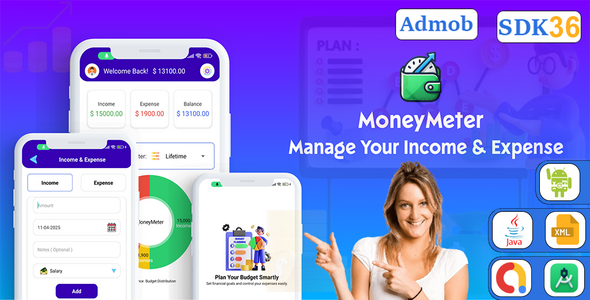
MoneyMeter – Android Expense Tracker, Budget Planner & Money Manager App

- Description
- Reviews
- FAQ
Take Control of Your Financial Future with the Ultimate Personal Finance App
Struggling to keep track of where your money goes each month? You’re not alone. The MoneyMeter – Android Expense Tracker, Budget Planner & Money Manager App is the definitive solution for anyone looking to build and launch a powerful, user-friendly personal finance application. This comprehensive source code provides the foundation to create an app that helps users master their budgets, track every expense, and achieve their financial goals with ease.
Built with clean code and a modern, intuitive interface, MoneyMeter offers a premium user experience right out of the box. Stop spending months on development and thousands on custom builds. Launch your own high-demand financial management app on the Google Play Store in a fraction of the time and cost.
Core Features of MoneyMeter: Your All-in-One Financial Toolkit
MoneyMeter is packed with powerful features designed to provide a complete and seamless financial management experience. Here’s what makes this app source code stand out:
- Intuitive Expense & Income Tracking: Effortlessly log transactions in seconds. Categorize spending and income to see exactly where your money is going.
- Powerful Budget Planner: Create custom daily, weekly, or monthly budgets for different categories. Get notifications when you’re approaching your limits to prevent overspending.
- Insightful Reports & Analytics: Visualize your financial habits with beautiful, easy-to-understand charts and graphs. Analyze spending patterns and make smarter financial decisions.
- Financial Goal Setting: Define and track savings goals, whether it’s for a vacation, a new car, or a down payment. Watch your progress and stay motivated.
- Multi-Currency Support: Perfect for travelers or users who manage finances in more than one currency. The app handles conversions seamlessly.
- Top-Tier Security: Protect sensitive financial data with biometric security (fingerprint or face lock) and a secure passcode lock.
- Modern UI with Dark & Light Mode: Offer your users a visually stunning experience with a choice between a sleek dark mode and a clean light mode.
- Ready to Monetize: Integrated with Google AdMob and configured for in-app purchases, allowing you to start generating revenue from day one.
A Deeper Look into MoneyMeter’s Key Capabilities
Let’s explore the three features that make MoneyMeter the best choice for developers and entrepreneurs aiming to enter the lucrative finance app market.
Advanced Budgeting and Goal Management
MoneyMeter isn’t just an expense logger; it’s a proactive financial planning tool. The budget planner allows users to set specific spending limits for categories like ‘Groceries’, ‘Entertainment’, or ‘Transport’. The app provides real-time feedback on their spending, helping them stay on track and avoid debt.
Furthermore, the goal-setting feature transforms saving from a chore into an achievable objective. Users can create a goal, set a target amount, and contribute to it regularly. This visual progress tracker is a powerful motivator that increases user engagement and retention.
Comprehensive & Visual Financial Reporting
Data is useless without understanding. MoneyMeter excels at transforming raw transaction data into actionable insights. It generates beautiful, interactive pie charts and bar graphs that break down spending by category, track cash flow over time, and compare income versus expenses.
This powerful data visualization helps users instantly identify their biggest spending habits and find opportunities to save. For a developer, this means providing immense value that keeps users coming back to your app daily.
Effortless Monetization & Customization
This source code is built for business. With Google AdMob ads seamlessly integrated, you can start earning revenue from banner and interstitial ads immediately. The architecture is also prepared for you to add premium features via in-app purchases, creating a sustainable business model.
Written in clean, well-documented Kotlin, the code is incredibly easy to reskin and customize. Change the colors, logo, and branding to match your vision without needing to be a senior developer. The project is configured for Android Studio, making the setup process smooth and straightforward.
Who is the MoneyMeter App Source Code For?
This powerful tool is perfect for a wide range of individuals and businesses looking to capitalize on the growing demand for personal finance solutions.
Android Developers
Skip the tedious process of building an app from scratch. Use MoneyMeter as a robust foundation for your next project, saving hundreds of development hours. Learn from clean, professional code and launch a portfolio-worthy app quickly.
Entrepreneurs & Startups
Want to enter the FinTech market without a massive initial investment? This source code allows you to launch a feature-rich, market-ready app for a fraction of the cost of hiring a development team. Test your market, build a user base, and start generating revenue fast.
Digital Agencies
Offer your clients a high-quality, customizable mobile app solution. Add a financial management app to your service offerings and deliver incredible value without tying up your development resources for months on end.
The Smart Choice: Why Download This Version?
In a market filled with options, choosing the right one can be difficult. Here’s why our version of the MoneyMeter – Android Expense Tracker, Budget Planner & Money Manager App is the superior choice for savvy developers and entrepreneurs.
Unbeatable Value & Freedom
Why pay for a restrictive single-use license when you can have complete freedom? With our offering, you get the original, professional-grade source code for a simple, one-time payment. Use it to create one app or one hundred—the choice is yours. There are no recurring fees or hidden costs.
Safe, Untouched, and Authentic Code
We provide the exact same code as the original developer, released under the GPL. It’s 100% original, verified, and free from any third-party modifications or malicious scripts. You can build your business on this code with the confidence that it’s secure and stable.
Empower Your Projects
This isn’t just about saving money; it’s about gaining control. You have the freedom to customize every aspect of the app, integrate new features, and build a unique product that stands out. This flexibility is essential for long-term success and growth in the competitive app market.
Frequently Asked Questions (FAQ)
What version of Android Studio is needed for MoneyMeter?
The MoneyMeter source code is designed to work with the latest stable versions of Android Studio. The documentation included with your download provides specific version recommendations and setup instructions to ensure a smooth and easy compilation process.
Will I receive future updates for the MoneyMeter app?
Yes. As a customer, you gain access to all future updates for this item for free. Whenever the original developer releases a new version with bug fixes or new features, we make it available for you to download from your account.
Is the source code easy to reskin and customize?
Absolutely. The code is written in clean, well-organized Kotlin and follows modern Android development best practices. Customizing colors, branding elements, and the app name is straightforward, and detailed documentation is provided to guide you through the process.
Can I integrate other ad networks besides AdMob?
Yes. While the code comes pre-integrated with Google AdMob for convenience, the open-source nature of the code gives you the freedom to integrate any other ad network you prefer, such as Meta Audience Network or Unity Ads. You have full control over your monetization strategy.
Is it safe and legal to use this GPL-licensed source code?
It is 100% safe and legal. The software is distributed under the GNU General Public License (GPL), which gives you the freedom to use, study, share, and modify the software. We provide you with the original, untouched code, ensuring it’s secure and ready for your projects.
What kind of support is included with my purchase?
We provide basic support related to accessing your downloads and understanding the setup documentation. For in-depth code customization or feature development, you would need to leverage your own development skills or hire a developer, which is standard for any source code purchase.
Q: Do I need a license key?
A: No. All products are Pre-Activated. You can use 100% of the Premium features immediately.
Q: Can I use the One-Click Demo Import?
A: Yes, absolutely! We ensure the demo import feature works perfectly.
Q: Can I use the products on multiple websites?
A: Absolutely. The GPL license allows use on unlimited domains.
Q: Are the files safe?
A: Yes. All files are scanned by McAfee and VirusTotal before uploading.
Share Now!
Related Products
 Liquid Color Sort – Puzzle Game Android Studio Project with AdMob Ads + Ready to Publish$5.00
 Poster Banao – Poster Maker ,Festival & Business & Political , AdBanao Clone Poster Maker App$6.00
 Wecare – Online Doctor Consultation – Appointment – Healthcare App – Hospital Management$8.00
 Emoji Battery Status Bar with AdMob Ads Android$5.00
 Swipe The Pin Puzzle Game$5.00




Related Products
Same Contributor


Featured Products


