
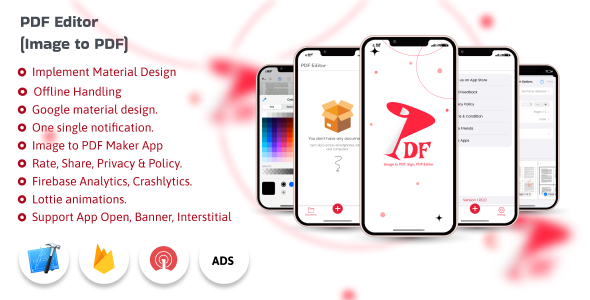
PDF Editor – Image to PDF | Digital Signature

- Description
- Reviews
- FAQ
Tired of Juggling Multiple Tools for PDF Management?
Managing PDF documents can be a frustrating and time-consuming task. You often need one tool to merge files, another to convert images, and yet another for a simple digital signature. This fragmented workflow wastes valuable time and can even introduce security risks. It’s a common problem that holds back productivity for businesses and individuals alike.
Introducing the ultimate solution: the PDF Editor – Image to PDF | Digital Signature plugin for WordPress. This powerful, all-in-one toolkit brings a complete suite of PDF management features directly into your WordPress dashboard. Stop paying for expensive monthly subscriptions and take back control of your document workflow today.
With this single plugin, you can empower yourself or your users to edit, create, and manage PDFs with unparalleled ease. It’s the smart, cost-effective, and secure way to handle all your PDF needs without ever leaving your website.
Key Features of the PDF Editor Plugin
This isn’t just a simple PDF viewer; it’s a comprehensive document powerhouse. Here are the core features that will transform your WordPress site into a PDF processing hub:
- Complete PDF Toolkit: Merge, split, compress, and organize PDF pages with an intuitive drag-and-drop interface.
- Image to PDF Conversion: Effortlessly convert multiple JPG, PNG, and other image formats into a single, professional PDF document.
- Digital & Electronic Signatures: Add secure, legally-binding digital signatures or simple electronic signatures to any PDF.
- Advanced PDF Editing: Add text, images, shapes, and annotations directly onto PDF files. Fill out forms and highlight important sections with ease.
- Watermarking & Protection: Protect your intellectual property by adding text or image watermarks. Secure your documents with password protection.
- Works Directly in WordPress: All functionality is integrated into your WordPress dashboard. No need for third-party software or external websites.
- 100% Self-Hosted & Secure: All file processing happens on your own server, ensuring your sensitive documents remain private and under your control.
A Deeper Look: The Features That Matter Most
Let’s explore the three game-changing features that set this PDF editor apart from the rest. These tools are designed to solve real-world business problems and streamline your daily operations.
All-in-One PDF Manipulation Toolkit
Imagine having a complete set of PDF tools right at your fingertips. This plugin consolidates over a dozen functions into one seamless interface. You no longer need to export a document to a separate app just to perform a simple task.
The toolkit includes:
- Merge PDF: Combine multiple PDF files into one cohesive document. Perfect for creating reports, portfolios, or project summaries.
- Split PDF: Extract specific pages or page ranges from a large PDF. Easily create smaller, more manageable files for sharing.
- Compress PDF: Reduce file size without a significant loss in quality. This is essential for faster website loading, easier emailing, and saving server storage space.
- Organize Pages: Reorder, rotate, or delete pages within a PDF using a simple visual editor. It’s document management made easy.
Effortless Image to PDF Conversion
Turning a collection of images into a professional PDF has never been simpler. Whether you’re compiling scanned receipts, creating a photo album, or submitting a design portfolio, the Image to PDF converter is your best friend. The process is incredibly intuitive.
Simply upload your JPG, PNG, or other image files. You can then drag and drop them to set the correct order, choose page size, orientation (portrait or landscape), and add margins. Hit ‘Convert,’ and the plugin generates a high-quality PDF in seconds, ready for downloading or further editing.
This feature is a massive time-saver for anyone who works with visual media. It eliminates the need for complex desktop software and provides a fast, web-based solution for you and your website’s users.
Secure and Simple Digital Signatures
In today’s digital world, the ability to sign documents online is not a luxury—it’s a necessity. The PDF Editor plugin provides a robust and secure e-signature feature that is perfect for contracts, agreements, and internal approvals. This isn’t just about drawing your signature; it’s about creating a secure and verifiable digital record.
You can:
- Draw Your Signature: Use your mouse or a touchscreen to draw a natural-looking signature.
- Type Your Signature: Type your name and choose from several professional-looking script fonts.
- Upload an Image: Upload a pre-made image of your signature for consistent use across all documents.
This functionality is crucial for streamlining business workflows. You can send and receive signed documents without ever touching a printer or scanner, saving time, money, and resources. The entire process is handled on your server, ensuring maximum privacy for your sensitive agreements.
Who Is This PDF Editor For?
This versatile plugin is a valuable asset for a wide range of users and businesses. Its powerful features can be adapted to solve document challenges across many industries.
Perfect for Freelancers and Consultants
Streamline your client work. Create professional proposals by merging different documents, get contracts signed digitally, and convert design mockups into easy-to-share PDFs. Present a polished and efficient image to your clients.
A Must-Have for Small to Medium Businesses
Handle all your internal and external document needs. Onboard new employees with digitally signed HR forms, create financial reports, and protect sensitive internal documents with passwords and watermarks. Reduce your reliance on expensive SaaS subscriptions.
Essential for Agencies and Web Developers
Offer more value to your clients by integrating a powerful PDF tool directly into their websites. This plugin can be a fantastic feature for membership sites, educational platforms, or any business that deals with user-generated documents. Give your clients the freedom to manage their own files.
Ideal for Educational Institutions & Non-Profits
Manage student applications, create course materials, and handle administrative paperwork with ease. The cost-effective nature of this solution makes it perfect for organizations with tight budgets that still require premium functionality.
Why Download Our Version? The Smart Choice for Your Website
You have choices when it comes to WordPress plugins. Here’s why our version of the PDF Editor – Image to PDF | Digital Signature plugin is the best decision for your project and your budget.
Unbeatable Value and Cost-Effectiveness
Premium software shouldn’t come with a punishing price tag. By leveraging the freedom of the GPL license, we can offer you this complete, feature-rich PDF editing suite for a fraction of the original cost. You get all the powerful functionality without the financial burden, making it an incredibly smart investment.
Freedom to Use and Innovate
This is not a restrictive, single-site license. You have the freedom to install and use this plugin on as many websites as you need—whether they’re for your own business or for your clients. This flexibility is invaluable for developers and agencies managing multiple projects.
Clean, Safe, and Secure Code
Your website’s security is our top priority. We provide you with the original, untouched plugin files, free from any malware, viruses, or intrusive advertising. You can build with confidence, knowing the code is clean and your site is safe.
Frequently Asked Questions
Does the PDF Editor plugin work with the latest version of WordPress?
Absolutely. We ensure our plugins are tested for compatibility with the latest major releases of WordPress and the Gutenberg block editor. You can be confident that the PDF Editor will integrate smoothly into your modern WordPress environment.
Is the digital signature feature legally binding?
The plugin provides tools for creating electronic and digital signatures that are widely accepted for many types of agreements, similar to services like DocuSign. However, the legal validity of an e-signature can vary based on local laws and the specific context of the agreement. For critical legal contracts, we always recommend consulting with a legal professional.
Will I receive updates for the PDF Editor plugin?
Yes. As a member, you will have access to updates for the plugin. This ensures you benefit from the latest features, security patches, and compatibility improvements as they are released by the original developer.
Is all the PDF processing done on my own server?
Yes, and this is a major security advantage. Unlike many online PDF tools that require you to upload your files to their servers, this plugin performs all processing (merging, compressing, signing, etc.) directly on your own WordPress hosting. Your sensitive documents never leave your control.
Will this plugin slow down my website?
The plugin is well-coded and optimized for performance. The front-end of your site will not be impacted. The PDF processing tools are located in the WordPress admin area and only consume server resources when they are actively being used, so it won’t affect your visitors’ browsing experience.
Is it safe to download and use this version of the plugin?
Yes, it is 100% safe. We provide the exact same files as the original developer, obtained directly from the source. The code is original and has not been altered in any way, ensuring it is free from any malicious code or security vulnerabilities.
Can I convert Word or Excel files to PDF with this plugin?
This plugin’s primary focus is on robust PDF-to-PDF manipulation and Image-to-PDF conversion (JPG, PNG, etc.). It does not natively support the conversion of DOCX or XLSX files. For that functionality, you would need a separate, dedicated document conversion tool.
Q: Do I need a license key?
A: No. All products are Pre-Activated. You can use 100% of the Premium features immediately.
Q: Can I use the One-Click Demo Import?
A: Yes, absolutely! We ensure the demo import feature works perfectly.
Q: Can I use the products on multiple websites?
A: Absolutely. The GPL license allows use on unlimited domains.
Q: Are the files safe?
A: Yes. All files are scanned by McAfee and VirusTotal before uploading.
Share Now!
Related Products



Related Products


Same Contributor



Featured Products


