
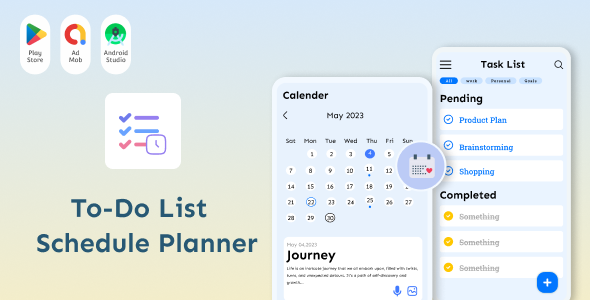
Todo List – Schedule – Tasks Planner – Notes and Lists – Daily Routine Planner – Tasks Reminder

- Description
- Reviews
- FAQ
Finally, a Powerful Task Manager That Lives Inside Your WordPress Dashboard
Tired of juggling multiple apps and browser tabs just to manage your daily tasks? The constant switching between your website, your project management tool, and your notes app kills productivity. We have the ultimate, integrated solution you’ve been looking for.
Meet the Todo List – Schedule – Tasks Planner – Notes and Lists – Daily Routine Planner – Tasks Reminder, a comprehensive productivity suite built directly into WordPress. It’s designed to streamline your workflow, keep you focused, and help you reclaim your day without ever leaving your site’s backend.
Organize your projects, schedule your content, and track your goals with an intuitive and powerful interface. This is the central hub your workflow needs.
Core Features at a Glance
This isn’t just a simple checklist plugin. It’s a full-featured productivity powerhouse designed for professionals. Here’s what makes it stand out:
- Intuitive Drag & Drop Interface: Effortlessly organize and prioritize your tasks by simply dragging and dropping them into place.
- Advanced Scheduling & Recurring Tasks: Set due dates, create daily, weekly, or monthly recurring tasks, and never miss a deadline again.
- Powerful Task Reminders & Notifications: Get timely reminders for your important tasks right within your WordPress admin area.
- Sub-Tasks & Progress Tracking: Break down large projects into smaller, manageable sub-tasks and visually track your completion progress.
- Integrated Notes System: Create detailed notes with a rich text editor, keeping all your project information right next to your tasks.
- Multiple Lists & Boards: Organize your work by project, client, or department by creating separate lists for ultimate clarity.
- Fully Responsive Design: Manage your tasks on the go from any device, whether it’s a desktop, tablet, or smartphone.
A Deeper Look at Your New Productivity Hub
Let’s explore the three core components that will transform how you manage your work within WordPress.
Intuitive Drag & Drop Task Management
Say goodbye to clunky interfaces. Our task planner is built around a fluid drag & drop system that feels natural and fast. You can re-prioritize your entire day in seconds.
This visual approach to project management helps you instantly see what’s important and what can wait. Move tasks between different lists like “To Do,” “In Progress,” and “Completed” to create your own personal Kanban-style workflow.
Advanced Scheduling & Reminder System
The heart of any good planner is its ability to keep you on schedule. This plugin excels with a robust system for setting due dates and reminders that ensure nothing falls through the cracks.
Do you have a task you need to do every Monday? Set it as a recurring task and forget about it. The system will automatically add it to your list each week, helping you build a consistent and productive daily routine.
Integrated Notes & Lists for Complete Organization
A task is often more than just a title. It comes with details, links, and important information. The integrated notes feature allows you to attach rich, detailed notes to any task.
Use the simple text editor to format your thoughts, add links, or paste in code snippets. This eliminates the need for a separate notes app, keeping all your project-related information in one centralized, easy-to-access location.
Who Is This Ultimate Task Planner For?
This powerful tool is designed for anyone who uses WordPress and wants to improve their organization and productivity.
WordPress Developers & Agencies
Manage development sprints, client change requests, and internal project deadlines all within the client’s WordPress dashboard. Create separate lists for each project to maintain perfect organization across your entire portfolio.
Freelancers & Solopreneurs
Your business lives inside WordPress. Now your project management can too. Track client work, manage your own business tasks, and plan your content schedule without paying for expensive monthly SaaS subscriptions.
Content Creators & Bloggers
Plan your editorial calendar with precision. Create tasks for brainstorming, writing, editing, and promotion. Attach your article drafts in the notes section and track each post’s progress from idea to publication.
Small Business Owners
Coordinate tasks for your small team, manage daily operational checklists, and keep track of customer-related follow-ups. This plugin serves as a lightweight, internal project management tool that’s simple for everyone to use.
Unlock Unbeatable Value and Freedom
Why pay recurring monthly fees for external tools when you can have a more integrated solution for a fraction of the cost? Here’s why our GPL-licensed version is the smartest choice.
A Cost-Effective Productivity Powerhouse
Tools like Trello, Asana, or Monday.com charge hefty monthly fees, especially for teams. With our one-time purchase, you get a feature-rich task planner that you can use forever. It’s the most budget-friendly way to professionalize your workflow.
The Freedom of the GPL License
Because this plugin is licensed under the GPL, you have the freedom to use it how you see fit. Install it on a single personal site or across all of your client websites without ever needing to purchase additional licenses. This is a game-changer for agencies and freelance developers.
Clean, Safe, and Verified Code
Your website’s security is our top priority. You can be confident that the plugin you download from us is the original code, 100% free from any malware or malicious scripts. We provide you with a safe and reliable tool to build your business on.
Frequently Asked Questions
Can I create multiple task boards or lists for different projects?
Absolutely. The plugin is designed for multi-project management. You can easily create separate lists or boards to organize tasks for different clients, websites, or internal departments, keeping your workspace clean and focused.
Does the Todo List – Schedule – Tasks Planner send email reminders?
The core functionality focuses on providing clear, visible reminders and notifications within the WordPress admin dashboard to keep you on track while you work. For specific email notification features, you can check the official documentation or pair it with a WordPress SMTP plugin for enhanced email delivery from your site.
Is this task planner responsive and easy to use on a mobile phone?
Yes, it is. The interface is fully responsive, meaning it adapts beautifully to any screen size. You can easily add, check off, and manage your tasks from your desktop, tablet, or smartphone, making it a perfect tool for when you’re on the go.
Will this plugin slow down my website for visitors?
No. This is a backend productivity tool, meaning its code and scripts load only for logged-in users within the `/wp-admin/` area. It has zero impact on your website’s front-end performance, so your visitor experience remains fast and smooth.
How do I receive updates for the plugin?
When you purchase from us, you gain access to our repository for 12 months. During this period, you will receive all official updates as they are released by the original developer. You can easily update the plugin from your WordPress dashboard with just a few clicks.
Is the code for this plugin safe to install on my website?
Yes, completely. We download the files directly from the original author and pass them on to you without any modification. The file you receive is the original, authentic plugin, ensuring it is secure and free from any malicious code.
What kind of support is included with my purchase?
We provide comprehensive technical support to help you with plugin installation, setup, and troubleshooting any issues that may arise. While we don’t offer general ‘how-to’ guidance for the plugin’s features (the developer’s documentation is best for that), we are here to ensure the plugin works as intended on your website.
Q: Do I need a license key?
A: No. All products are Pre-Activated. You can use 100% of the Premium features immediately.
Q: Can I use the One-Click Demo Import?
A: Yes, absolutely! We ensure the demo import feature works perfectly.
Q: Can I use the products on multiple websites?
A: Absolutely. The GPL license allows use on unlimited domains.
Q: Are the files safe?
A: Yes. All files are scanned by McAfee and VirusTotal before uploading.
Share Now!
Related Products
 Game Store – Android All in One Games App with Admob Ads, Unlimited Games & Much More$5.00
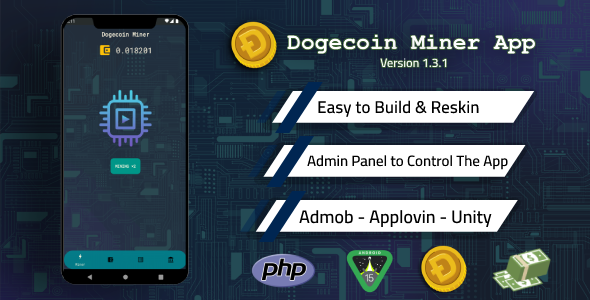 Dogecoin Miner App with Admin Panel and Admob + Unity Ads$5.00
 Vegetable Smash Match – Unity Game with Admob Ads$5.00
 BidKing Pro – Best Value Auction Script with Analytics, Tax Settings & Buyer Insights$6.00
 RaffKing – Complete PHP Lottery & Raffle Script with 38+ Payment Gateways$6.00



Related Products
Same Contributor


Featured Products


