
ScanifyAI – Document Scanner & OCR App | Android
- Description
- Reviews
- FAQ
Transform Your Android Device into a Powerful Pocket Scanner
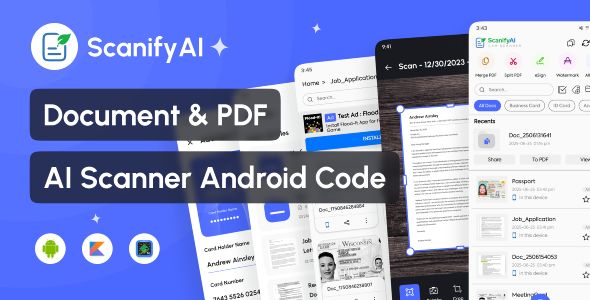
Are you tired of paper clutter and disorganized documents? The ScanifyAI – Document Scanner & OCR App | Android source code is your ultimate solution for creating a modern, paperless workflow. This powerful application turns any Android smartphone into a high-quality portable scanner, ready to digitize anything from receipts to multi-page contracts.
Effortlessly capture, manage, and share your documents in seconds. With its intelligent AI-powered features, ScanifyAI doesn’t just scan; it understands your documents, making them searchable, editable, and incredibly easy to organize. Go digital and boost your productivity today.
Core Features of ScanifyAI
ScanifyAI is packed with professional-grade tools designed to make document management simple and efficient. Here’s a look at what makes this app a must-have for professionals, students, and businesses.
- AI-Powered OCR Technology: Accurately extract editable text from any scanned document or image, turning static information into dynamic, searchable content.
- High-Quality PDF & JPG Creation: Convert your scans into crisp, clear PDF or JPG files. Perfect for professional sharing and digital archiving.
- Batch Scanning Mode: Save time by scanning multiple pages in a single session. ScanifyAI automatically processes them into one streamlined document.
- Smart Cropping & Image Enhancement: The app intelligently detects document borders and auto-crops the image. It also enhances scans for maximum readability, removing shadows and adjusting brightness.
- Digital Signatures & Annotations: Sign contracts and fill out forms directly on your device. Add notes, highlights, and annotations to your documents with ease.
- Advanced QR & Barcode Scanner: Instantly scan and interpret QR codes and barcodes to access websites, contact information, or product details.
- Seamless Cloud Integration & Sharing: Effortlessly share your documents via email, WhatsApp, or upload them directly to cloud services like Google Drive and Dropbox.
In-Depth Feature Analysis
Let’s dive deeper into the three standout features that set ScanifyAI apart from the competition. These tools are designed to solve real-world problems and supercharge your productivity.
AI-Powered OCR for Intelligent Text Recognition
The heart of ScanifyAI is its sophisticated Optical Character Recognition (OCR) engine. This isn’t just basic image-to-text conversion; it’s an intelligent system that accurately recognizes and extracts text from your scans. This transforms a simple picture of a document into a fully editable and searchable file.
Imagine scanning a 20-page report and being able to search for a specific keyword in seconds. You can also copy text from a business card directly into your phone’s contacts or extract quotes from a book without typing a single word. This feature is a game-changer for creating an efficient digital archive.
Comprehensive Document Management & Organization
A scanner is only as good as its ability to help you organize your files. ScanifyAI provides a robust document management system right within the app. You can create custom folders, rename files, and tag documents for easy retrieval.
This system allows you to build a true paperless office on your phone. Organize your work by client, project, or date. Keep personal documents like receipts and warranties separate from business contracts, all in one secure and accessible place.
Effortless Signing, Annotation, and Sharing
In today’s fast-paced world, you need to act on documents quickly. ScanifyAI includes powerful tools for e-signatures and annotations. Sign important contracts on the go and send them back instantly, eliminating the need to print, sign, and re-scan.
The annotation feature lets you highlight key points, add notes, or redact sensitive information before sharing. Once your document is ready, you can share it as a professional-grade PDF or JPG through virtually any app on your phone, making collaboration seamless.
Who is This App Source Code For?
The ScanifyAI source code is an incredibly versatile asset, perfect for a wide range of users and developers looking to launch their own powerful app.
- Mobile App Developers: Acquire a feature-rich, high-quality source code to fast-track your entry into the lucrative productivity app market. Save months of development time and cost.
- Students & Educators: Digitize lecture notes, textbook pages, and research papers. Use OCR to make study materials searchable and easily share notes with classmates.
- Business Professionals & Freelancers: Scan and manage invoices, receipts, contracts, and business cards on the fly. Keep your finances organized and close deals faster with e-signatures.
- Small Business Owners: Create a low-cost, in-house solution for digitizing records and creating a paperless office. Improve workflow efficiency without expensive hardware.
Why Download Our Version of ScanifyAI?
You have choices when it comes to acquiring premium app source code, but our offering provides unparalleled value and freedom.
The Freedom of GPL
This product is distributed under the General Public License (GPL). This means you receive the exact same code as the original author, giving you the freedom to use and modify it for your projects. It’s a cost-effective way to access premium, high-quality tools without restrictive licenses or recurring fees.
Unbeatable Value
Why pay a premium price when you can get the same powerful, feature-complete source code for a fraction of the cost? Our price point makes top-tier technology accessible to everyone, from individual developers to startups. You get 100% of the functionality without the hefty price tag.
Safe, Secure, and Original Code
We provide you with the original, untouched source code files. Our downloads are free from malware, viruses, or any malicious scripts. You can build your app with confidence, knowing you’re starting with a clean and secure foundation.
Frequently Asked Questions (FAQ)
What version of Android does ScanifyAI require?
The ScanifyAI source code is designed for modern Android development. It is compatible with Android 5.0 (Lollipop) and higher, ensuring it will run smoothly on the vast majority of devices currently in use.
Does the OCR feature support multiple languages?
Yes, the AI-powered OCR engine within ScanifyAI is highly advanced and supports a wide range of languages. This allows you to accurately extract text from documents written in English, Spanish, French, German, and many others, making it a truly global tool.
Can I integrate my own ad networks like AdMob?
Absolutely. Since you are getting the full source code, you have the freedom to integrate any ad network you choose, including Google AdMob or Facebook Audience Network. This provides a clear path to monetizing your app and generating revenue.
How do I receive updates for ScanifyAI?
When you purchase from us, you get access to all future updates for this item for one year. As the original developer releases new versions, we make them available for you to download from your account dashboard, ensuring your app stays current.
Is the code provided here safe to use?
Yes, completely. We download the files directly from the original developer and provide them to you untouched. Our files are 100% original and free from any malware, ads, or malicious code, so you can use them with full confidence.
What kind of support is included with this purchase?
Our support is focused on ensuring you can successfully download and access the product files. However, as we are not the original developers, we do not provide technical support for customization or implementation. For that, you would need to hire a developer or purchase the item directly from the author at a premium price.
Q: Do I need a license key?
A: No. All products are Pre-Activated. You can use 100% of the Premium features immediately.
Q: Can I use the One-Click Demo Import?
A: Yes, absolutely! We ensure the demo import feature works perfectly.
Q: Can I use the products on multiple websites?
A: Absolutely. The GPL license allows use on unlimited domains.
Q: Are the files safe?
A: Yes. All files are scanned by McAfee and VirusTotal before uploading.
Share Now!
Related Products
 NoteWise – Smart Notes, Reminders & To-Do Organizer Android$4.99
 Food Delivery App – A Complete Ready to Use MultiStore Mobile App(Android, ios) + Website$5.00
 Unity Game Template – Miniman Defender (Unity 6!)$8.00
 Android News App$5.00
 On Demand Pharmacy Delivery with Medicine Delivery and Upload Prescription App with 2 Apps & Admin$5.00


Related Products
Same Contributor



Featured Products


