
WordPress Widget Style Editor Elementor Addon
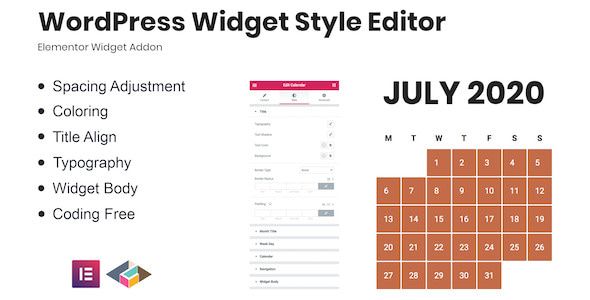
- Description
- Reviews
- FAQ
Ever get frustrated when a third-party widget just doesn’t match your website’s design? You spend hours searching for the right CSS class or trying to inject custom code, only to have it break with the next update. The WordPress Widget Style Editor Elementor Addon is the definitive solution to this common problem.
This powerful addon seamlessly integrates with the Elementor page builder, giving you a dedicated widget to style any other widget on your WordPress site. Finally, you can use Elementor’s intuitive visual editor to customize the look and feel of everything, from a WooCommerce product filter to a simple recent posts list.
Say goodbye to design limitations and hello to complete creative control. Achieve a pixel-perfect, cohesive website design without ever writing a single line of code.
Key Features of the Widget Style Editor
This addon is packed with features designed to save you time and unlock your design potential. It’s the missing piece in your Elementor toolkit.
- Universal Widget Compatibility: Works with core WordPress widgets and widgets from almost any third-party plugin (e.g., WooCommerce, The Events Calendar, etc.).
- Full Elementor Style Control Panel: Access all the familiar Elementor styling options, including typography, colors, backgrounds, borders, and box shadows.
- No-Code Visual Customization: What you see is what you get. Make style changes in real-time with a live preview, completely eliminating the need for custom CSS.
- Responsive Design Adjustments: Fine-tune your widget styles for desktop, tablet, and mobile devices directly within the Elementor interface for a perfect look on every screen.
- Lightweight & Performance-Focused: The plugin is built to be efficient, loading its assets only within the Elementor editor to ensure your live website remains fast and responsive.
- Seamless Elementor Workflow: Integrates as a native Elementor widget. Simply drag, drop, select the widget you want to style, and start designing.
- Save and Reuse Styles: Save your customized widget styles as global presets or copy-paste styles between different widgets to maintain design consistency and speed up your workflow.
Unlock Unprecedented Design Control
Let’s dive deeper into the core features that make this addon an essential tool for any serious WordPress user or developer. See how you can transform your workflow and design capabilities.
1. Universal Widget Styling Engine
The true power of this addon lies in its universal compatibility. It adds a new element to your Elementor library called “Widget Styler.” You simply drag this onto your page.
From there, a dropdown menu appears, populated with every single widget available on your WordPress installation. This includes default widgets like ‘Archives’ or ‘Calendar’, and more importantly, widgets added by other plugins.
Imagine being able to perfectly style a third-party booking form, an event list from a calendar plugin, or a complex product filtering widget from WooCommerce, all using the familiar Elementor controls. This addon acts as a bridge, making every widget an ‘Elementor-ready’ widget.
2. Complete Visual Style Editor
Once you select a widget to style, you gain access to the full suite of Elementor’s ‘Style’ and ‘Advanced’ tabs. This is not a limited set of options; it’s the complete design powerhouse you already know and love.
- Typography: Control the font family, size, weight, letter spacing, and color of all text within the widget.
- Backgrounds: Apply solid colors, stunning gradients, or even background images and videos to the widget’s container.
- Borders & Shadows: Add custom borders with unique styles (solid, dashed, dotted), control border-radius for rounded corners, and apply subtle or dramatic box shadows for a modern, layered look.
- Spacing: The ‘Advanced’ tab gives you full control over margin and padding, allowing you to position the widget perfectly within your layout and adjust its internal spacing for better readability.
3. Zero Coding Required for Custom Designs
This addon democratizes web design. Previously, achieving a cohesive look with third-party widgets required technical skill, time, and patience. You had to use your browser’s inspect tool, identify the correct CSS selectors, and write custom code that could easily break.
The WordPress Widget Style Editor Elementor Addon removes that barrier entirely. Business owners can now make their own design tweaks without hiring a developer. Junior designers can execute complex style requests with confidence.
It transforms a technical task into a creative one, allowing you to focus on what matters: creating a beautiful and effective user experience on your website.
Who is the Widget Style Editor For?
This versatile tool provides immense value to a wide range of WordPress users. If you build with Elementor, you will benefit from this addon.
Freelancers & Web Designers
Stop saying “no” to client requests because a specific widget is hard to style. This addon allows you to deliver pixel-perfect results every time, increasing client satisfaction and speeding up your development cycle. Use it on unlimited client projects for maximum value.
Agency Teams
Standardize your design workflow and empower your entire team. The Widget Style Editor allows you to create a consistent design language across all site elements, regardless of their source. It’s a reliable tool that reduces dependency on senior developers for simple CSS tasks.
Small Business Owners
Take control of your website’s appearance. That social media feed or testimonial widget that clashes with your brand colors? You can now fix it yourself in minutes. This addon empowers you to make your site look professional and on-brand without any technical expertise.
E-commerce Store Managers
Create a unique and high-converting shopping experience. Style WooCommerce widgets like ‘Products by Category’, ‘Product Filters’, and ‘Shopping Cart’ to perfectly match your store’s aesthetic. A cohesive design builds trust and can lead to increased sales.
The Smart, Cost-Effective Choice
Premium plugins often come with high price tags and restrictive licenses that limit you to a single site. This can quickly become expensive, especially for developers and agencies building multiple websites.
We offer a better way. By providing this WordPress Widget Style Editor Elementor Addon under the General Public License (GPL), we give you more than just a powerful tool; we give you freedom. You get the exact same powerful, original code, but with the liberty to use it on as many websites as you need.
This is the most cost-effective solution for building professional websites. You receive a safe, verified, and untouched plugin, allowing you to allocate your budget to other critical areas of your business while still using top-tier tools.
Frequently Asked Questions
Here are answers to some common questions about the WordPress Widget Style Editor Elementor Addon.
Does this addon work with the free version of Elementor?
Yes, absolutely. The addon is designed to work perfectly with both the free version of Elementor and Elementor Pro. It simply adds the ‘Widget Styler’ element to your widget library, regardless of your Elementor version.
Can I style widgets from other plugins like WooCommerce or The Events Calendar?
Yes, this is the primary function and greatest strength of the addon. It is specifically built to recognize and allow styling for widgets from virtually any third-party plugin, making it an indispensable tool for creating a cohesive site design.
Will using this addon slow down my website?
No. The addon is engineered for performance. It is lightweight and only loads its necessary scripts and styles within the Elementor editor environment. It has no negative impact on your frontend website’s loading speed for your visitors.
How do I receive plugin updates?
Your purchase includes 12 months of access to our secure repository. We provide regular and timely updates, often available within 24-48 hours of their official release. You can update directly from your WordPress dashboard with a single click.
Is the code provided safe and original?
Yes. Your security is our priority. We provide the original, untouched code as released by the developer under the GPL. All files are scanned and verified to be 100% free of malware, viruses, or any modified code.
Is this addon compatible with the latest WordPress and PHP versions?
We consistently test the addon to ensure it is fully compatible with the latest major releases of WordPress, Elementor, and PHP. You can build with confidence, knowing your tools are modern and secure.
What if I need technical support?
Our business model focuses on making premium software accessible at an unbeatable price, which does not include direct technical support from the original developer. However, the plugin is highly intuitive. For any issues related to installation or accessing updates, our support team is happy to assist you.
Q: Do I need a license key?
A: No. All products are Pre-Activated. You can use 100% of the Premium features immediately.
Q: Can I use the One-Click Demo Import?
A: Yes, absolutely! We ensure the demo import feature works perfectly.
Q: Can I use the products on multiple websites?
A: Absolutely. The GPL license allows use on unlimited domains.
Q: Are the files safe?
A: Yes. All files are scanned by McAfee and VirusTotal before uploading.
Share Now!
Related Products




Related Products



Same Contributor


Featured Products


