
Weather Forecast – WordPress Weather Plugin
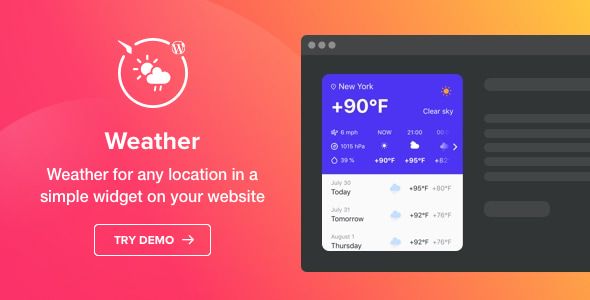
- Description
- Reviews
- FAQ
Display Beautiful, Accurate Weather Forecasts on Your WordPress Site
Are you looking for a simple yet powerful way to add weather information to your website? The Weather Forecast – WordPress Weather Plugin is the ultimate solution for displaying clean, customizable, and real-time weather data. Engage your visitors and provide valuable, location-specific information with just a few clicks.
This plugin solves a common problem for local businesses, travel blogs, event sites, and community portals: providing relevant, up-to-the-minute weather conditions. Forget complex setups or ugly, non-responsive widgets. Our plugin is built for performance, aesthetics, and ease of use, integrating seamlessly into any WordPress theme.
Key Features of the Weather Forecast Plugin
Unlock a suite of powerful features designed to give you complete control over your weather display. Here’s what makes this plugin stand out:
- Automatic Location Detection: Automatically show weather relevant to each visitor’s current location for a personalized experience.
- Highly Customizable Design: Control everything from background colors and fonts to which weather details (like wind, humidity, or pressure) are displayed.
- Flexible Layouts: Choose from multiple layouts, including a compact widget for your sidebar or a detailed forecast for a full-page display.
- Daily & Hourly Forecasts: Provide users with both a quick overview of the day and a detailed hour-by-hour projection.
- Multi-Language Support: The plugin is translation-ready, ensuring your weather widget is understandable to a global audience.
- Works with Any Location: Simply enter a city name, ZIP code, or coordinates to display weather for any spot on the globe.
- Lightweight & Fast: Built with performance in mind, the plugin won’t slow down your website, ensuring a great user experience and SEO ranking.
A Deeper Look at Core Functionality
Let’s explore the three features that make the Weather Forecast – WordPress Weather Plugin an indispensable tool for your website.
1. Advanced Customization & Styling Engine
Your website has a unique brand identity, and your weather widget should match it perfectly. Our plugin moves beyond generic, one-size-fits-all designs. You get a powerful visual editor that lets you fine-tune every aspect of the widget.
- Color Schemes: Easily adjust the background, text, and icon colors to align with your site’s palette.
- Font Control: Choose from a library of fonts and adjust sizes for titles and text to maintain brand consistency.
- Show or Hide Elements: Decide exactly what information to display. You can include temperature, real feel, wind speed, humidity, pressure, and sunrise/sunset times, or keep it minimal with just the temperature and an icon.
This level of control ensures the weather forecast becomes a natural, integrated part of your design, not a tacked-on afterthought.
2. Dynamic & Static Location Targeting
Relevance is key to user engagement. This plugin offers two powerful modes for location targeting to serve your specific audience.
For a personalized touch, enable Auto Location Detection. The widget will use the visitor’s IP address to show the weather for their city, which is perfect for national or international websites. Alternatively, set a Fixed Location to display the weather for a specific place. This is ideal for:
- Local business websites (e.g., a restaurant showing weather for its neighborhood).
- Hotel and resort sites displaying the forecast for their destination.
- Event websites showing conditions at the venue location.
3. Flexible Placement with Shortcodes & Widgets
Where you place the weather forecast matters. This plugin gives you the freedom to display it anywhere on your WordPress site without writing a single line of code.
It fully supports multiple placement methods:
- Gutenberg Block: Simply add the ‘Weather Forecast’ block directly within your posts and pages for seamless integration with the modern WordPress editor.
- Classic Widget: Add the weather widget to your sidebar, footer, or any other widget-ready area through the classic Appearance > Widgets screen.
- Shortcode Integration: Copy and paste a simple shortcode to embed your customized weather forecast inside page builders like Elementor, Divi, Beaver Builder, or directly within your content.
This versatility means you can create a dedicated weather page, add a forecast to your contact page, or place a compact version in your site’s header.
Who Is This Weather Plugin For?
The Weather Forecast – WordPress Weather Plugin is a valuable tool for a wide range of users and industries. Its flexibility makes it a perfect fit for:
- Local Businesses: Restaurants, cafes, and shops can show local conditions to attract foot traffic, especially for outdoor seating.
- Travel & Tourism Blogs: Showcase the weather for destinations you write about, helping readers plan their trips.
- Hotels & Resorts: Give potential guests a glimpse of the beautiful weather awaiting them at your location.
- Event Organizers: Display the forecast for an upcoming outdoor concert, festival, or sporting event.
- Community & News Portals: Provide a valuable daily service to your local readers by featuring a prominent weather widget.
- Web Developers & Agencies: Add a premium, in-demand feature to your client websites without the high cost or restrictive licensing.
Why Choose Our GPL Version? Freedom, Value, and Safety
You have choices when it comes to WordPress plugins. Our version of the Weather Forecast – WordPress Weather Plugin is distributed under the GNU General Public License (GPL), and that offers you incredible benefits.
Instead of paying for expensive annual subscriptions or per-site licenses, you get the same powerful, feature-rich plugin at a fraction of the cost. This isn’t a nulled or cracked version; it’s 100% original, safe code, legally redistributed under the GPL. This freedom allows you to use the plugin on as many websites as you wish—for yourself or your clients.
Choose the smart, cost-effective path. Get the functionality you need without being locked into a restrictive payment model. It’s the perfect way to build professional websites while keeping your budget in check.
Frequently Asked Questions (FAQ)
Does this weather plugin work with page builders like Elementor or Divi?
Yes, absolutely. The plugin is designed for maximum compatibility. You can easily place your customized weather forecast into any page built with Elementor, Divi, Beaver Builder, WPBakery, or any other page builder using the provided shortcode. It also includes a native Gutenberg block for the default WordPress editor.
How does the plugin get its weather data? Do I need my own API key?
The plugin retrieves its data from a reliable, open-source weather API. In most cases, our version is configured to work out-of-the-box without requiring you to sign up for and manage your own API key, simplifying the setup process significantly.
Can I display the temperature in both Celsius and Fahrenheit?
Yes. The plugin settings allow you to choose your preferred temperature unit. You can select Celsius, Fahrenheit, or even let the user toggle between them, depending on the specific layout you choose. This makes it useful for both US-based and international audiences.
Will I receive updates for the Weather Forecast – WordPress Weather Plugin?
Yes. We provide regular updates to ensure the plugin remains compatible with the latest version of WordPress and continues to function securely. When an update is available, you can download it from your account and install it on your site. This process ensures you get the benefits of the GPL—freedom and value—while still receiving critical updates.
Is the plugin’s design responsive and mobile-friendly?
Of course. All layouts and widgets created with this plugin are fully responsive. They will automatically adapt to fit any screen size, from large desktops to tablets and mobile phones, ensuring a perfect display and user experience for every visitor.
Is it safe to use this GPL version on my professional or client websites?
Yes, it is 100% safe. The plugin file we provide is the original, untouched software. It is not ‘nulled’ or modified with malicious code. We simply redistribute it under the GPL, which is the license it was originally created under. You can confidently use it to add value to your clients’ websites without security concerns.
How many different layouts can I create?
The plugin comes with several pre-designed layouts that serve as a great starting point. These typically include a current weather overview, a simple sidebar widget, an hourly forecast list, and a detailed daily forecast. Using the customization options, you can adapt these layouts to create a nearly unlimited number of unique styles to match your site.
Q: Do I need a license key?
A: No. All products are Pre-Activated. You can use 100% of the Premium features immediately.
Q: Can I use the One-Click Demo Import?
A: Yes, absolutely! We ensure the demo import feature works perfectly.
Q: Can I use the products on multiple websites?
A: Absolutely. The GPL license allows use on unlimited domains.
Q: Are the files safe?
A: Yes. All files are scanned by McAfee and VirusTotal before uploading.
Share Now!
Related Products




Related Products



Same Contributor


Featured Products


